September 2026

New features, improvements, and fixes in Attribuly.

Have an idea? Share feedback · Roadmap

3 updates

New: Auto-Tag Captured Emails in Shopify with "Attribuly Capture"

We've just made it way easier to segment your Capture leads right inside Shopify. 🥳

What's new

Attribuly now automatically syncs all emails captured by the Capture feature to your Shopify admin on a schedule. Each synced email gets tagged with Attribuly Capture, so you can instantly pull up a list of every visitor who dropped their email via Capture.

No more manual CSV exports → imports. It just runs in the background.

How to use it

1. Connect the destination (one-time setup)
Go to Destinations → Email→ Shopify and make sure your Shopify integration is enabled. Once it's on, the auto-tagging runs on the schedule — no extra setup needed.

2. Filter customers in Shopify
Open your Shopify Admin → Customers page, then filter by the tag:
View update

📣 Introducing: New Customer CPA (NC CPA) Benchmarks — Free for All Merchants

🎁 : All Benchmark metrics (NC CPA today, and every metric we add next) are 100% free forever for every merchant on Attribuly — no paid plan required.

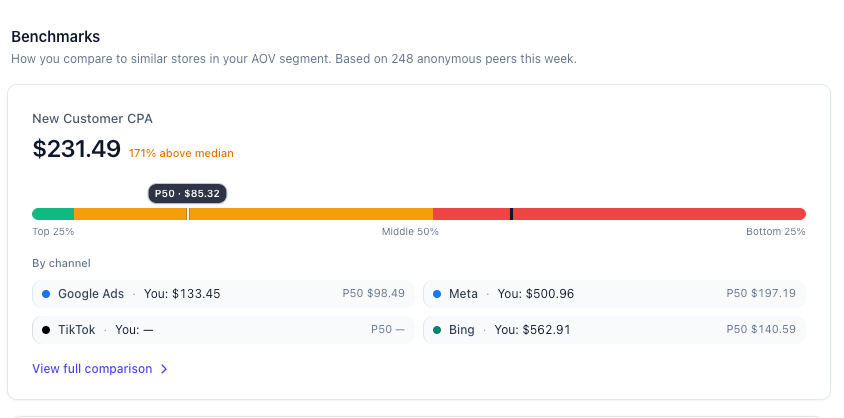
What's launching today: New Customer CPA Benchmark

image

How NC CPA is calculated

  • ✅ Only FIRST purchases count. Not repeat orders — because that's what "customer acquisition cost" actually means.
  • ✅ Attributed using Attribuly Full Impact model. 30-day click window + 1-day view window with a balanced 40/40/20 position weighting (first/last/middle). The same calculation our recommendations engine uses.
  • ✅ Advertising spend only. Pure media cost from Google / Meta / TikTok / Bing. Affiliate payouts excluded — keeping it directly comparable across stores.
  • ✅ 28-day rolling window. Anchored on your order date, so the number answers the question: What did I pay to buy new customers in the last 28 days?
  • ✅ Cancelled / fully-refunded orders removed. But partial refunds, offline orders, and test orders are still included (loose filter — no phantom NC CPA drops).

What you'll see on your dashboard

Home → Benchmarks sectionYour NC CPA vs peer P50, with a gradient bar showing Top 25% / Middle 50% / Bottom 25% ranges. One glance tells you if you're competitive.
Benchmarks detail page (click View full comparison)6 metric cards (NC CPA, CPA, CPC, ROAS, CVR, MER) side-by-side, plus Google / Meta / TikTok / Bing per-channel breakdowns.
Future: Recommendations cardsUpcoming evidence rows will surface NC CPA benchmarks when we flag your spend structure (e.g. "Your Brand Search NC CPA is 36% below peer median — this is a well-tuned budget.")

🗺️ Coming Soon: More Benchmark Metrics (all free)

This is just the beginning. Over the next 8 weeks we're shipping these — on the house:

NC CPA ✅ Released"What should I pay for a new customer?"Today
CPA (total conversions)"What's my blended cost per action, compared to similar stores?"Next 2 weeks
CPC"Am I overpaying per click on Google vs peers?"Next 2 weeks
Blended ROAS"Is my $1 of ad spend turning into more or less revenue than the competition?"Month 2
CVR (Conversion Rate)"Should I fix my ads first, or my landing page?"Month 2
MER (Marketing Efficiency Ratio)"What % of my revenue is going out the door as ad spend?"Month 3
Secret metric 7 🤫Ask us in-app! Feedback from merchants shapes this column.Month 3

How to see yours — right now

  1. Go to Home → scroll down to the Benchmarks card (just below Business Performance Summary).
  2. Connect Shopify + at least one Ads integration (Google / Meta / TikTok / Bing) if you haven't already. Takes ~30 seconds.
  3. Your NC CPA card loads instantly. Click View full comparison to open the full Benchmarks page.

🔒 Your data never leaves the pool individually. Every benchmark number is aggregated and anonymized — other merchants never see your store, and you never see theirs. It's a one-way mirror: everyone gets the market-level truth, nobody gets anyone's private numbers.

Questions? Feedback? Tell us what metric you want next.

View update

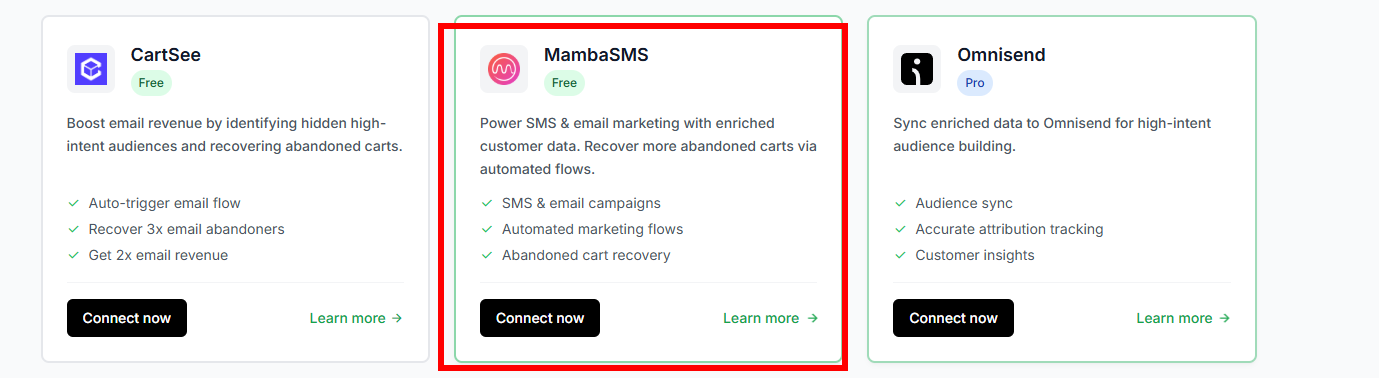
MambaSMS Integration

New Feature
MambaSMS Integration Support

  • Added official integration with MambaSMS,
  • Users can configure MambaSMS callback destinations in the Attribuly platform after successful integration. Integration setup: Go to Connections → Sources and select MambaSMS to set up the integration. For destination configuration, navigate to Connections → Destinations. image

Important Notes

  • A valid MambaSMS registered store account is required before enabling the integration.
  • After completing callback configuration on the Attribuly side, please contact the MambaSMS team to configure the corresponding flow to complete the full business data pipeline.
View update