Set up channel identification
Attribuly uses the parameters and referrer of each visit to decide which channel it came from. Attribution is only accurate when channels are identified correctly. Set up the sections below for each channel you run or are testing.
Meta ads
- On the Attribuly Sources page, connect your Facebook ad account.
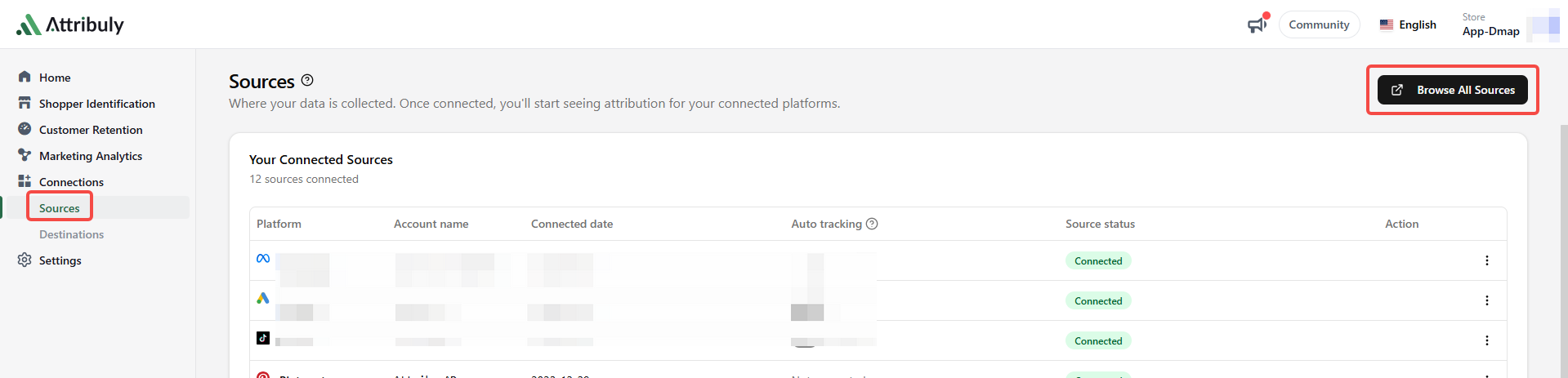
- Turn on Auto tracking for the connected Facebook ad account. Attribuly then uses the API to add its tracking template to your active ads.

- Some time after completing these steps, check the Ad tracking warnings list on the All Attribution page. It shows active ads that are missing the Attribuly tracking parameters.
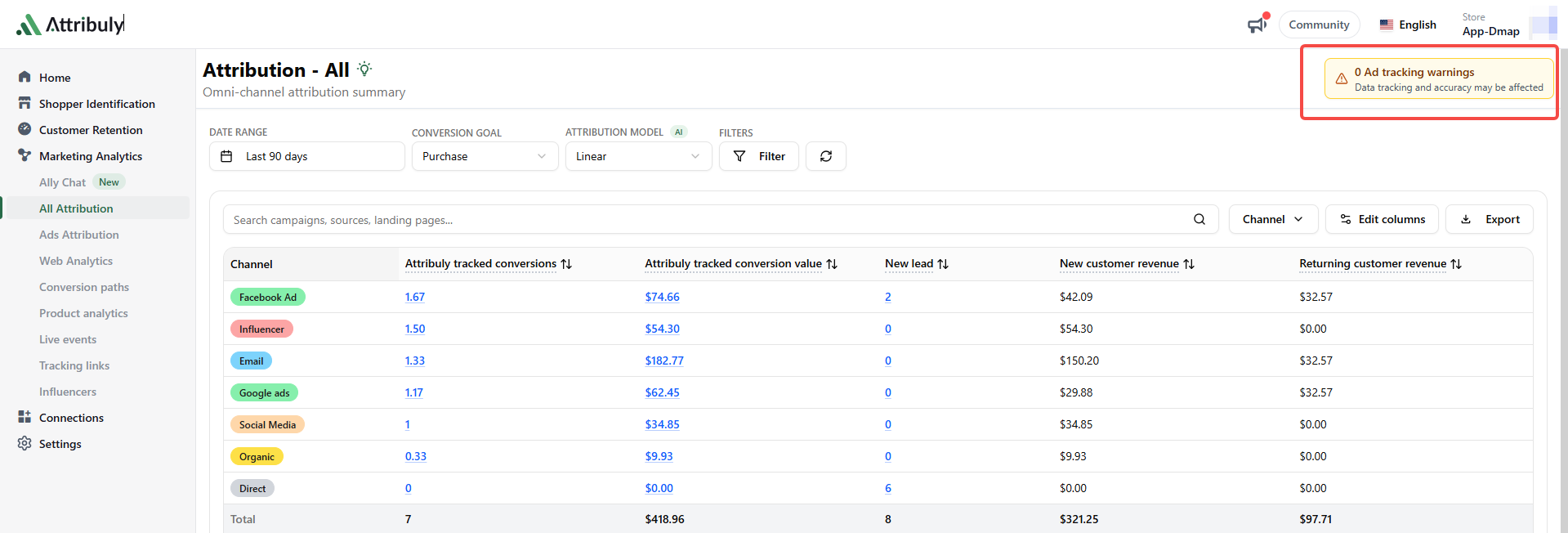
If an ad in this list also has no {{ad.id}} in its current tracking parameters, add the Attribuly tracking template or the {{ad.id}} parameter to that ad manually.
Attribuly tracking template:
dm_cam={{campaign.id}}&dm_grp={{adset.id}}&dm_ad={{ad.id}}&dm_net=facebook
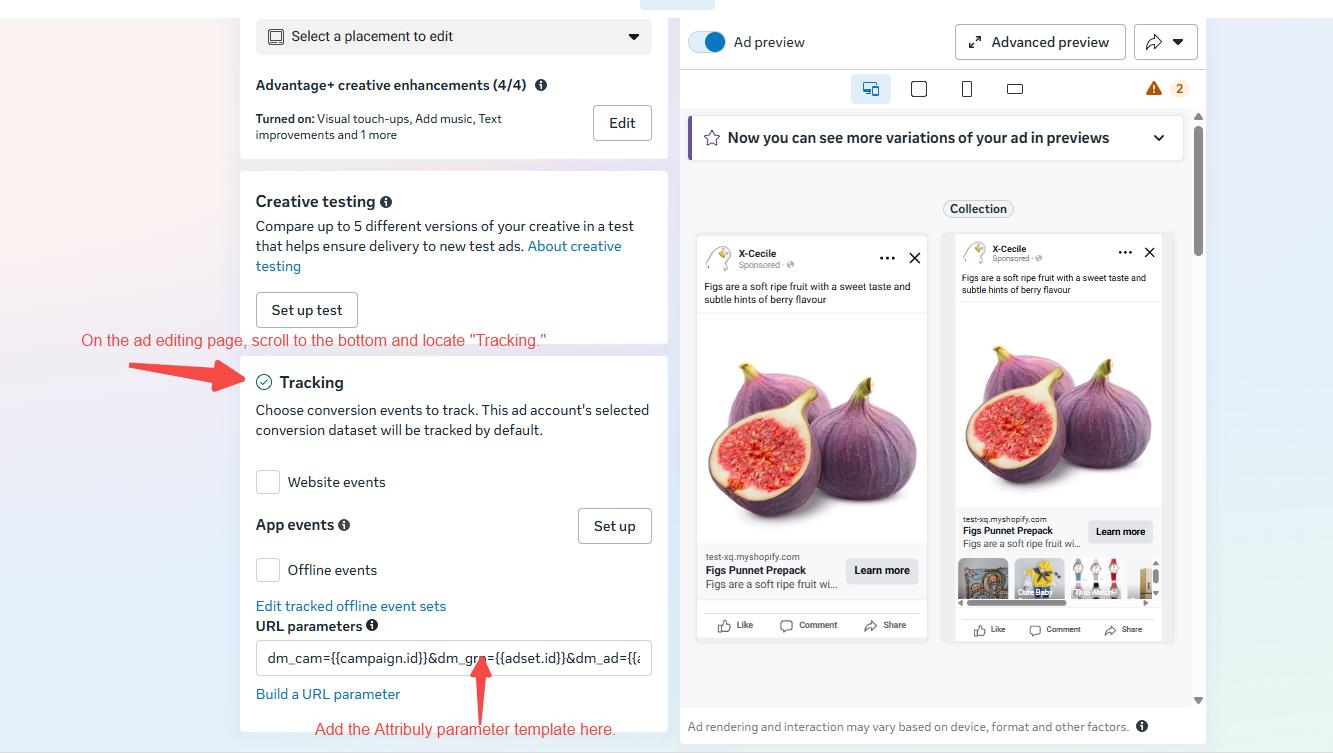
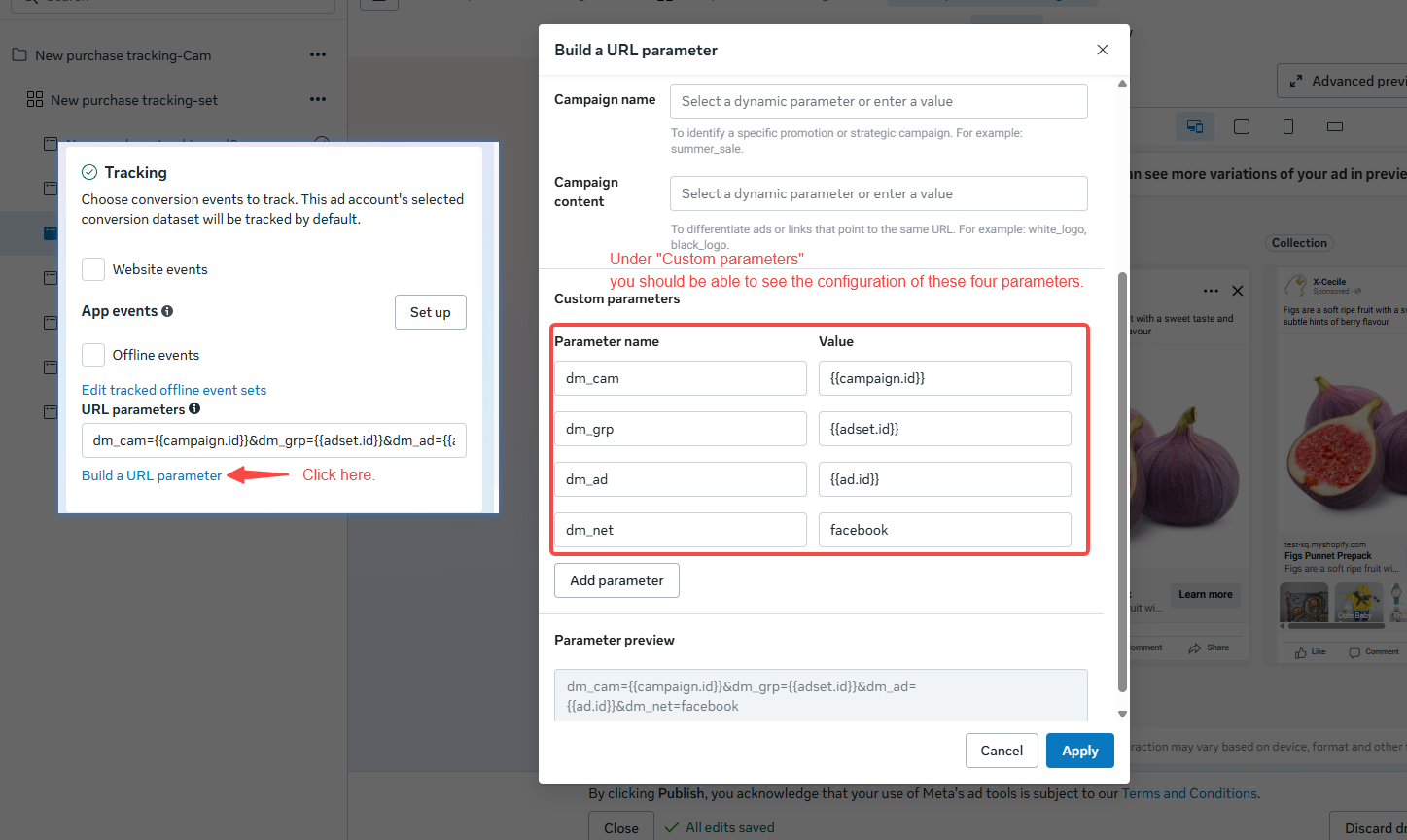
Note: How to avoid ads re-entering the learning phase when you change tracking parameters
Google ads
- On the Attribuly Sources page, connect your Google Ads account.
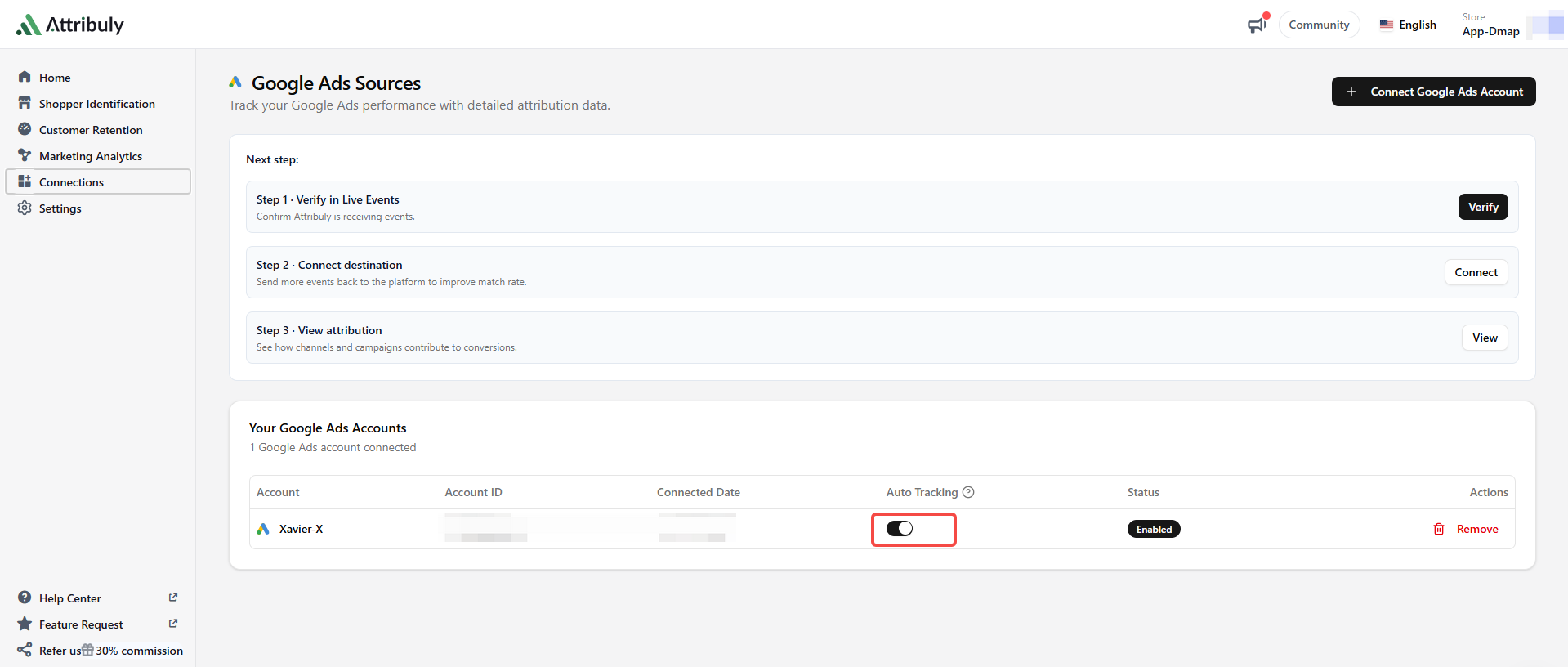
- Turn on Auto tracking for the connected Google Ads account. Attribuly then uses the API to add its tracking template to your active ads.
TikTok ads
On the Attribuly Sources page, connect your TikTok ad account.
Auto tracking is on by default and can't be turned off. Attribuly uses the API to add its tracking template to your active ads.
Note: If you run Smart+ ads, add the Attribuly tracking template to them manually:
dm_net=tiktok
dm_cam=__CAMPAIGN_ID__
dm_grp=__AID__
dm_ad=__CID__
Bing ads
On the Attribuly Sources page, connect your Bing Ads account.
Auto tracking is on by default and can't be turned off. Attribuly uses the API to add this tracking template to your active ads:
{lpurl}?dm_net=Bing_ad&dm_cam={Campaignid}&dm_grp={Adgroupid}&dm_ad={Adid}&dm_kw={keyword:default}&att_mscid={msclkid}
Microsoft documentation: URL tracking with upgraded URLs
LinkedIn ads
On the Attribuly Sources page, connect your LinkedIn ad account.
Auto tracking is on by default and can't be turned off. Attribuly uses the API to add this tracking template to your active ads:
dm_net=linkedin&dm_cam={campaign_group_id}&dm_grp={campaign_id}&dm_ad={creative_id}
Snapchat ads
- On the Attribuly Sources page, connect your Snapchat ad account.
- In Snapchat Ads Manager, add the Attribuly tracking template:
dm_net=snapchat
dm_cam={{campaign.id}}
dm_grp={{adSet.id}}
dm_ad={{ad.id}}
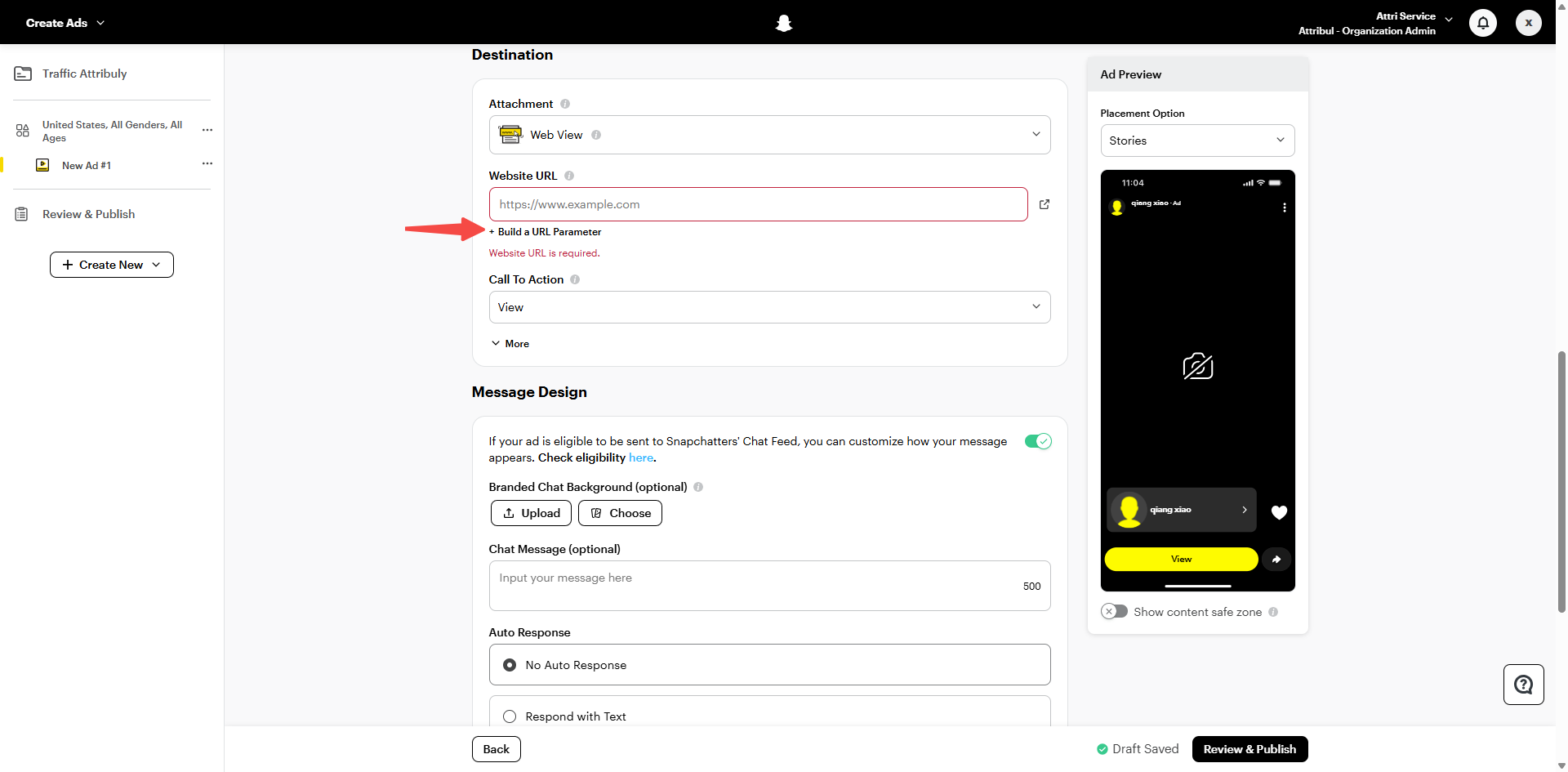
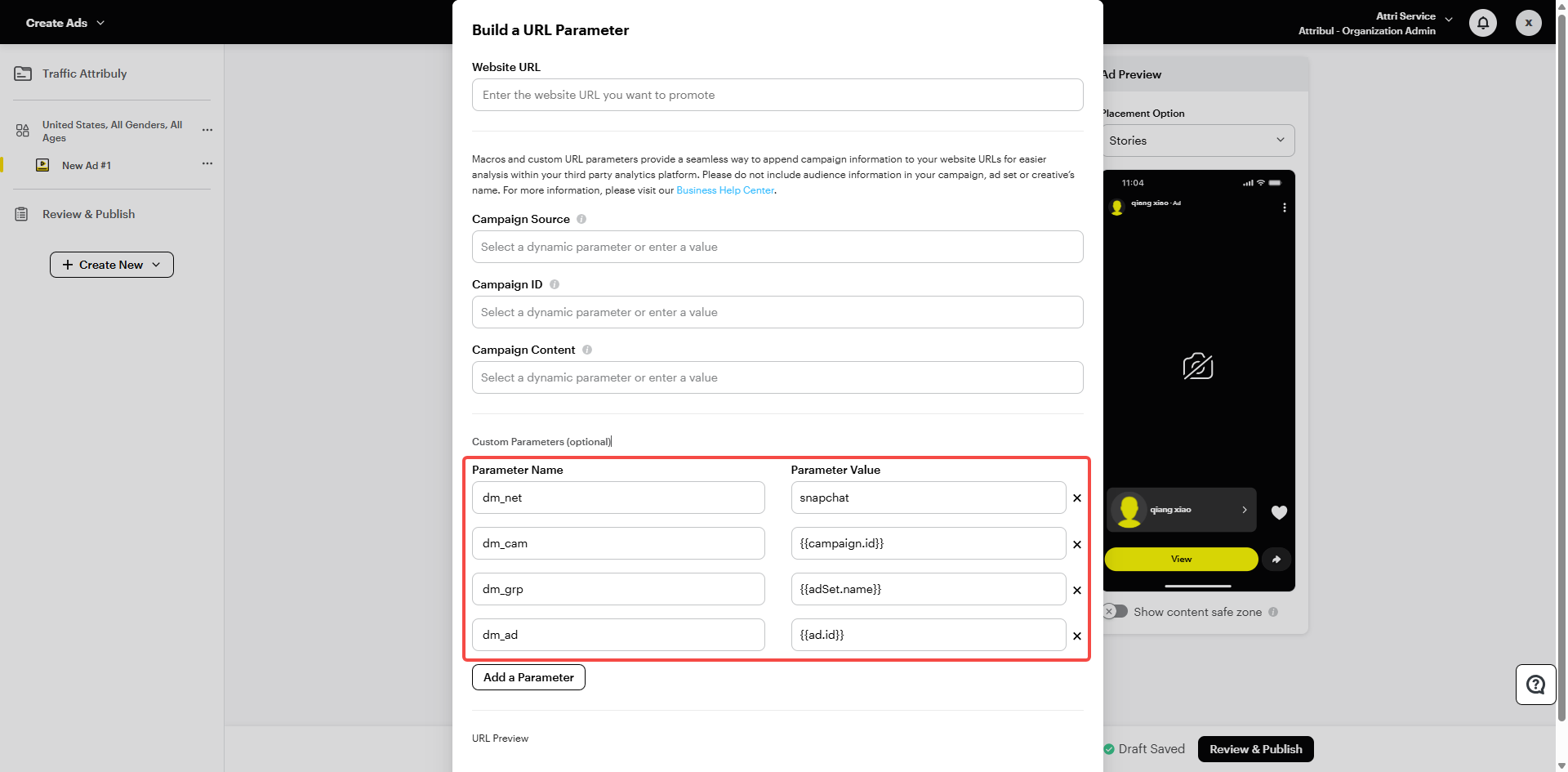
How to add parameters to Snapchat ads: Add URL macros
Pinterest ads
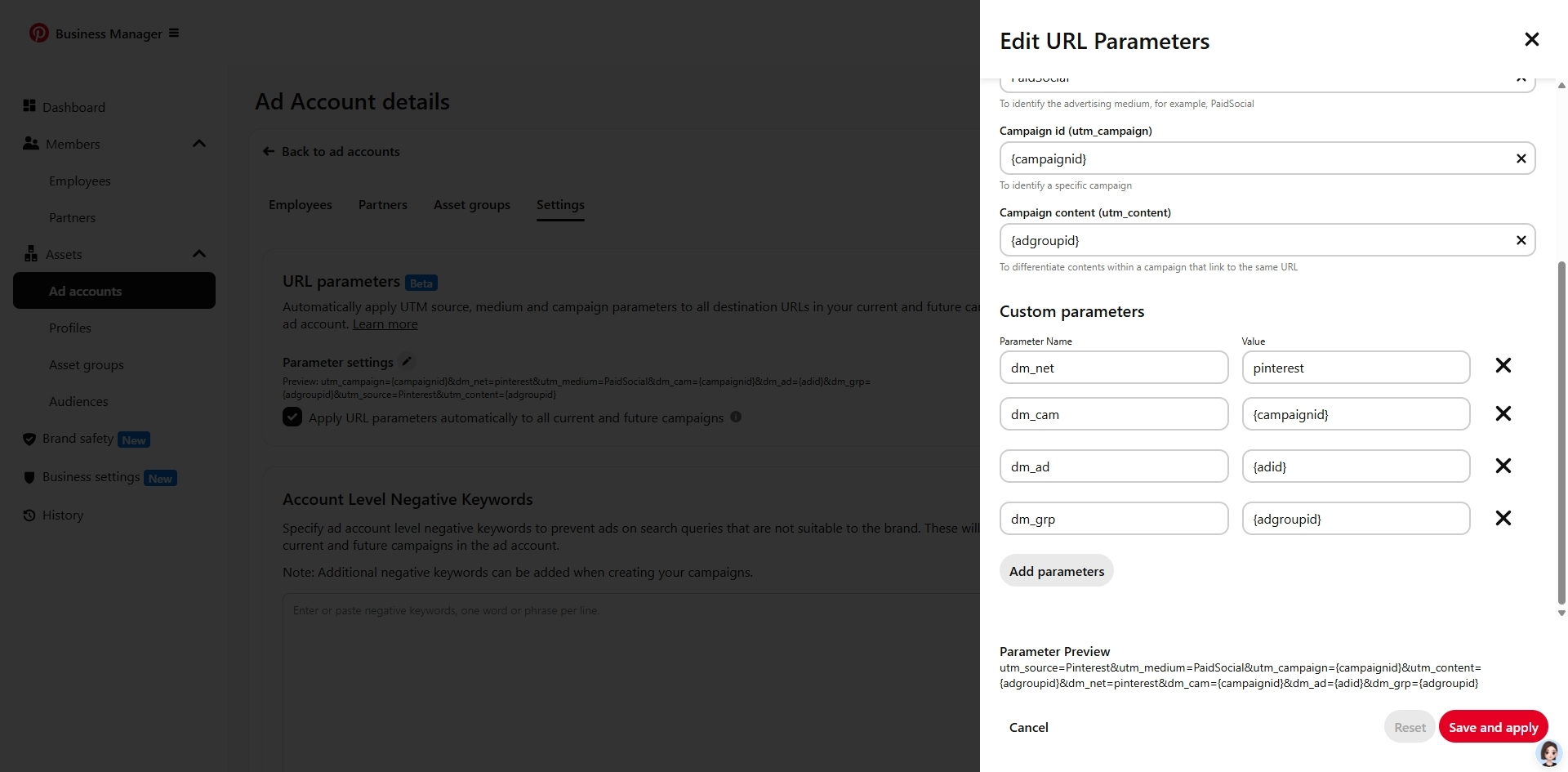
- On the Attribuly Sources page, connect your Pinterest ad account.
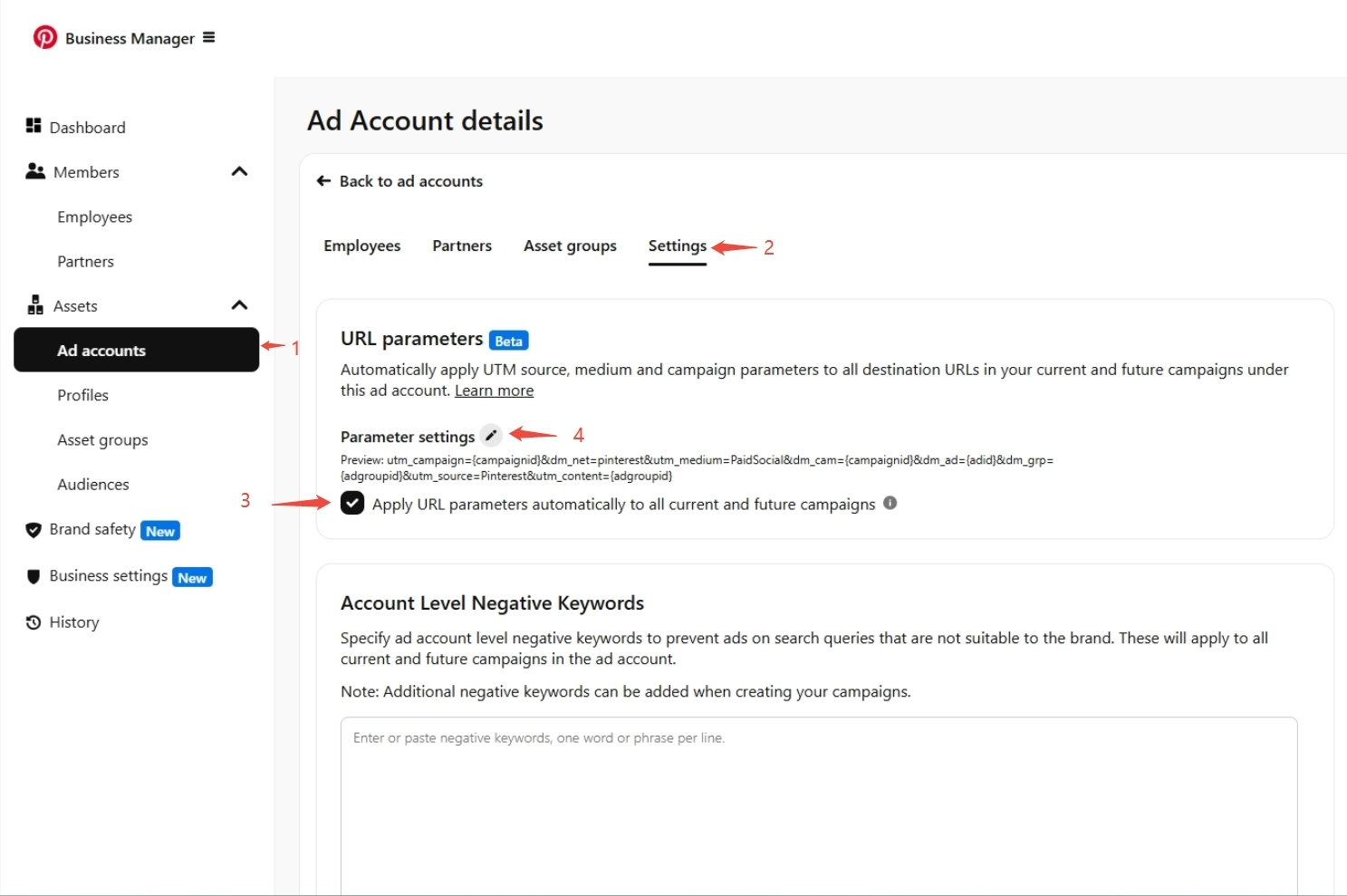
- In Pinterest, set the Attribuly tracking parameters:
dm_net=pinterest
dm_cam={campaignid}
dm_grp={adgroupid}
dm_ad={adid}
Criteo ads
In Criteo, add the Attribuly tracking parameters:
&dm_net=criteo&utm_campaign=YOUR-CAMMPAIGN-NAME
Note: Replace YOUR-CAMMPAIGN-NAME with your real campaign name.
How to set parameters for Criteo ads: Getting started with Criteo
Amazon DSP
Add the Attribuly tracking parameters to this channel's promotion links:
?att_source=amazon&utm_campaign=YOUR-CAMMPAIGN-NAME
Note: Replace YOUR-CAMMPAIGN-NAME with your real campaign name.
CyberTargeter
Make sure this channel's promotion links include the czclickid parameter, or add the Attribuly tracking parameters manually:
?dm_net=cybertargeter&utm_campaign=YOUR-CAMMPAIGN-NAME
Note: Replace YOUR-CAMMPAIGN-NAME with your real campaign name.
Preciso
Add the Attribuly tracking parameters to this channel's promotion links:
?dm_net=preciso&utm_campaign=YOUR-CAMMPAIGN-NAME
Note: Replace YOUR-CAMMPAIGN-NAME with your real campaign name.
AppLovin
- On the Attribuly Sources page, connect your AppLovin account.
- Make sure this channel's promotion links include the
aleidparameter, or add the Attribuly tracking parameters manually:
?dm_net=applovin&utm_campaign=YOUR-CAMMPAIGN-NAME
Note: Replace YOUR-CAMMPAIGN-NAME with your real campaign name.
ShareASale
Make sure this channel's promotion links include the sscid parameter. We also recommend adding a utm_campaign parameter.
Impact
- On the Attribuly Sources page, connect your Impact account.
- In Impact, set these parameters:
irclickid={clickid}
dm_cam={ircid}
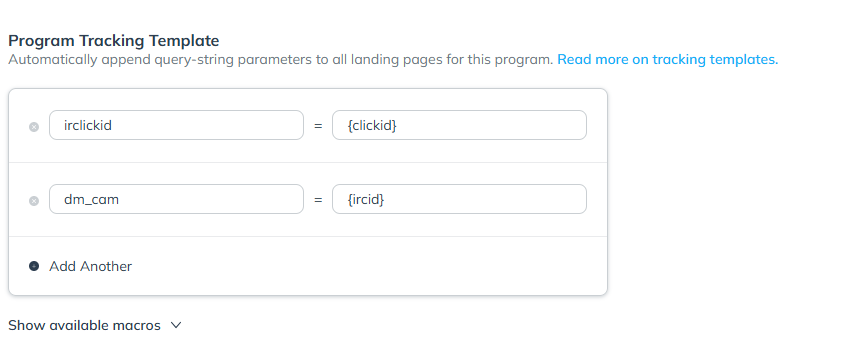
How to set parameters in Impact: Parameters reference
Awin
- On the Attribuly Sources page, connect your Awin account.
- Make sure Default Query String Append in your Awin settings includes:
sv1=affiliate
sv_campaign_id=!!!id!!!
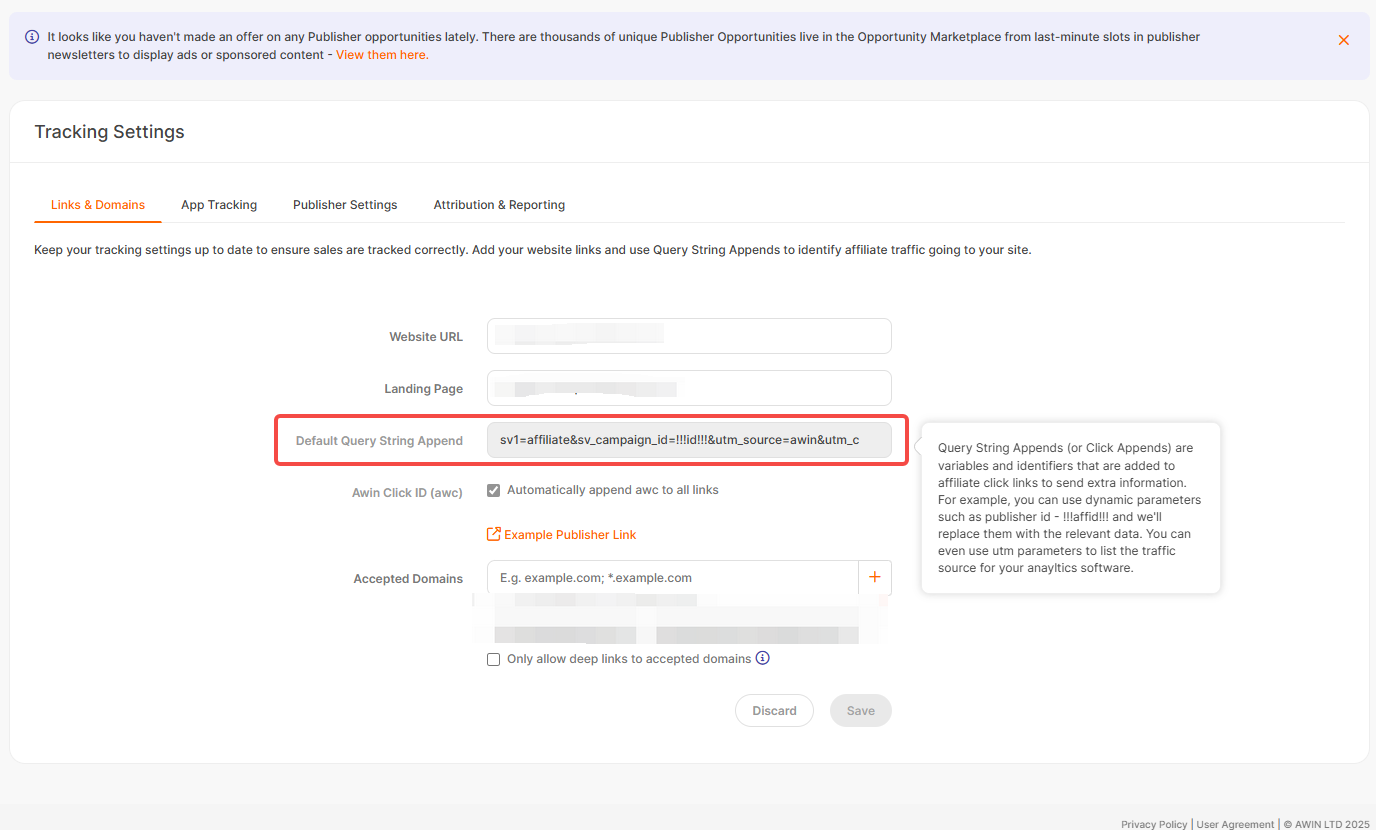
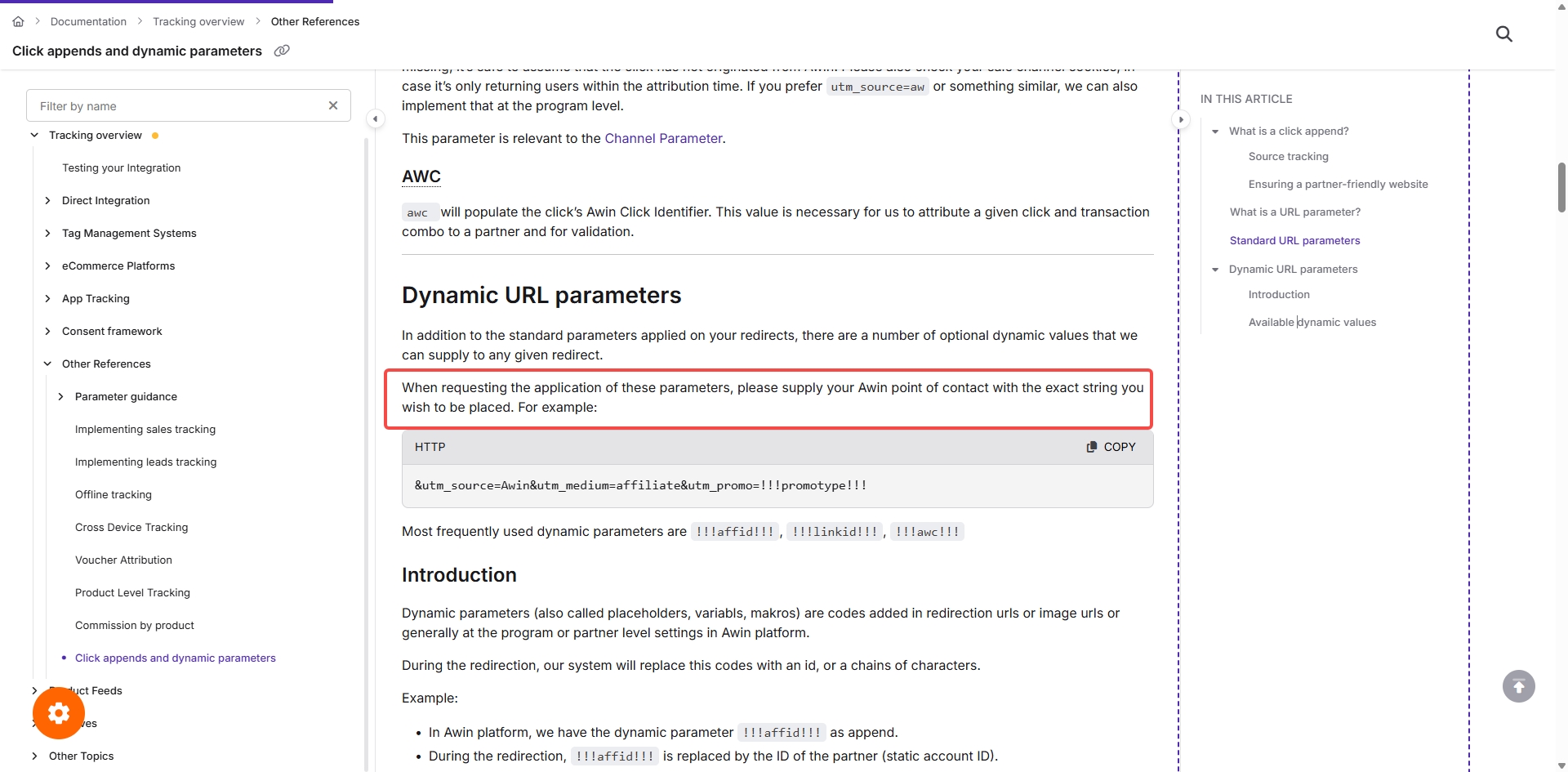
Note: According to Awin's documentation, you can't change Default Query String Append yourself. Ask your Awin contact to change it. See Click appends and dynamic parameters.
GoAffPro
In your GoAffPro settings, add this parameter:
utm_source=goaffpro
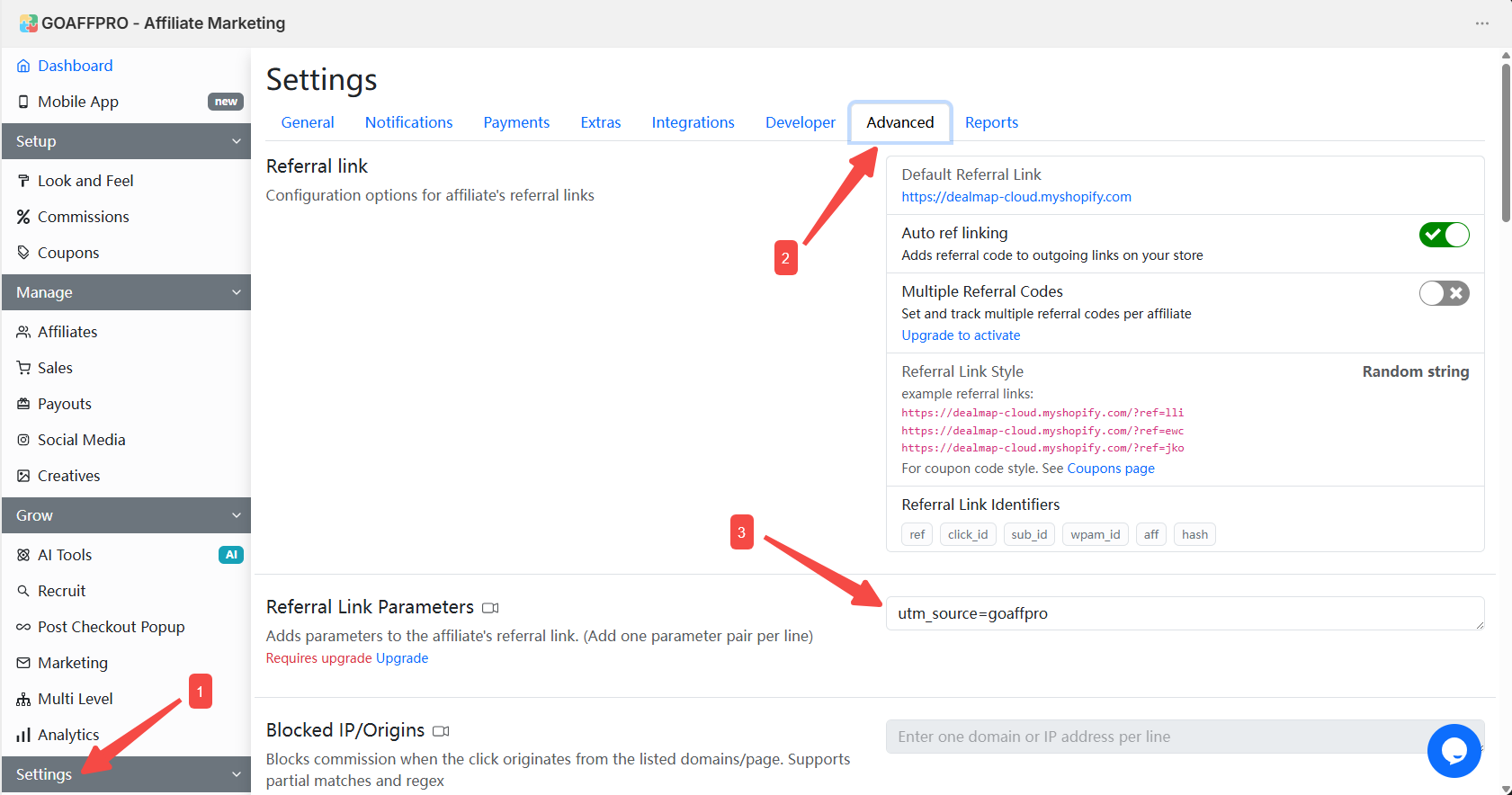
How to set parameters in GoAffPro: Set referral link parameters
UpPromote
Attribuly recognizes UpPromote's default tracking parameter, sca_ref, so no extra setup is needed.
Influencers
Option 1: Use influencer links created on the Attribuly Influencer page.
Option 2: If you create short links on another platform or share links directly, add utm_medium=influencer to the influencer's promotion links.
Recommended parameters:
?utm_campaign=YOUR-CAMMPAIGN-NAME&utm_medium=influencer&utm_source=Platform-Name
Note: Replace YOUR-CAMMPAIGN-NAME with your real campaign name, and replace the utm_source value with the platform name.
Affiliates
Besides the integrated Impact, ShareASale, Awin, GoAffPro, and UpPromote, any other affiliate tool can be identified as Affiliate. Just make sure its promotion links include utm_medium=affiliate. We also recommend adding a utm_campaign parameter.
utm_medium=affiliate
Klaviyo
- On the Attribuly Sources page, connect your Klaviyo account.
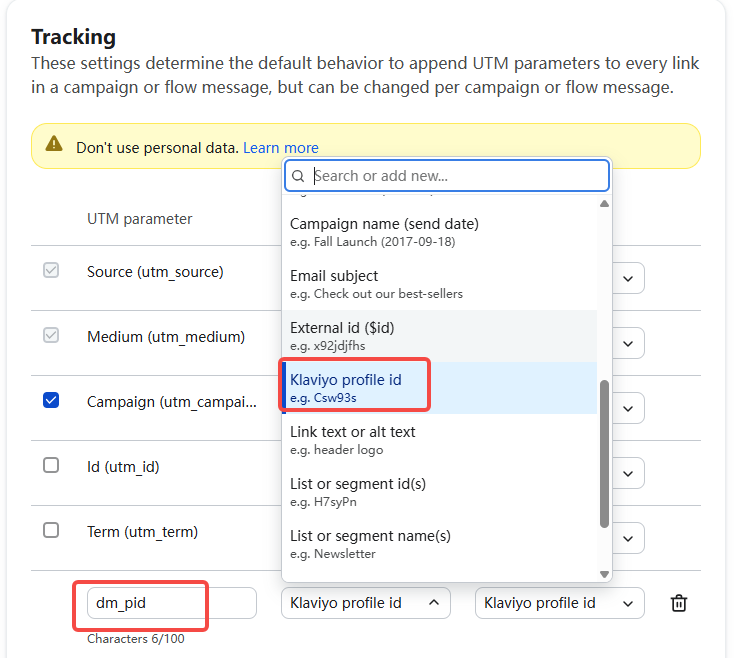
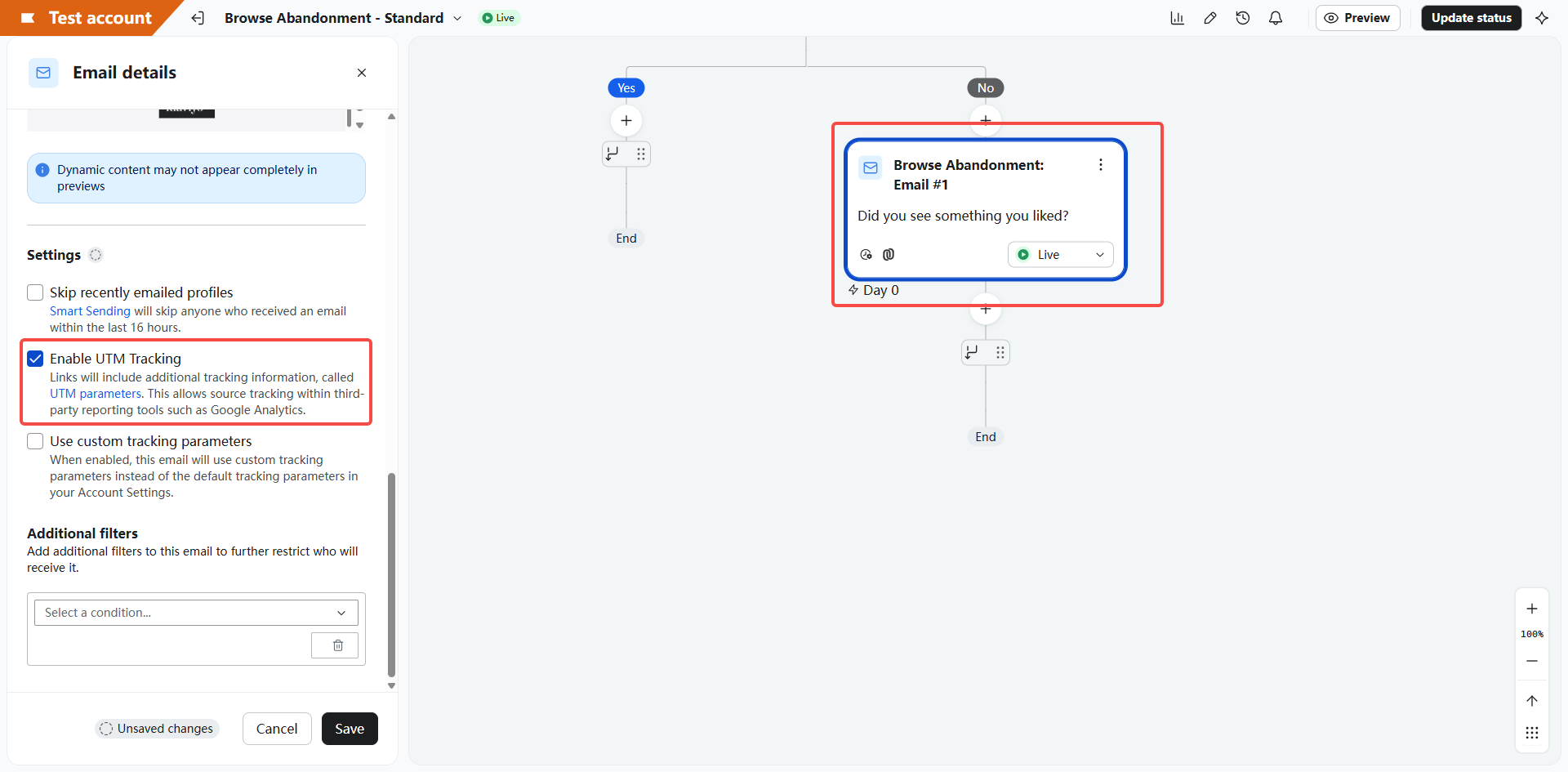
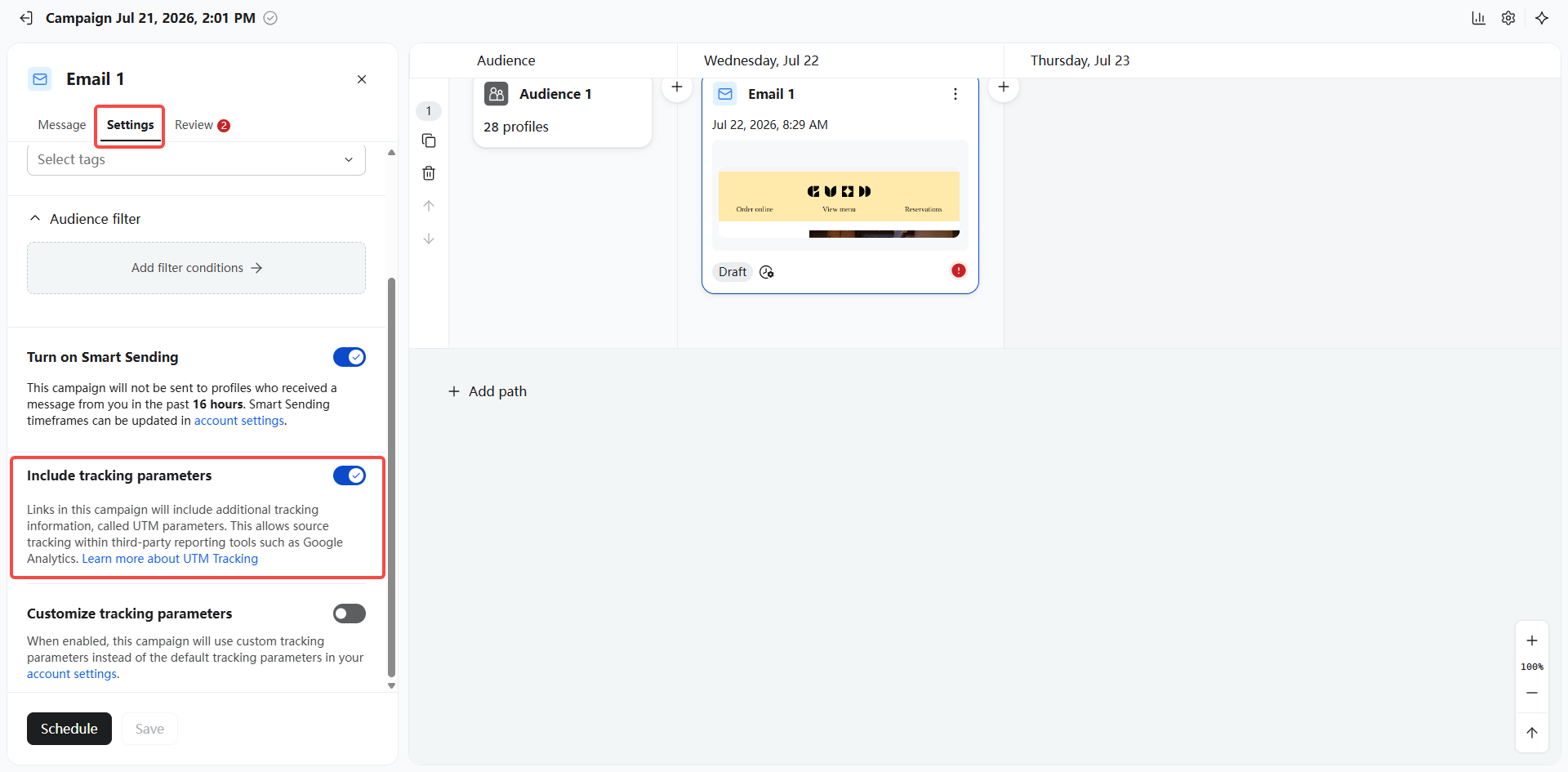
- In your Klaviyo settings, set the parameters as shown in the screenshots:
- Turn on Automatically add UTM parameters to links.
- Make sure both the Campaign value and the Flow value of Source are set to Klaviyo.
- Add a parameter named
dm_pidand choose Klaviyo profile id as its value. - We recommend setting the Campaign value of Campaign to “Campaign name” and its Flow value to “Flow name”.
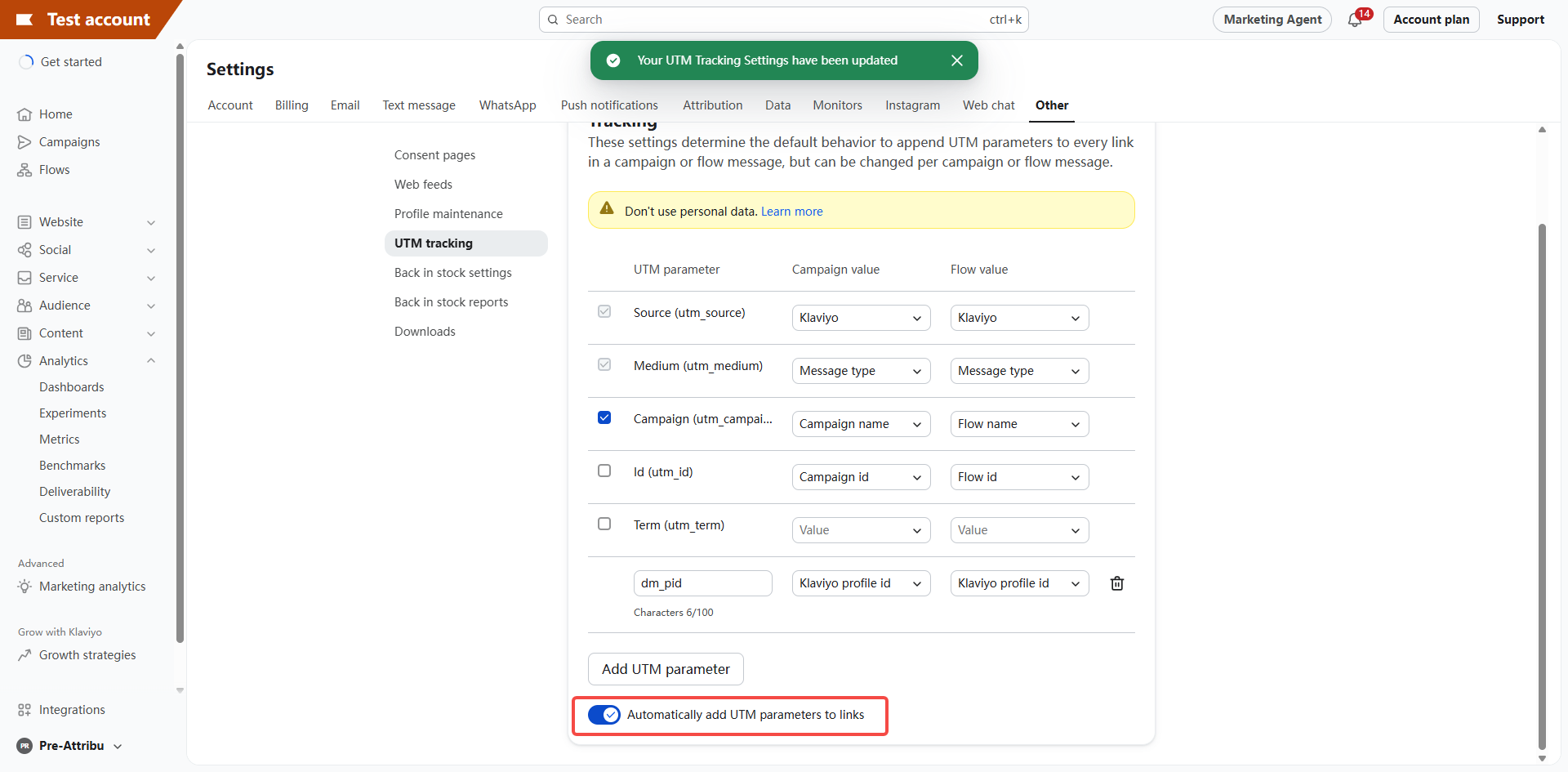
dm_pid
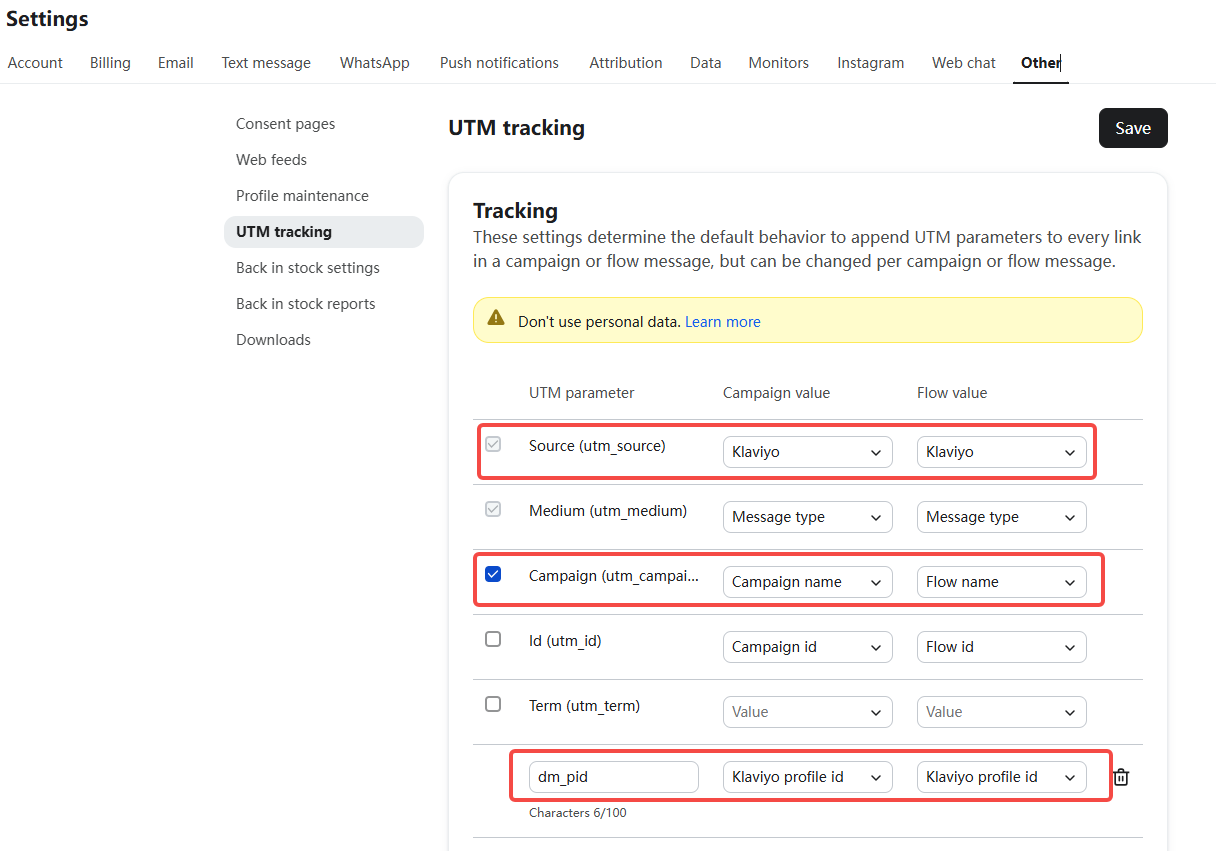
- Check all active flows. Make sure Enable UTM Tracking is selected for every email and SMS in each flow.
- Check the settings of every email in Campaigns. Make sure Include tracking parameters is selected.
Note: If you choose Customize tracking parameters in campaign or flow settings, keep both utm_source=klaviyo and dm_pid=Klaviyo profile id.
Mailchimp
- On the Attribuly Sources page, connect your Mailchimp account.
- Make sure Mailchimp promotion links include one of these parameters:
mc_cid,mc_eid, orutm_source=mailchimp.
Omnisend
- On the Attribuly Sources page, connect your Omnisend account.
- Make sure all Omnisend promotion links include
utm_source=omnisend.
How to set parameters in Omnisend: Omnisend reports UTM tags
Cartsee
- On the Attribuly Sources page, connect your Cartsee account.
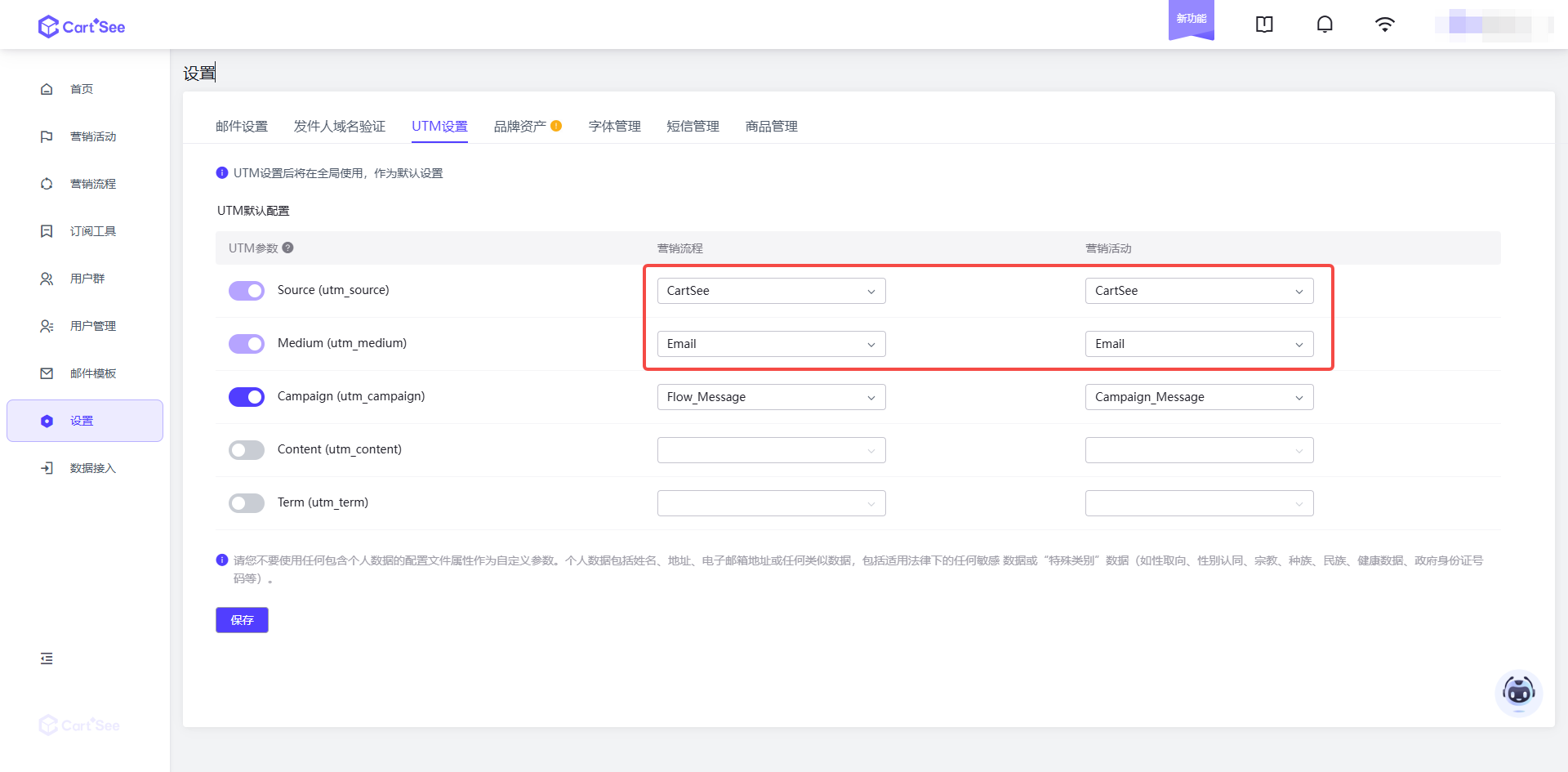
- In your Cartsee settings, set the parameters as shown in the screenshot:
utm_source: set both Flows and Campaigns to Cartsee.utm_medium: set both Flows and Campaigns to Email.utm_campaign: we recommend the settings shown in the screenshot.
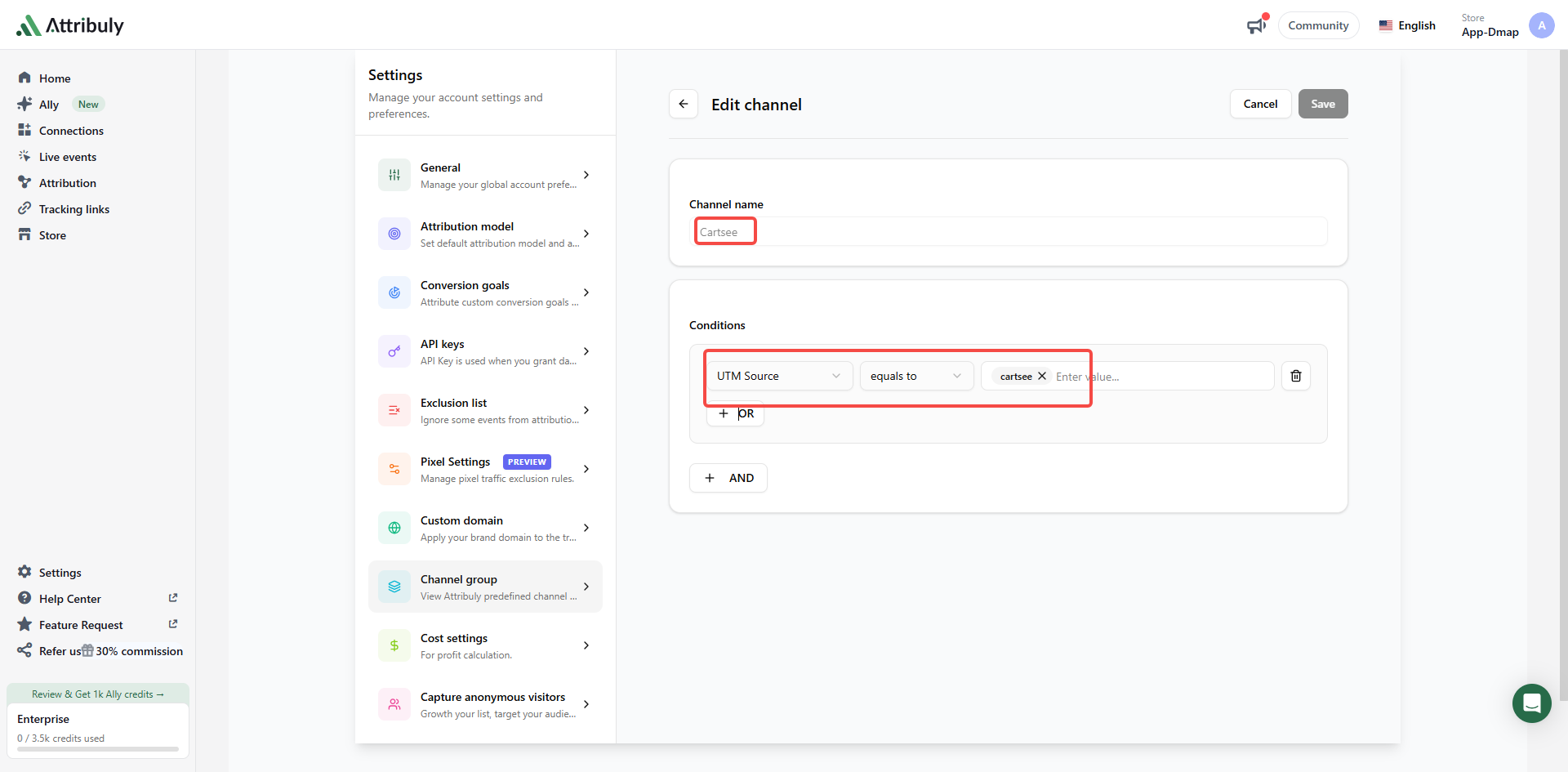
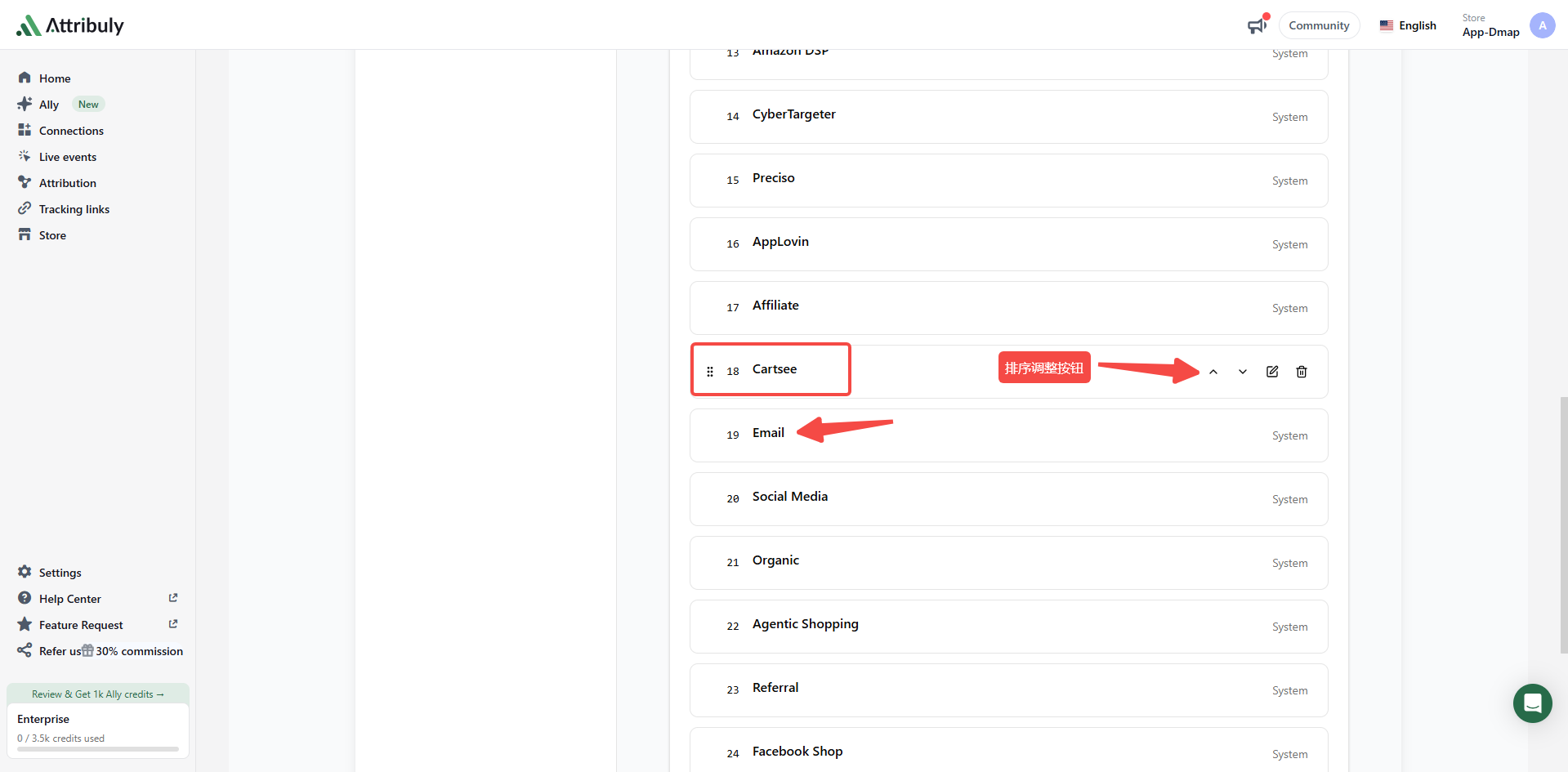
Note: If utm_medium isn't set to “Email” and can't be changed, create a custom channel named “Cartsee” under Settings → Channel group in Attribuly to identify Cartsee traffic. Set the conditions as shown in the screenshots, and make sure utm_source is “Cartsee” for both Flows and Campaigns in Cartsee.
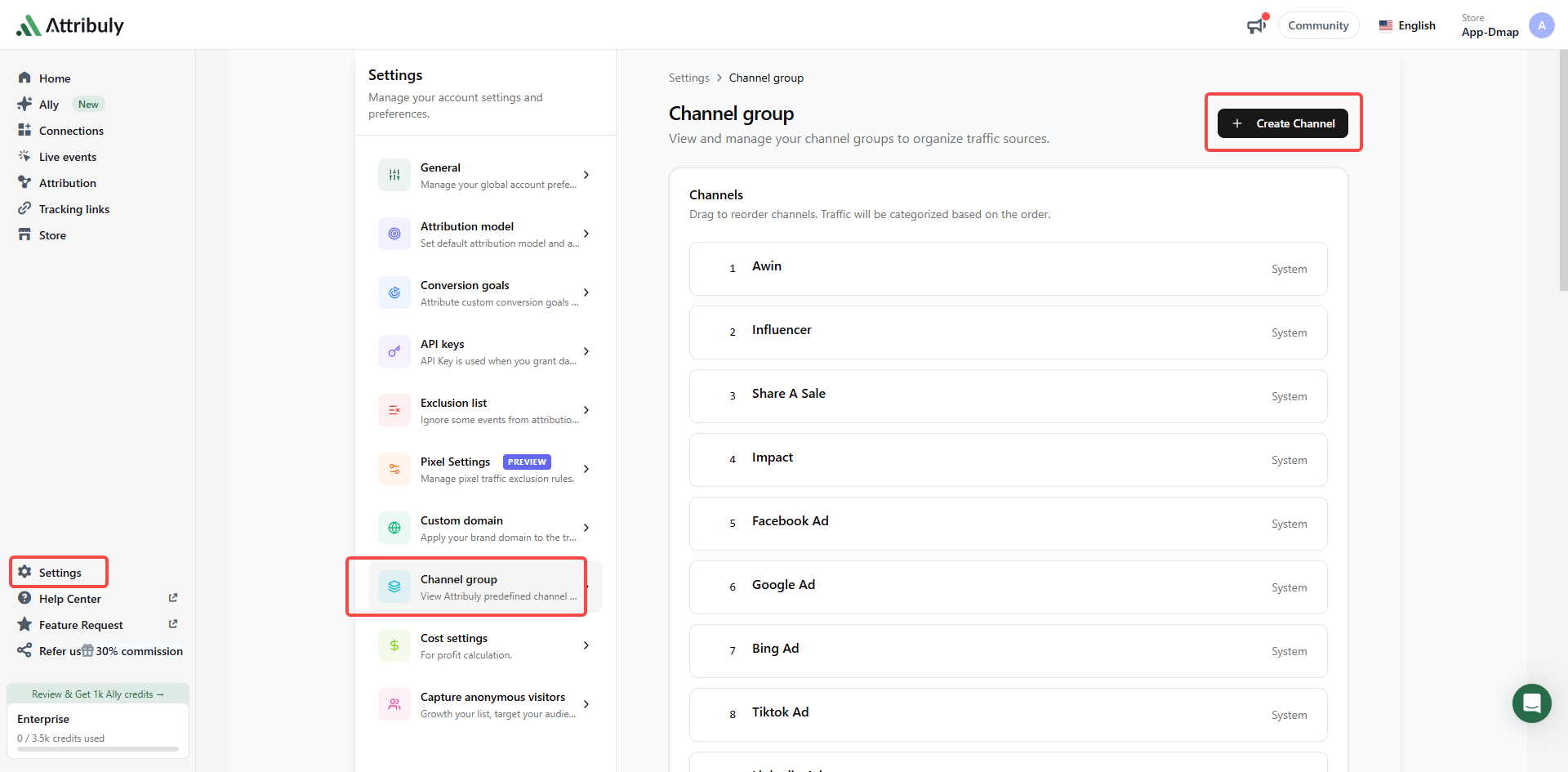
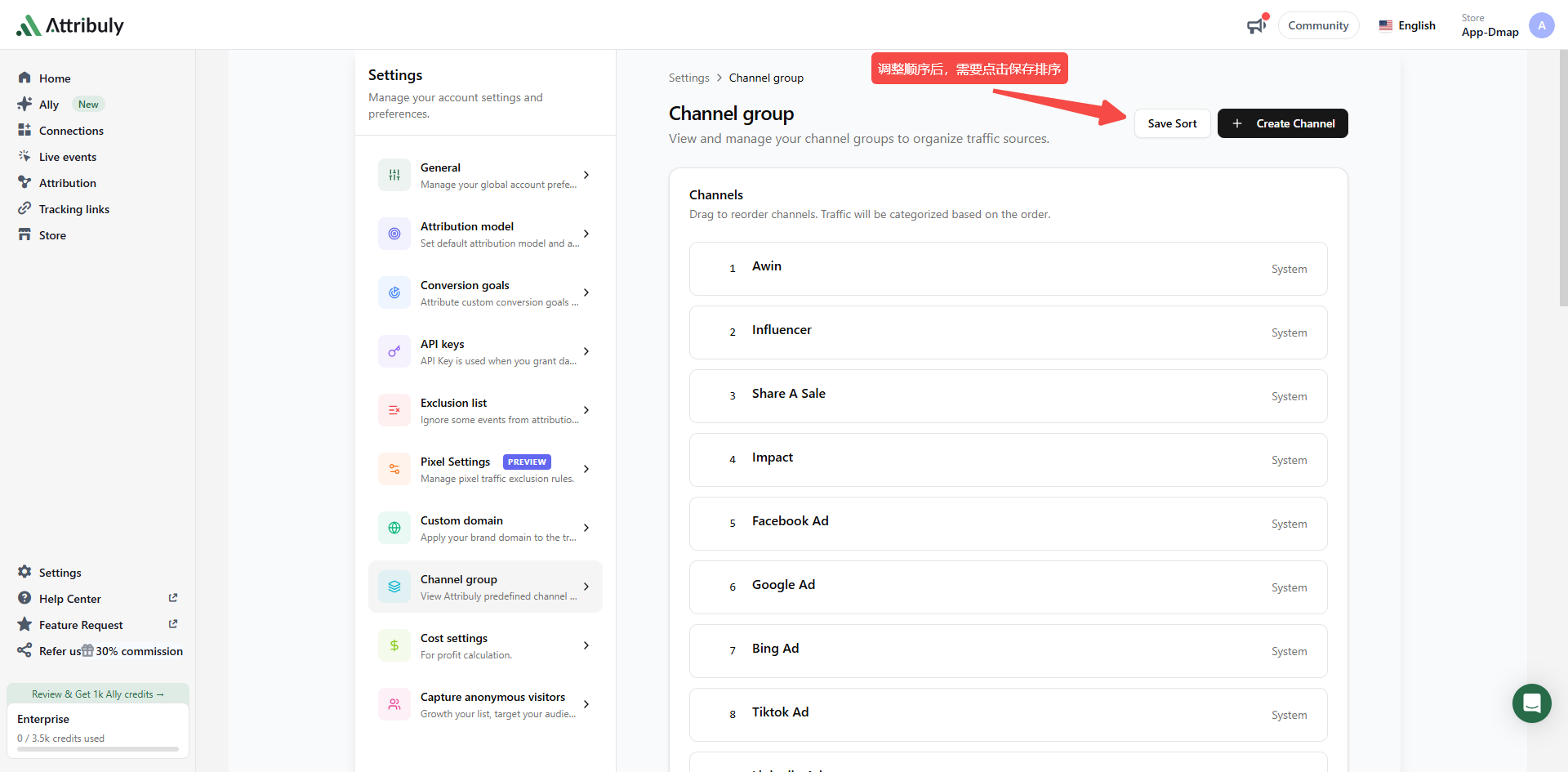
After creating the “Cartsee” channel, move it above the existing “Email” channel and save the order.
Other email platforms
Make sure promotion links from these platforms include utm_medium=email.
Recommended parameters:
utm_campaign=YOUR-CAMMPAIGN-NAME&utm_source=Platform-Name&utm_medium=email
Note: Replace YOUR-CAMMPAIGN-NAME with your real campaign name and Platform-Name with the platform name.
Social media
Social media channels are identified even without parameters, but the results may be inaccurate. For accurate identification, make sure links from social media platforms include utm_medium=social and the matching utm_source value from the table below.
Recommended parameters (Facebook example):
?utm_campaign=YOUR-CAMMPAIGN-NAME&utm_medium=social&utm_source=facebook
Note: Replace YOUR-CAMMPAIGN-NAME with your real campaign name, and use the utm_source value for your platform from the table below.
| Platform | utm_source |
|---|---|
facebook |
|
| BlogCatalog | blogcatalog |
| Fark | fark |
| Flickr | flickr |
| HackerNews | hackernews |
| HootSuite | hootsuite |
instagram |
|
| Ig | ig |
linkedin |
|
| LiveJournal | livejournal |
| Metacafe | metacafe |
| Mixx | mixx |
| mixxx | mixxx |
| MySpace | myspace |
| Ning | ning |
| Orkut | orkut |
pinterest |
|
| Plurk | plurk |
| Propeller | propeller |
| Propelleraero | propelleraero |
| Quora | quora |
qq |
|
reddit |
|
| Redditinc | redditinc |
| Slashdot | slashdot |
| SlideShare | slideshare |
| Snapchat | snapchat |
| StumbleUpon | stumbleupon |
| Technorati | technorati |
| TikTok | tiktok |
| Tipd | tipd |
| Triiibes | triiibes |
| Tumblr | tumblr |
| Twitch | twitch |
| Vimeo | vimeo |
whatsapp |
|
| Wikipedia | wikipedia |
| X (Twitter) | x |
xing |
|
| YouTube | youtube |
| Zhihu | zhihu |
| Slide | slide |
| Sphinn | sphinn |
Agentic Shopping
Agentic Shopping identifies traffic from AI assistants and AI search, such as ChatGPT, Claude, Perplexity, Gemini, and similar platforms. This channel is identified automatically. No setup is needed.
Organic search
Attribuly automatically recognizes these search engines:
Google, Bing, Startpage, Qwant, Brave, You.com, Swisscows, Cốc Cốc Search, Seznam, Sogou, Haosou, Shenma, Dogpile, Yahoo, Yandex, Ecosia, Naver, AOL, Baidu, Ask, DuckDuckGo, WolframAlpha, WebCrawler
Referral
Visits from links on third-party websites that don't match any of Attribuly's other channel rules are classified as Referral.
Unassigned
Visits that carry UTM parameters but don't match any of Attribuly's channel rules are classified as Unassigned.
Direct
Visits that don't match any of Attribuly's channel rules are classified as Direct.