
How to Validate Multi-Touch Attribution in 30 Days
Step-by-step 30-day pilot to validate multi-touch attribution: dual-run client vs server, event mapping for Meta/TikTok/Google, ROAS readouts, and success thresholds.
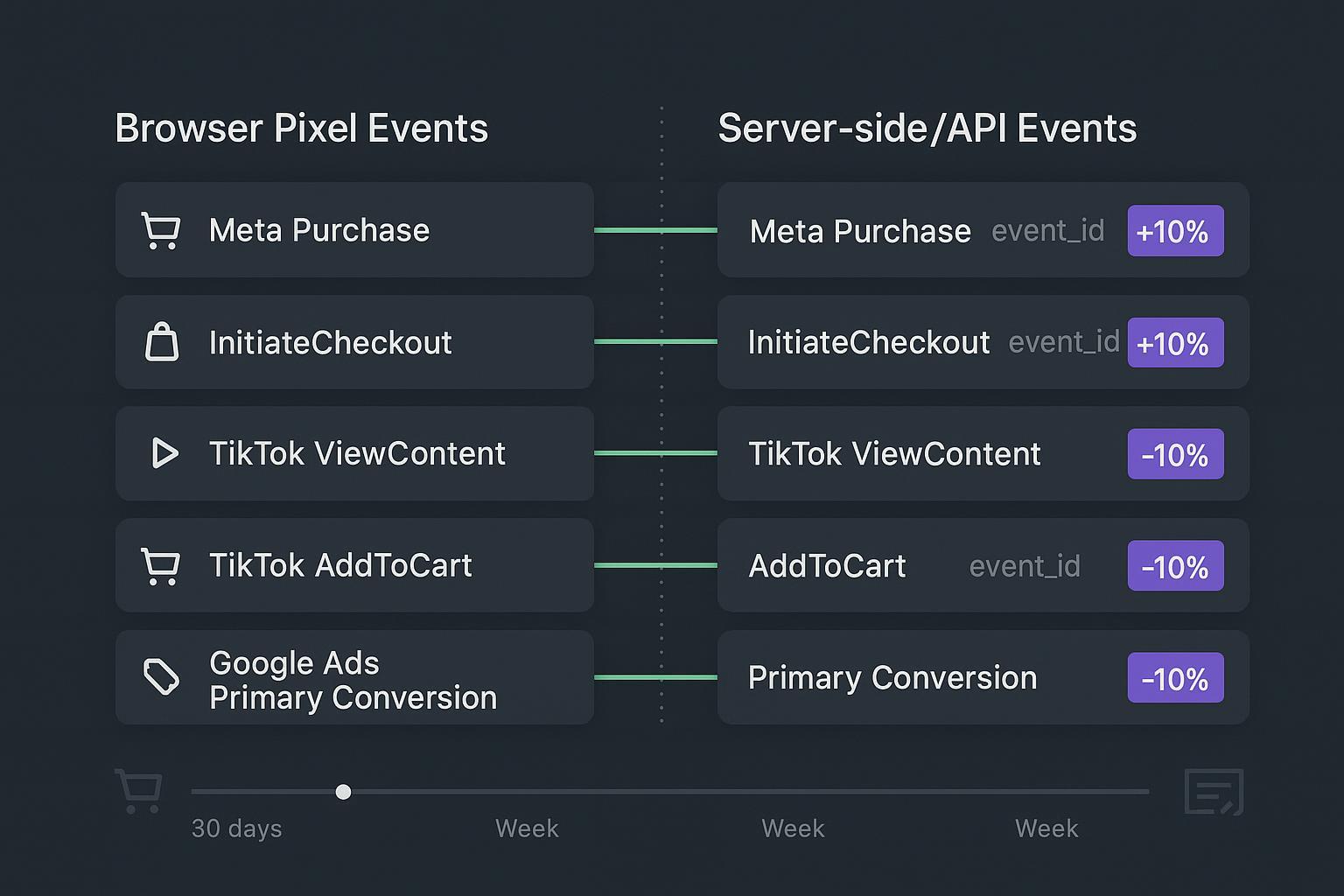
Most e‑commerce teams don’t lack data; they lack agreement. Meta, TikTok, Google, and your checkout all tell a slightly different story. This 30‑day dual‑run pilot shows you how to validate multi‑touch accuracy against your current stack—without pausing campaigns—so you can decide if server‑side + multi‑touch is worth a full roll‑out.
Primary validation goal: measure attributed revenue lift versus your current stack. Success threshold: capture 20–30% more conversions compared to baseline.
Key takeaways
Run a dual‑pipeline (pixel and server/API) for 30 days and compare coverage, match quality, and ROAS variance across Meta, TikTok, and Google.
Required events in scope: Meta Purchase/InitiateCheckout; TikTok ViewContent/AddToCart; Google Ads Primary Conversion with Enhanced Conversions.
Treat ≤10–15% cross‑readout ROAS variance as an operational stability band (a heuristic, not a universal rule). The primary win condition is +20–30% more conversions captured vs baseline.
What a dual‑run pilot is (and why it works)
A dual‑run means you keep your client‑side pixels active while sending the same conversion intent server‑side via platform APIs. You then deduplicate overlaps using a shared event_id, align timestamps, and enrich identity (first‑party data for Google Enhanced Conversions; fbp/fbc for Meta) to recover lost signals. After 30 days, you compare the coverage and performance deltas. When implemented correctly, the dual‑run reveals whether server‑side tracking improves conversion completeness and stabilizes your multi‑touch attribution validation without disrupting bidding.
Meta recommends pairing Pixel and Conversions API with matching event_name, closely aligned event_time, and a shared event_id for deduplication; fbp/fbc improve match quality. See Meta’s Original Event Data and best practices in the Omni Optimal Setup Guide: Meta Conversions API — Original Event Data, event_id and Omni Optimal Setup Guide.
TikTok supports Pixel + Events API with deduplication using event_id and documented time windows; diagnostics live in Events Manager: About Events API and Event deduplication rules.
Google Enhanced Conversions increases measurement fidelity by sending hashed first‑party identifiers with your conversion; verify with Tag Diagnostics and EC Assist: About enhanced conversions for web/leads and Tag Diagnostics tool.
The 30‑day plan at a glance
Think in four sprints. Keep consent, dedup, and timestamp checks on all the time.
Days 0–3 (Setup & dry‑run): Stand up server‑side tracking (e.g., GTM server container), generate/persist event_id on the client, forward the same ID server‑side, and validate in each platform’s diagnostics. Google’s server container docs are a solid reference: GTM server‑side setup.
Week 1 (Parallel on): Begin full traffic dual‑run. Monitor client vs server coverage, platform match quality, and dedup health daily.
Week 2–3 (Stabilize & document): Track ROAS trend stability across channels, investigate outliers, and fix identity/timestamp gaps.
Week 4 (Analyze & decide): Compare 30‑day totals vs your baseline. If conversion coverage improved by 20–30% and ROAS variance is within your operational band, you have a green‑light signal to scale.
Step‑by‑step instrumentation (Meta, TikTok, Google)
First, align the events and the data each platform expects.
Channel | Client‑side event | Server/API event | Key identity & context |
|---|---|---|---|
Meta | InitiateCheckout, Purchase | Conversions API (same names) | event_id, fbp, fbc, external_id; currency, value, event_time |
TikTok | ViewContent, AddToCart | Events API (same names) | event_id, user parameters; currency, value, event_time |
Google Ads | Primary conversion | Primary conversion with Enhanced Conversions | transaction_id, SHA‑256 hashed email/phone; currency, value, event_time |
Guidelines that keep your data honest:
Generate event_id on the client when the event happens (e.g., at checkout start or purchase). Persist it (cookie/localStorage or order record) and pass the same value in the server request to enable deduplication.
Normalize times to UTC seconds. Keep server event_time within seconds of the browser hit; document the typical delta (median/95th percentile) so you can catch clock drift.
Honor consent. If consent is denied, suppress or model per policy and platform rules. For Google, ensure Consent Mode is implemented and mirrored server‑side.
Meta Purchase payload pair (client and server) — simplified examples
Client (Pixel JS, conceptual):
fbq('track', 'Purchase', {
    value: 129.99,
    currency: 'USD',
    contents: [{id: 'SKU-123', quantity: 1}],
  }, {eventID: window.__event_id});
Server (Conversions API JSON):
{
    "event_name": "Purchase",
    "event_time": 1736201105,
    "action_source": "website",
    "event_id": "{{window.__event_id}}",
    "user_data": {
      "fbp": "fb.1.1699999999.1234567890",
      "fbc": "fb.1.1700000000.AbCdEf...",
      "external_id": "user_98765"
    },
    "custom_data": {
      "currency": "USD",
      "value": 129.99,
      "contents": [{"id": "SKU-123", "quantity": 1}]
    }
  }
TikTok AddToCart pair — simplified
Client (Pixel, conceptual):
ttq.track('AddToCart', {
    value: 59.00,
    currency: 'USD',
    contents: [{id: 'SKU-555', quantity: 1}]
  }, { event_id: window.__event_id });
Server (Events API JSON):
{
    "event": "AddToCart",
    "event_id": "{{window.__event_id}}",
    "timestamp": 1736201105,
    "properties": {
      "value": 59.0,
      "currency": "USD",
      "contents": [{"id": "SKU-555", "quantity": 1}]
    }
  }
Google Ads Primary Conversion with Enhanced Conversions — simplified
Client (pseudo‑code for hashing):
const ec = {
    email: sha256(normalize(email)),
    phone_number: sha256(normalize(phone)),
    address: {
      first_name: sha256('Ana'),
      last_name: sha256('Ng'),
      country: 'US'
    }
  };
Server (conversion with EC fields):
{
    "conversion_action": "AW-XXXX/primary",
    "conversion_date_time": "2026-01-07T12:45:05Z",
    "currency_code": "USD",
    "conversion_value": 129.99,
    "order_id": "ORDER-100045",
    "user_identifiers": [
      {"hashed_email": "<sha256>"},
      {"hashed_phone_number": "<sha256>"}
    ]
  }
Platform notes and docs
Meta dedup requires matching event_name and a shared event_id; keep event_time close. See Meta Original Event Data and fbp/fbc reference.
TikTok recommends a joint Pixel + Events API setup with dedup via event_id and diagnostics in Events Manager: Events API overview and Events Manager diagnostics.
Google Enhanced Conversions setup/validation: About enhanced conversions and Tag Diagnostics.
Verification and monitoring cadence
Daily checks (5–10 minutes):
Coverage diff: Compare counts of client vs server events for each required event. Expect near‑parity after day 3; investigate >10% diffs.
Dedup health: In Meta/TikTok debug tools, confirm duplicate events resolve to a single counted conversion (matching event_id).
Identity presence: Spot‑check that fbp/fbc are present for Meta server events and that hashed identifiers are present for Google EC payloads.
Weekly checks (30 minutes):
ROAS readouts per channel and model: ROAS = Revenue / Ad Spend. Normalize attribution windows and currency before comparing. Google explains ROAS in Analytics Help: ROAS metric definition.
Variance band: Compare channel‑level ROAS across your platform reports and your multi‑touch model. Treat ≤10–15% variance as an operational stabilizer to flag anomalies, not a promise of alignment.
Funnel integrity: InitiateCheckout → Purchase rate on Meta should look reasonable; ViewContent → AddToCart on TikTok should not collapse after enabling Events API.
Troubleshooting playbook (fast triage)
Duplicates not deduping: Verify identical event_id across client and server and that event_name matches exactly; check event_time deltas.
Match rate drops (Meta/TikTok): Confirm fbp/fbc and other identifiers are present; inspect platform diagnostics for hashing/format issues.
Google EC warnings: Ensure SHA‑256 hashing, consistent casing/whitespace handling, and valid order_id. Use Tag Diagnostics and EC Assist.
Practical workflow: a neutral Attribuly example
Disclosure: Attribuly is our product.
Here’s how a growth team can run the same pilot using Attribuly’s onboarding steps and dashboards, without changing the core playbook above:
Connect ad platforms and enable server‑side signals
In Attribuly, connect Meta, Google Ads, and TikTok from the integrations area. See the public pages for supported connections: Integrations directory and the Meta Ads integration overview.
For Meta, pair Pixel with Conversions API; for TikTok, enable Events API on ViewContent and AddToCart; for Google Ads, enable Enhanced Conversions for your primary conversion. Attribuly forwards the event_id you generate client‑side to server destinations to support deduplication.
Validate coverage and ROAS in one place
Use the attribution dashboards to compare purchase counts and values from server vs pixel, and track ROAS alongside spend. If you need a conceptual refresher on why multi‑touch can differ from last‑click, see the internal explainer: Multi‑touch vs Last‑click Accuracy for DTC Brands.
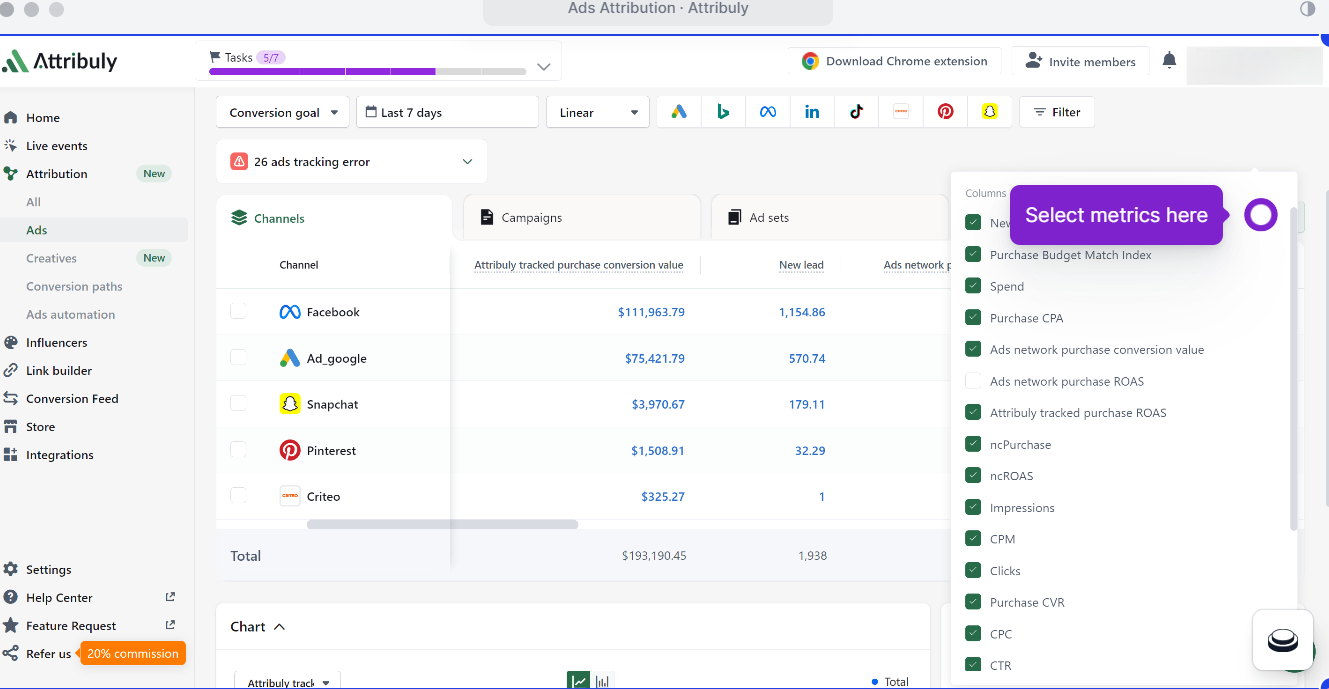
Keep an eye on sync cadence
Most ad platform connections refresh at a regular cadence (e.g., roughly every 30 minutes). Expect small intra‑day lags; evaluate at daily and weekly levels for the pilot call.
Note: The same dual‑run logic works even if you build in‑house pipelines; the example above just shows where these controls live in a typical tool.
Analysis and go/no‑go decision (Day 30)
Primary success criterion: Conversions captured increased by 20–30% versus your baseline measurement (client‑only or legacy stack). Use identical attribution windows, currencies, and include or exclude refunds consistently.
Secondary guardrails (decision aids, not promises):
Cross‑readout ROAS variance within roughly 10–15% per channel and at the aggregate level.
Reduced “unattributed” orders and improved identity presence (e.g., higher share of events with event_id + identifiers).
Sample‑size caveat: If your store’s purchase volume is small, extend to 45–60 days. You’re looking for directional lift and stability, not perfect statistical proof on day 30.
What good looks like (signals to document)
Dedup reliability: ≥95% of overlapping client/server events resolve to a single conversion in platform diagnostics.
Timestamp discipline: Median client→server delta under a few seconds; no unexplained long tails.
Identity coverage: fbp/fbc present on Meta server events; EC identifiers present and hashed correctly on Google.
Reporting clarity: A single sheet where each row is a channel, with Spend, Revenue (per model), ROAS, and Variance columns.
Downloadable templates (use as‑is or adapt)
30‑day dual‑run checklist (CSV/Sheets): columns for Date, Event, Client Count, Server Count, Coverage Diff %, Dedup Status, Identity Presence, Notes.
ROAS comparison workbook: inputs for spend by channel, revenue by model, window normalization toggles, and variance checks.
Sample payloads bundle: the JSON snippets above for Meta, TikTok, and Google EC.
If you prefer to centralize these assets in a tool, the Attribuly dashboards and integrations listed above can host and visualize the same comparisons alongside campaign spend.
You now have a pragmatic plan to run multi‑touch attribution validation in 30 days—without pausing ads. If you want templates and dashboards pre‑wired for the dual‑run, you can run this pilot with Attribuly’s integrations and reporting views.