
How to Sequence UGC & Dynamic Product Ads
Step-by-step playbook to sequence UGC and Dynamic Product Ads for e‑commerce—storyboard, timing (0–1d/2–7d/8–30d), UGC scaling, and catalog personalization to boost blended MER.
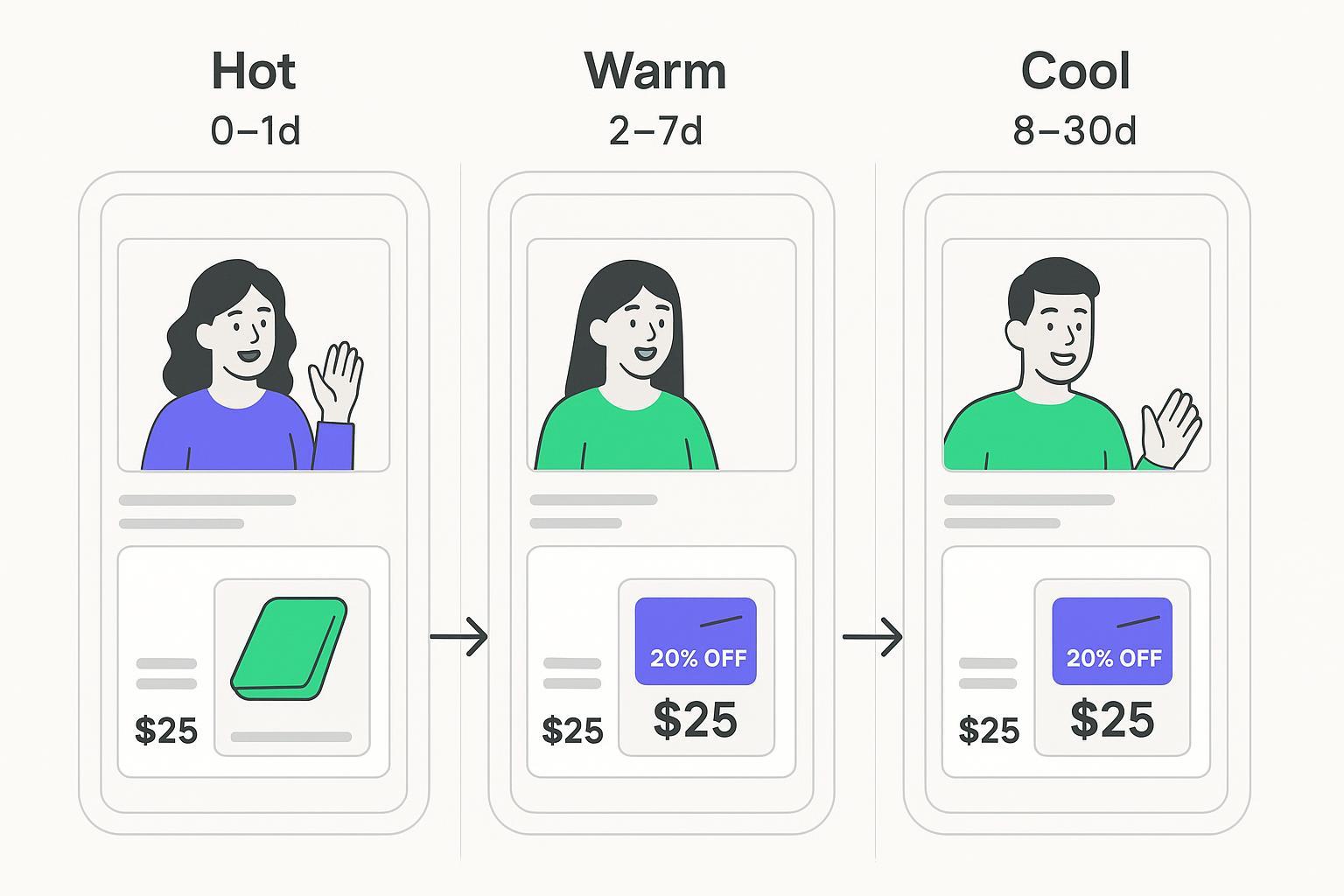
If your blended MER/ROAS is wobbling, it’s rarely just a bidding issue—it’s a sequencing issue. This playbook shows exactly how to choreograph UGC, Dynamic Product Ads (catalog ads), and short-form video into a tight, three-stage sequence that respects intent by time: 0–1d (hot), 2–7d (warm), 8–30d (cool). You’ll get the storyboard, asset specs, audience logic, and verification steps so you can deploy in one to two sprints.
Key takeaways
The hero metric is higher blended MER/ROAS; stage metrics guide optimization but don’t replace blended views.
Default windows: 0–1d hot to close now, 2–7d warm to solve objections, 8–30d cool to reframe value.
Sustain the sequence with a modular UGC system (hooks × proofs × CTAs) so you never run out of variants.
Catalog overlays (price/discount badges) and product sets are your personalization backbone for DPAs.
Verify tracking and catalog quality before launch; protect learning and document every change.
Prerequisites and setup validation
Before you build the sequence, lock in the plumbing and catalog hygiene so your creative personalization actually renders:
Meta Dynamic Ads/Catalog Sales: set up catalog, pixel mapping (content_id to catalog id), and product sets. Follow the official Business Help Center guide in the page titled Set up Dynamic Ads for your catalog.
Advantage+ catalog overlays: enable price, strikethrough, and discount badges by including both price and sale_price in your feed; review options in Meta’s product catalog creative overlays guide.
TikTok Catalog Ads: create catalogs, define product sets, and tie to Website Conversions or Video Shopping Ads; see TikTok Ads Manager Help: How to create Catalog Ads for the Website Conversions objective.
Measurement frame: calculate Marketing Efficiency Ratio (MER = Total Revenue ÷ Total Marketing Spend). See Shopify’s definition in Shopify’s guide to the Marketing Efficiency Ratio.
Experiments: when validating angles or offers, use platform-native A/B testing; Meta documents setup and interpretation in A/B tests and experiments and incrementality in Conversion Lift studies.
Note: Use each source once; keep a simple change log with windows, budgets, and major creative swaps.
The storyboard for UGC and Dynamic Product Ads sequencing
This is the core choreography. We’ll keep each stage focused: the creative role, the audience logic, and the verification checks.
0–1d (Hot) — Close the loop fast
Intent is peaking. Match product interest precisely and remove friction.
Creative role: short UGC demo with a direct offer in the first 3 seconds. Keep it vertical 9:16 with burned-in captions and a crisp CTA. Pair with catalog ads that render the exact product or set just viewed; price/discount overlays do the heavy lifting on urgency and relevance.
Formats to deploy: on Meta, run Advantage+ catalog creatives with overlays tied to your product sets; on TikTok, use Catalog Ads for Website Conversions or Video Shopping Ads with a lo-fi creator video that mirrors the product card. Keep copy simple: product benefit, guarantee, CTA.
Audience logic: include last 24h product viewers and add-to-carts; exclude recent purchasers (7d) to avoid waste. Keep frequency tight—hot pools are small and saturate quickly.
Verification: preview catalog ads to confirm overlays render (check sale_price vs. price), and test event mapping so content_id aligns with catalog id. Confirm landing pages reflect the same SKU/offer the ad shows.
Operator tip: Think of this stage like a cashier lane. Speed, clarity, and exact product matching trump everything.
2–7d (Warm) — Handle objections and widen carts
Buyers here need reassurance or a nudge toward a better bundle.
Creative role: move from “demo” to “proof.” Use creator testimonials, side-by-sides, or a quick “answering top 3 questions” format. Visuals should show outcomes, not just features.
Formats to deploy: DPA carousels for complementary products or bundles; “bestseller” sets and back-in-stock cues (policy-compliant). On TikTok, run Catalog Ads with a creator comparison or FAQ voiceover. Keep hooks fresh—don’t recycle hot-stage openers verbatim.
Audience logic: include 2–7d viewers and add-to-carts plus hot-stage video viewers (e.g., 25%+). Exclude purchasers (7–30d) and exclude the 0–1d audience to reduce overlap.
Verification: watch frequency and incremental CTR. If CTR holds but CVR dips, the angle may be off—test social proof density or risk-reversal (free returns, warranty) in copy and overlays.
Operator tip: Use “proof blocks” you can swap: review counts, UGC montage, press blurb, risk reversal. Two strong proofs beat four weak ones.
8–30d (Cool) — Reframe value and invite community
Fence-sitters often need a bigger story—identity, community, longevity.
Creative role: tell a short narrative. Founder POV or “why we built this,” stitched UGC compilations, and credibility signals (ratings, awards). Aim for empathy over hard sell, then present evergreen bundles or top-rated sets.
Formats to deploy: catalog ads labeled Top-rated or Editor’s picks; on TikTok, Video Shopping Ads with creator VO that emphasizes use-cases and lifestyle alignment.
Audience logic: include 8–30d non-purchasers and engaged social audiences (profile visitors, ad engagers). Pull in CRM/email clickers who didn’t buy, where policy and consent allow. Exclude recent purchasers to prevent churn-inducing overexposure.
Verification: read cohorts weekly. If MER improves while stage CVR lags, cool-stage may be assisting; consider a small lift test before cutting.
Operator tip: Here’s the deal—let cool-stage be persuasion, not pressure. If you push discounts too hard, you train delay.
Build enough UGC to feed the sequence
The biggest blocker is creative volume. Solve it with a modular system that multiplies variants without multiplying shoots.
Modular script blocks: Hook (3s) → Pain → Proof (demo/testimonial) → Offer → CTA. Create 5–10 hooks, 3–5 proofs, 2–3 CTAs per product or category. Mix and match per stage: direct hooks for hot, credibility hooks for warm, story hooks for cool.
Batch shooting: brief creators to capture multiple angles in one session (demo, comparison, FAQ, unboxing, testimonial) plus extra B-roll for catalog/video pairings. Maintain a naming taxonomy so edits are trackable.
Versioning matrix (start with your top 15–20 variants to protect learning):
Component | Options |
|---|---|
Hooks | 5 distinct openers (problem, wow outcome, myth-bust, time-saver, social proof first) |
Proofs | 5 variants (demo, testimonial, before/after, press quote, review count) |
CTAs | 5 variants (Shop now, See it on you, Pick your size, Bundle and save, Try risk-free) |
Copyable creator brief (paste into your doc):
Objective: Drive purchases in [stage] with [key benefit].
Must show: [top feature], [proof element], [offer terms if any].
Hooks to try: [list 5].
Shots needed: front demo, use-in-context, close-up detail, UGC selfie, product in motion, logo/mark where allowed.
Editing notes: captions on, brand-safe language, vertical 9:16, 15–30s.
Deliverables: raw clips + 3 edited cuts; separate audio if possible.
Think of this as assembling with blocks. Once you have blocks, you can build new ads in hours, not weeks.
Measurement for operators: blended first, stage-aware second
Primary KPI: blended MER/ROAS. Read it daily with 7/28-day views. If blended MER rises while a stage’s CVR dips, hold your nerve and diagnose assists before pausing.
Stage readouts: track CVR, CPC/CPM, frequency, and sell-through at the product-set level. Guardrails: rising frequency with falling CTR = fatigue; flat CTR with falling CVR = misaligned landing or offer.
Experiments: use platform-native tests for creative angles and offer frames. Meta’s A/B tests are documented in A/B tests and experiments; for larger budgets, consider Conversion Lift studies to gauge incrementality of warm/cool sequences. Keep changes isolated and logged.
Troubleshooting quick reference
Catalog overlays not showing: confirm both price and sale_price exist, currency/locale matches, and products aren’t disapproved. Re-check in Commerce Manager diagnostics and product catalog creative overlays.
ID mismatches: make sure content_id in Pixel/CAPI events equals catalog id; fix mapping rules and validate event quality in Meta Events Manager.
Double counting or missing purchases: implement server-side events with an event_id so browser and server deduplicate properly; validate in Test Events and review Meta’s Conversions API documentation.
Audience overlap and waste: enforce exclusions between 0–1d, 2–7d, and 8–30d; check delivery overlap reports; tighten hot-stage frequency.
Creative fatigue: if CTR and watch time slide after 7–14 days, rotate hooks and proofs; don’t just tweak CTAs. TikTok’s Creative Center can surface fresh angles.
Practical workflow example (where a neutral tool can help)
For stage-level audience syncing and blended readouts, a tool like Attribuly can be used to capture high-intent segments from your store, sync them to ad platforms, and monitor blended MER alongside channel metrics. If you’re building audiences from store behavior, review Attribuly’s Capture product overview. Pair that with your platform-native tests and catalog diagnostics to keep sequencing decisions objective.
Two-week rollout plan
Day 1–2: Validate catalog diagnostics, Pixel/Events API mapping, and overlays. Build or refresh product sets (top-sellers, bundles, top-rated). Draft 15–20 modular UGC variants and finalize briefs.
Day 3–5: Ship hot-stage ads (UGC + DPAs), set exclusions, and verify rendering. Launch warm-stage creative in parallel but hold spend low until hot-stage stabilizes.
Day 6–9: Scale warm-stage as hot-stage frequency rises. Introduce cool-stage storytelling with top-rated sets. Start one focused A/B test (angle or offer) and log settings.
Day 10–14: Read cohorts and blended MER. If blended improves yet a stage underperforms, test a new proof block before pausing. Refresh 3–5 hooks and rotate catalog overlays if inventory or pricing changed.
Next step if you want help operationalizing capture and measurement: explore Attribuly starting from the homepage or the Capture product overview to see audience capture and reporting workflows.