
Shopify First-Party Data Collection: The Complete 2026 Guide
A complete 2026 guide to Shopify first-party data collection—set up Web Pixels, server-side tracking, GA4, Meta CAPI and Consent Mode v2 with step-by-step instructions. Read now.
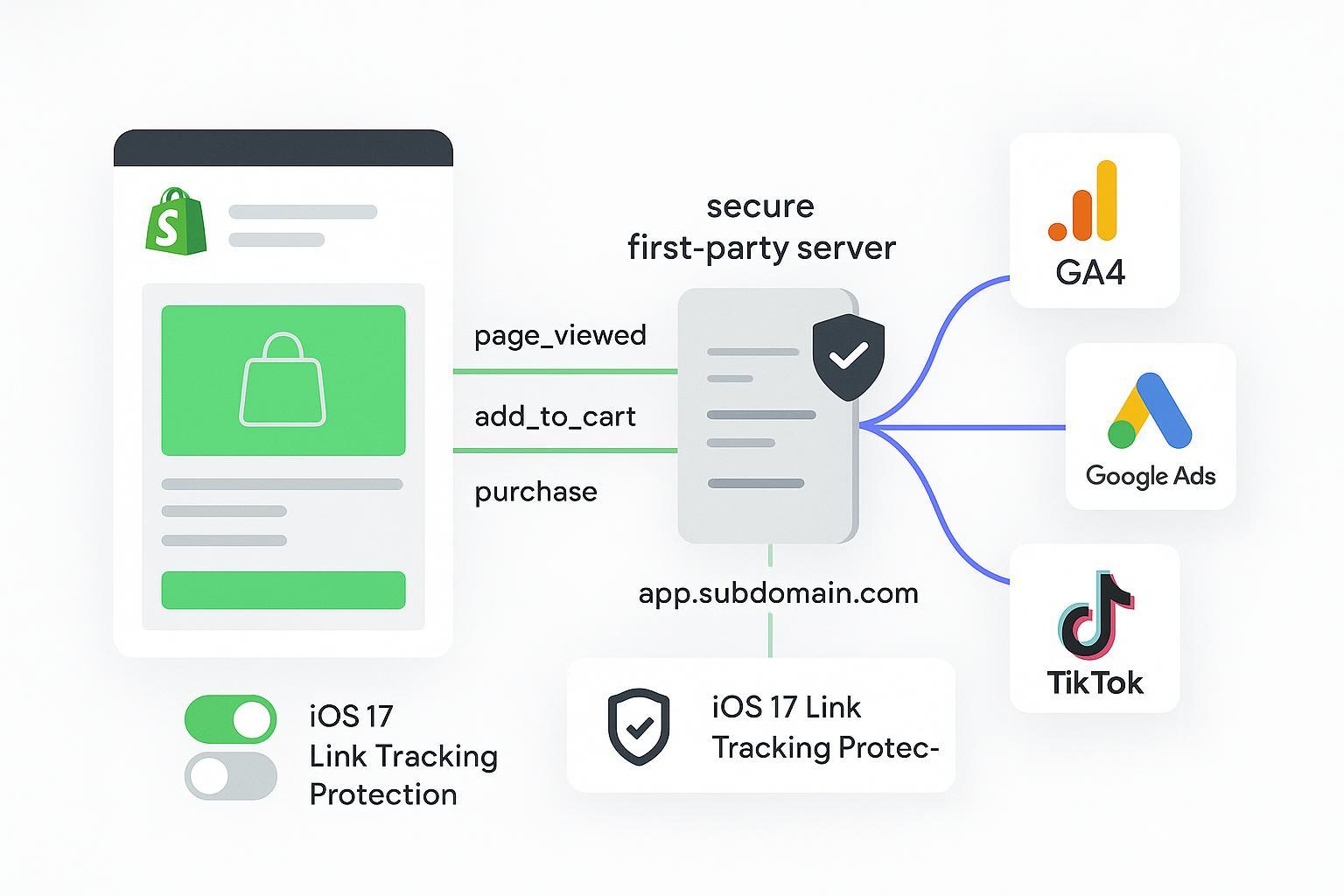
If you run a Shopify store in 2026, your growth increasingly depends on how well you collect and use first-party data—accurately, privately, and in a way that keeps your ad platforms informed. Browser restrictions, iOS 17 Link Tracking Protection, and consent requirements have changed the playbook. The good news: Shopify’s Web Pixels and Customer Events, paired with a server-side pipeline, can restore high-quality signals to GA4, Google Ads, Meta, and TikTok—without violating user trust.
This guide gives you a complete, step-by-step blueprint. You’ll set up modern Shopify tracking primitives, route events through a first-party server, respect Consent Mode v2 and regional laws, and validate everything with platform debuggers so you can scale performance with confidence.
Key takeaways
Shopify first-party data collection hinges on Web Pixels/Customer Events for standardized, durable client-side signals, plus webhooks for reliable server triggers.
A hybrid architecture—client pixel + server-side tagging on a first-party subdomain—improves match quality, reduces data loss, and enables deduplication across browser and server.
Consent Mode v2 and regional privacy laws (GDPR; CCPA/CPRA) require gating tags and payloads based on user choice; set EEA defaults to “denied” before any Google tags initialize.
iOS 17 Link Tracking Protection strips tracking parameters in some contexts; mitigate with first-party redirects and server-side logging rather than relying solely on visible UTM parameters.
Validate continuously: watch Event Match Quality, deduplication status, and revenue deltas between Shopify and analytics/ad platforms; fix issues before scaling budgets.
Shopify first-party data collection fundamentals
Shopify rebuilt its modern tracking layer around Web Pixels and Customer Events. Instead of sprinkling scripts across theme files or legacy checkout pages, you subscribe to standardized storefront and checkout events and forward them to your analytics and ad platforms.
Web Pixels API and standard events: use
analytics.subscribe()to capture events likepage_viewed,product_viewed,cart_updated,checkout_started, andcheckout_completed. See Shopify’s official Web Pixels documentation: the Web Pixels API hub, the standard events catalog, and the analytics.subscribe API reference.Customer Privacy and consent: Shopify exposes privacy signals you can check before sending data onward. Review the Customer privacy API for consent fields and regional behavior.
Checkout extensibility: If you’ve relied on legacy “Thank You” scripts, migrate to Customer Events and Checkout UI Extensions. Shopify explains the upgrade in Replace Thank You/Order Status scripts with Customer Events.
Here’s a minimal Custom Pixel that runs in Settings → Customer events, subscribes to key events, and pushes a normalized ecommerce object to your data layer (or forwards to your endpoint):
// Shopify Custom Pixel (Settings → Customer events → Add custom pixel)
  // Hints: Use strict checks; avoid blocking the UI; keep payloads compact.

  function pushDL(evtName, evt) {
    window.dataLayer = window.dataLayer || [];
    window.dataLayer.push({
      event: evtName,
      ecommerce: evt?.data?.ecommerce || {},
      // include a dedup/event_id if you mirror this server-side later
      event_id: crypto.randomUUID()
    });
  }

  analytics.subscribe('product_viewed', (event) => {
    pushDL('view_item', {
      data: {
        ecommerce: {
          items: [{
            item_id: event?.data?.productVariant?.id,
            item_name: event?.data?.productVariant?.title
          }]
        }
      }
    });
  });

  analytics.subscribe('checkout_completed', (event) => {
    const order = event?.data?.checkout;
    if (!order) return;
    pushDL('purchase', {
      data: {
        ecommerce: {
          transaction_id: order?.order?.id,
          value: Number(order?.totalPrice?.amount || 0),
          currency: order?.currencyCode,
          items: (order?.lineItems || []).map(i => ({
            item_id: i?.variant?.id,
            item_name: i?.title,
            price: Number(i?.variant?.price?.amount || 0),
            quantity: i?.quantity
          }))
        }
      }
    });
  });
Consent-aware gating with Shopify’s privacy signals:
// Example: only forward analytics events if analytics consent is true
  analytics.subscribe('checkout_completed', (event) => {
    const consent = analytics?.meta?.customerConsent; // see Shopify Customer privacy API
    if (consent?.analytics !== true) return; // default deny behavior in restricted regions
    // forward to your endpoint or dataLayer
  });
Why this matters now: as of 2026, Shopify’s standard events and privacy APIs are the canonical way to capture storefront/checkout behavior while honoring user choices. See the developer references above for Web Pixels, standard events, analytics subscribe, and the Customer privacy API.
Architectures for resilient signals (client, server, hybrid)
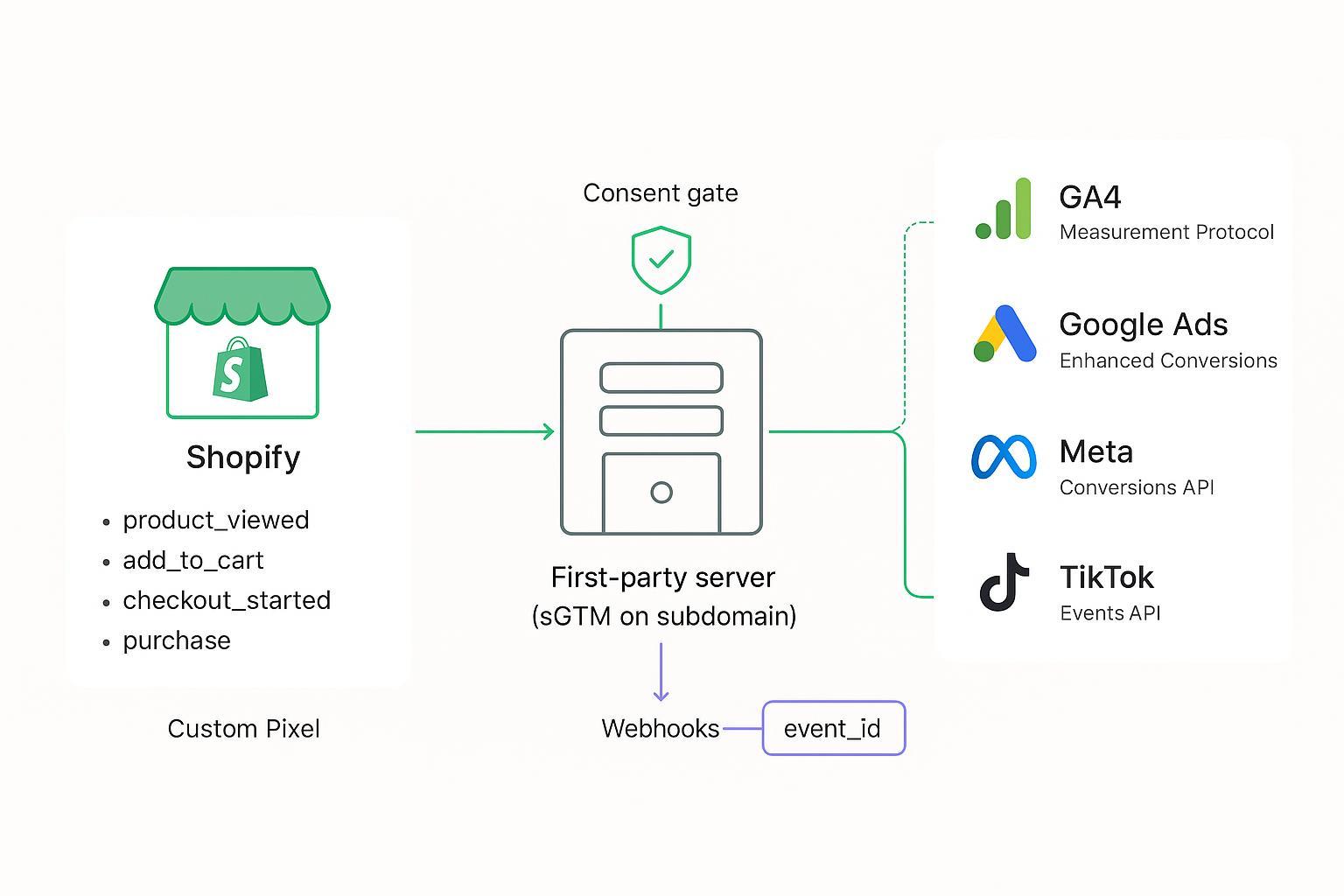
Client-only pixels still matter for on-page measurement and personalization, but server-side tagging closes gaps from ad-blocking, shortened cookie windows, and parameter stripping. A hybrid approach is now the default recommendation for Shopify first-party data collection:
Client: a Shopify Custom Pixel normalizes storefront events and, if needed, passes them to a web GTM container for client-side tags.
Server: a GTM Server container (or similar) running on a first-party subdomain receives browser events and Shopify webhooks, enriches payloads with first-party data, and forwards to GA4, Google Ads, Meta, and TikTok via their server APIs. For implementation patterns and first-party domains, see Stape’s primers (e.g., server-side tagging on Shopify) and first-party domain guides.
Dedup: share a consistent
event_idacross browser and server to prevent double-counting in platforms that support deduplication.
Two practical notes:
Host your server container on a first-party subdomain (e.g., track.yourbrand.com) to improve cookie durability and control. Stape and similar resources provide custom domain and first‑party mode explainers.
If you have checkout customizations, validate what’s allowed under Checkout UI Extensions (Plus vs. non‑Plus) and move legacy scripts into supported surfaces per Shopify’s checkout and account UI extensions availability and upgrade documentation.
For iOS 17 Link Tracking Protection, Apple documents that certain tracking parameters are stripped in Messages, Mail, and Safari Private Browsing. See Apple’s iOS 17 update notes and privacy protections overview for Private Browsing. Mitigation: log click metadata server-side at redirect time (on your own subdomain) and avoid reliance on long-lived, user-visible URL parameters.
Implementation walkthroughs: from Shopify events to server-side dispatch
Developer steps: capture events with Customer Events and webhooks
Custom Pixel subscriptions for key actions:
// Add to cart example using Shopify Customer Events standard schema
  analytics.subscribe('product_added_to_cart', (event) => {
    window.dataLayer = window.dataLayer || [];
    window.dataLayer.push({
      event: 'add_to_cart',
      event_id: crypto.randomUUID(),
      ecommerce: {
        currency: event?.data?.cart?.currency,
        value: Number(event?.data?.cart?.cost?.totalAmount?.amount || 0),
        items: (event?.data?.cart?.lines || []).map(l => ({
          item_id: l?.merchandise?.id,
          item_name: l?.merchandise?.title,
          price: Number(l?.merchandise?.price?.amount || 0),
          quantity: l?.quantity
        }))
      }
    });
  });
Shopify webhooks for server reliability (e.g.,
orders/paid). Shopify’s webhook resource covers topics, retries, and best practices. See Webhooks resource (Admin REST).
// Minimal Node/Express handler: acknowledge fast, queue async work
  app.post('/webhooks/orders-paid', async (req, res) => {
    res.status(200).send('OK'); // acknowledge within 5 seconds to prevent retries
    const payload = req.body;   // verify HMAC per Shopify docs before processing

    // enqueue job → transform to destinations
    jobs.enqueue('purchase_dispatch', {
      order_id: payload?.id,
      currency: payload?.currency,
      value: Number(payload?.total_price || 0),
      email: payload?.email,
      line_items: (payload?.line_items || []).map(i => ({
        item_id: i?.variant_id?.toString(),
        item_name: i?.title,
        price: Number(i?.price || 0),
        quantity: i?.quantity
      })),
      event_id: payload?.id?.toString() // stable dedup key (or map from client)
    });
  });
Server-side dispatch to destinations
GA4 Measurement Protocol: include
client_idoruser_id, settransaction_id,value,currency, anditems. See Google’s GA4 Measurement Protocol reference and ecommerce recommended events.
{
    "client_id": "123456789.123456789",
    "user_id": "user123",
    "events": [
      {
        "name": "purchase",
        "params": {
          "transaction_id": "T_10001",
          "value": 149.99,
          "currency": "USD",
          "items": [
            {"item_id": "SKU_001", "item_name": "Crewneck Tee", "price": 29.99, "quantity": 5}
          ]
        }
      }
    ]
  }
Google Ads Enhanced Conversions: normalize and hash first-party identifiers. Guidance: Enhanced Conversions for web and user-provided data matching.
# Pseudocode for EC hashing
  email = normalize_lower_trim(email_raw)
  phone = normalize_e164(phone_raw)
  sha256_email = sha256(email)
  sha256_phone = sha256(phone)
  # Send only with consent and proper disclosures per Google Ads EC documentation
Meta Conversions API: deduplicate with the Pixel using a shared
event_idand include user data when permitted. Docs: Meta Conversions API parameters and dedup.
{
    "data": [
      {
        "event_name": "Purchase",
        "event_time": 1715600000,
        "event_id": "T_10001",
        "action_source": "website",
        "user_data": {"em": ["<sha256_of_email>"]},
        "custom_data": {
          "currency": "USD",
          "value": 149.99,
          "contents": [{"id": "SKU_001", "quantity": 5, "item_price": 29.99}],
          "order_id": "T_10001"
        }
      }
    ]
  }
TikTok Events API: mirror the pixel event and deduplicate with
event_id. Docs: TikTok Events API overview and event deduplication.
{
    "event": "CompletePayment",
    "event_id": "T_10001",
    "timestamp": "2026-05-13T12:00:00Z",
    "context": {"ad": {"callback": "{{ttclid}}"}},
    "properties": {
      "value": 149.99,
      "currency": "USD",
      "contents": [{"content_id": "SKU_001", "quantity": 5, "price": 29.99}]
    },
    "user": {"email": "<sha256_of_email>"}
  }
Implementation tip: keep your event_id stable across client and server for the same conversion. When the same purchase is sent by both browser and server with matching event_id, platforms can suppress duplicates and improve signal quality. Validate in-platform: Meta Events Manager → Test Events/Diagnostics; TikTok Events Manager testers.
Consent Mode v2 and compliance: mapping choices to behavior
Consent isn’t just a banner—it’s a control system. In 2026, Google’s Consent Mode v2 introduces ad_user_data and ad_personalization alongside ad_storage and analytics_storage. You must set default-denied states for EEA/UK before any Google tags fire, then update consent after a user makes a choice. See Google’s Consent Mode developer overview and GA4 help for behavior specifics.
A practical mapping table (example; adapt to your CMP and region rules):
Consent category | Default (EEA/UK) | When user accepts | When user declines |
|---|---|---|---|
analytics_storage | denied | granted (fire GA4 tags, MP allowed) | denied (modeling may apply) |
ad_storage | denied | granted (ads cookies allowed) | denied |
ad_user_data | denied | granted (EC, CAPI user data allowed) | denied |
ad_personalization | denied | granted (remarketing allowed) | denied |
Implementation notes:
Initialize defaults at Consent Initialization (GTM) or with
gtag('consent', 'default', …)before tags load. See also Google’s Ads help on additional data sources and consent mapping.Send user-provided data (emails, phones) only when you have consent and proper disclosures; hash per Google’s and ad platforms’ guidance.
For California (CCPA/CPRA), ensure a clear “Do Not Sell or Share” control and honor Global Privacy Control signals. The California Privacy Protection Agency maintains current regulatory materials.
For GDPR/ePrivacy context and 2026 enforcement emphasis on transparency, review the EDPB’s work programme 2026–2027 and coordinated action on transparency/information duties noted by the EDPB in 2026.
Practical workflow example (neutral): unifying Shopify → server → ad platforms
Here’s a single, objective example of how teams operationalize a hybrid pipeline without writing everything from scratch. Many merchants deploy a unified attribution and server-side dispatch layer that ingests Shopify Customer Events and webhooks, then forwards normalized conversions to GA4, Google Ads, Meta CAPI, and TikTok Events API with deduplication. Tools like self‑hosted sGTM, Stape, Littledata, Elevar, or Attribuly can be used for this role. As one option, Attribuly supports Shopify integrations and can route first-party events to multiple destinations while preserving event IDs and consent logic. Explore capabilities at Attribuly. Keep evaluation objective—compare hosting model, consent handling, destination coverage, and how easily you can validate dedup and revenue alignment.
Validation and troubleshooting: make the data trustworthy
Even the best architecture needs proof. Build a short, repeatable validation routine using official debugging tools and a few health metrics.
Validation tools and checks:
GA4 DebugView and the Measurement Protocol validator: confirm
purchasehastransaction_id,value,currency, and the expected items. See Google’s MP sending guide and reference.Meta Events Manager → Test Events & Diagnostics: send a test
Purchasevia Pixel and CAPI with the sameevent_id. Ensure duplicates are suppressed and diagnostics are clear. See Meta’s CAPI docs.TikTok Events Manager and Pixel Helper: confirm server events arrive with the same
event_idas pixel events and that standard parameters match TikTok’s schema. See TikTok’s Events API overview.Consent Mode verification: in Tag Assistant/GTM Preview, validate that consent defaults are “denied” in EEA/UK until user action, and that updates flip states as expected.
Health metrics to monitor weekly:
Metric | What good looks like | Tools/where to check |
|---|---|---|
Event Match Quality (EMQ) | Trending up or stable; diagnostics clean | Meta Events Manager; TikTok Events Manager |
Deduplication status | Duplicates suppressed for shared event_id | Meta/TikTok Diagnostics; GA4 notes for duplicates |
Revenue delta vs. Shopify | Within your tolerated variance; documented causes for gaps | Compare Shopify Orders vs. GA4/Ads/TikTok |
Consent coverage | High decision rate; modeled vs. observed conversions understood | GA4 consent reports; CMP analytics |
A light QA checklist you can run in under 30 minutes:
Perform one clean test transaction from a new browser profile and confirm the event flows in all platforms.
Check dedup diagnostics in Meta and TikTok for that transaction’s
event_id.Spot-check GA4 DebugView for
purchasecompleteness and user_id/client_id presence.Compare last 7 days’ revenue across Shopify vs. each destination; log deltas and annotate known causes (refund batch, bulk edits, etc.).
Manager checklist: rollout without surprises
Confirm your CMP can map regions and set Consent Mode v2 defaults to denied in EEA/UK before any Google tags initialize, with clear “Do Not Sell or Share” controls for California.
Stand up a first-party server endpoint (sGTM or equivalent) on a branded subdomain; ensure HSTS, TLS, and logging are in place.
Implement Shopify Custom Pixel subscriptions for key events and wire a stable
event_idinto both pixel and server flows.Implement webhooks for
orders/paid(or your chosen “truth” event) and build an asynchronous queue to fan out to GA4, Google Ads (EC), Meta CAPI, and TikTok Events API.Establish a weekly QA routine using GA4 DebugView, Events Manager diagnostics (Meta/TikTok), and a simple reconciliation report vs. Shopify Orders.
What to watch in the first 90 days
Signal quality: Event Match Quality and user data match rates should stabilize as more logged-in and consented users flow through your pipeline.
Revenue alignment: Aim for consistent deltas across Shopify vs. GA4/ads platforms after dedup and refunds settle; document causes for any residual gaps.
Consent effects: Expect lower observed conversions in strict-consent regions; over time, Consent Mode modeling and better consent UX can narrow gaps.
Platform changes: APIs evolve. Bookmark official documentation—Shopify Web Pixels and Customer Events, Google’s GA4 Measurement Protocol and consent docs, Google Ads Enhanced Conversions help, Meta Conversions API, TikTok Events API, and Apple’s iOS privacy notes—and schedule quarterly audits.
If you keep the pipeline hybrid, consent-aware, and continuously validated, your Shopify first-party data collection will not only respect users but also give ad platforms the trustworthy signals they need to optimize.
References (authoritative, already cited inline):
Shopify developer references: Web Pixels API hub; standard events; analytics.subscribe; Customer privacy API; and Thank You/Order Status migration.
Server-side patterns and first-party domains: Stape sGTM on Shopify; Custom domain for sGTM.
GA4 Measurement Protocol and ecommerce: MP reference; ecommerce guide; sending events.
Consent and privacy: Google Consent Mode v2 overview; CPPA regulations; EDPB work programme 2026–2027.
Meta and TikTok: Meta Conversions API; TikTok Events API; TikTok deduplication.
Apple privacy updates: iOS 17 updates and privacy protections.