
How to Set Up Shopify Server-Side Tracking: Complete Guide
Step-by-step guide to Shopify server-side tracking: map events, set dedup rules, hash identifiers, and run a 30-day POC to measure CPA/ROAS lift.
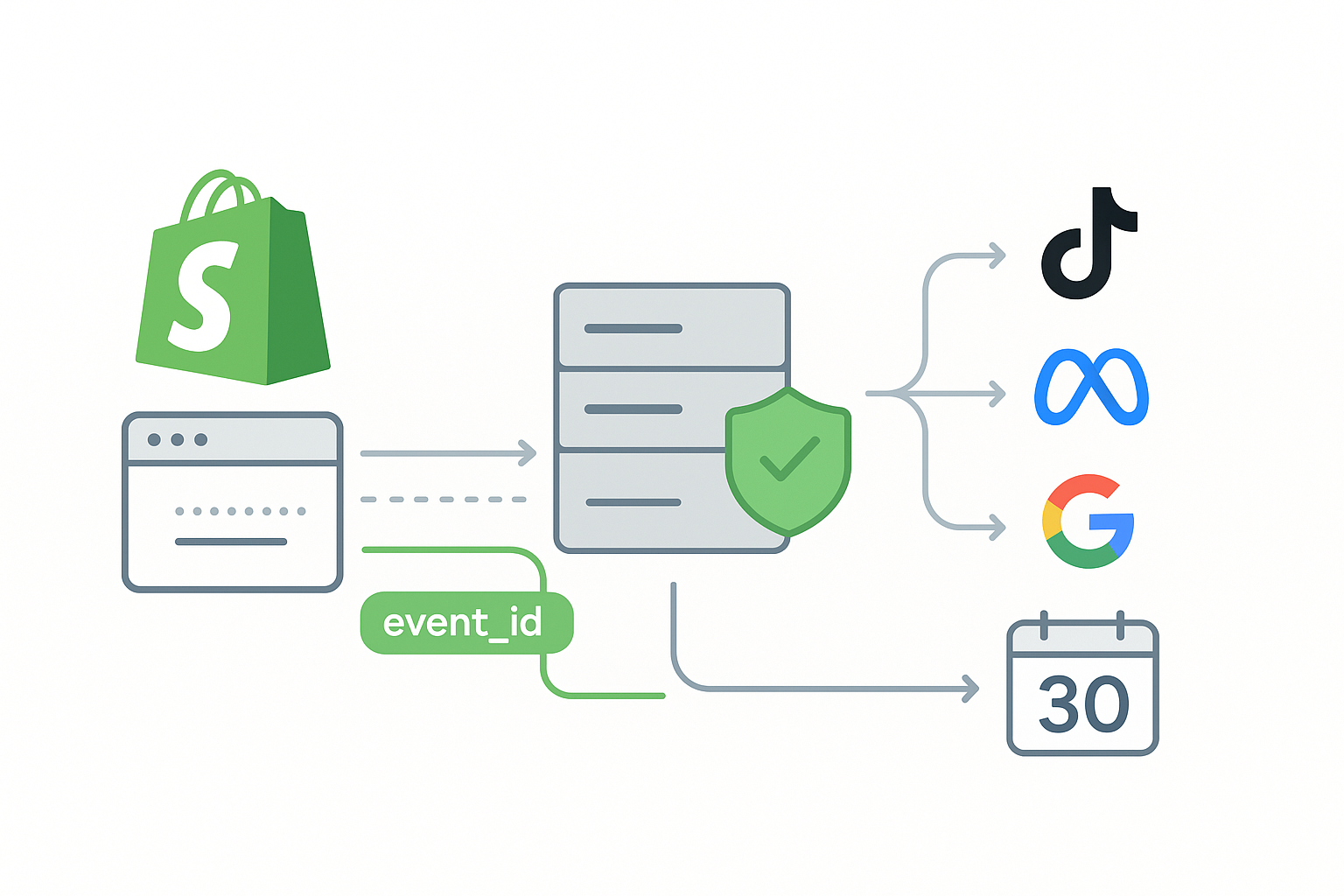
If you’re scaling a Shopify brand and paying for traffic on TikTok, Meta, or Google, missing or duplicated conversions can quietly inflate CPA and kneecap your optimization. Server-side tracking gives you a stable back channel to send high-quality, consent-respecting signals—so algorithms learn faster and reporting lines up with reality.
Key takeaways
Server-side tracking combines Shopify Web Pixel for consented client events with secure server events from webhooks to enrich and back up critical conversions.
TikTok works best when you run Pixel and Events API together with a shared event_id to deduplicate and recover short-video traffic attribution.
Hash first-party identifiers using SHA-256, align parameters to platform schemas, and verify consent before firing any event.
Start with Shopify Web Pixel plus server events, then run a 30-day POC targeting measurable CPA and ROAS lift with guardrails.
Keep duplicates under 2–5 percent and event coverage at or above 95 percent by testing in Events Manager and monitoring webhook logs.
What server-side tracking is for Shopify
Shopify server-side tracking pairs a client layer with a server layer:
Client layer: a Web Pixel app extension runs in a sandbox and subscribes to customer and checkout events, while respecting the store’s privacy signals. Shopify confirmed pixels now load on customer accounts and the order status page, expanding coverage for post-purchase views according to the Shopify changelog on web pixels loading across these surfaces. See the announcement in the Shopify changelog under web pixels load on customer accounts and order status pages, which increases coverage of post-purchase and account events: Shopify changelog on Web Pixels loading across accounts and order status. Privacy and consent are governed via Shopify’s customer privacy interfaces; you can check and subscribe to consent state through the documented Web Pixels API: Shopify customerPrivacy API for Web Pixels.
Server layer: Shopify webhooks like orders/create and orders/paid deliver authoritative order data to your server, where you verify the HMAC signature and forward events to ad platforms using their server APIs.
This hybrid ensures you send timely browser signals and robust server confirmations, with deduplication based on a shared event_id.
Why Shopify server-side tracking matters
Three outcomes justify the work:
Attribution completeness: Browser tracking alone misses sessions due to ITP, blockers, or app webviews. Server events add back a measurable share of conversions.
Optimization stability: Clean, deduplicated Purchase events improve match keys and give algorithms steadier feedback loops.
Privacy alignment: Consent-aware client events and hashed identifiers help you comply and still provide useful measurement.
TikTok specifically recommends combining Pixel and Events API with deduplication to prevent double counts and enrich data. Their Events API overview explains how server events complement pixel data for attribution and optimization. Read the high-level guidance in the official documentation: TikTok Events API overview and how deduplication works when Pixel and Events API overlap: TikTok event deduplication guidance.
Meta provides dataset-level feedback on coverage, match quality, and duplicates through the Dataset Quality API, which helps prioritize fixes so your Conversions API signals have business impact. See the developer reference for what’s measured and how to use it: Meta Dataset Quality API for CAPI diagnostics.
For Google Ads, Enhanced Conversions improves match accuracy by accepting SHA-256 hashed first-party identifiers with clear normalization rules. Google’s help center outlines the hashing and normalization requirements: Google Ads Data Manager hashing and normalization for Enhanced Conversions.
Shopify server-side tracking: events and parameters for TikTok
Map Shopify journey points to TikTok standard events and include recommended parameters:
ViewContent: content_id or content_ids, content_type, currency
AddToCart: content_ids, value, currency, quantity
InitiateCheckout: content_ids, value, currency
AddPaymentInfo: content_category, content_ids, value, currency
Purchase: event_id, timestamp, value, currency, content_ids, external_id and customer identifiers when available
Practical tips:
Use a stable event_id shared between the Pixel and Events API for each event instance.
Hash email and phone via SHA-256 prior to sending with Events API. Normalize to lowercase and trim whitespace; format phone to E.164 when possible.
Keep content_ids aligned with your catalog identifiers used in the platform.
For the complete standard event field set and recommendations, consult TikTok’s reference and align your payloads accordingly. Their parameters page lists required and suggested fields for commerce events: TikTok standard events and parameters reference.
Deduplication rules and timeline
Dedup hinges on an identical event_id across client and server events. A practical approach is to generate a UUIDv4 in the browser, attach it to client events, persist it through checkout, and reuse it server-side when the order webhook arrives.
TikTok dedup windows, per their guidance, operate roughly as follows:
Pixel to Pixel overlap is deduplicated if the same event and event_id occur within a 48-hour window.
Events API to Events API overlap is also deduplicated within 48 hours.
Pixel to Events API overlap is deduplicated when the same event and event_id arrive within 48 hours. If the server event comes after the browser event by more than a few minutes, the earlier event typically takes precedence and later payloads can enrich it.
Two practical rules help in production:
Prefer the browser event in the first 0–5 minutes post-action for immediacy and client context. Let the server event act as a backup and enrichment message.
Ensure the exact same event_id reaches both channels; without it, you will double count.
Example of generating and propagating event_id in a Shopify Web Pixel:
// In your Shopify Web Pixel app extension
  import {v4 as uuidv4} from 'uuid';

  let eventId = uuidv4();

  analytics.subscribe('checkout_completed', async (event) => {
    const payload = {
      event: 'Purchase',
      event_id: eventId, // persist this to cart attributes or a cookie that your server can read
      value: event?.data?.totalPrice?.amount,
      currency: event?.data?.totalPrice?.currencyCode,
      content_ids: event?.data?.lineItems?.map(li => li.merchandise?.product?.id).filter(Boolean),
    };
    // send to TikTok Pixel or your client collector
  });
Implementation path using Web Pixel and server events
We’ll follow a minimal, reliable setup: Web Pixel for client events with consent, plus server webhooks for authoritative orders. Then we’ll forward server events to TikTok Events API.
Step 1. Honor consent in the pixel
analytics.subscribe('init', async ({customerPrivacy}) => {
    const marketingAllowed = customerPrivacy?.marketingAllowed;
    // Gate any client-side event dispatch by marketingAllowed
  });
Step 2. Verify Shopify webhook HMAC in your server
// Node/Express example
  import crypto from 'crypto';
  import express from 'express';

  const app = express();
  app.post('/webhooks/orders/create', express.raw({type: 'application/json'}), (req, res) => {
    const hmacHeader = req.get('X-Shopify-Hmac-SHA256');
    const secret = process.env.SHOPIFY_APP_SECRET;
    const digest = crypto
      .createHmac('sha256', secret)
      .update(req.body, 'utf8')
      .digest('base64');

    if (!crypto.timingSafeEqual(Buffer.from(digest), Buffer.from(hmacHeader))) {
      return res.status(401).send('Unauthorized');
    }

    const order = JSON.parse(req.body.toString('utf8'));
    // Retrieve the event_id you stored during checkout, e.g., from order.note_attributes
    const eventId = (order.note_attributes || []).find(n => n.name === 'event_id')?.value;
    // Continue to build TikTok payload and post to Events API
    res.status(200).send('OK');
  });
Step 3. Build and send a TikTok Purchase via Events API
Representative JSON payload for a Purchase event. Align fields to your account setup and follow TikTok’s current authentication method and endpoint documented in their Events API guidance.
{
    "event": "Purchase",
    "event_id": "7f3c0a18-1b6e-4c2f-95b1-9d3a5b2a1f10",
    "timestamp": "2026-01-15T17:25:43Z",
    "properties": {
      "value": 129.99,
      "currency": "USD",
      "content_ids": ["gid://shopify/Product/1234567890"],
      "content_type": "product"
    },
    "user": {
      "external_id": "c3fcd3d76192e4007dfb496cca67e13b",
      "email": "b58996c504c5638798eb6b511e6f49af",
      "phone": "5e2d3d1a4b9f5c6b7a8d9e0f1a2b3c4d"
    },
    "context": {
      "ip": "203.0.113.42",
      "user_agent": "Mozilla/5.0"
    }
  }
Note: Hash email and phone with SHA-256 after normalization. The external_id typically carries a user or customer ID hashed with SHA-256 as well.
Step 4. Simple retry and idempotency
Add exponential backoff on 429 or 5xx from the Events API.
Include your own idempotency key in server processing to avoid duplicate posts when retrying webhooks.
Infrastructure options in brief
Shopify Web Pixel plus server webhooks: Fastest path, strong consent handling, minimal maintenance. Good default for most teams.
GTM Server-Side on GCP: Flexible routing and vendor connectors; higher setup and cloud ops overhead.
Custom AWS or GCP functions: Maximum control, but requires engineering bandwidth for scaling, security, and observability.
SaaS connector: Simplifies mappings and dedup, but evaluate vendor transparency and exportability.
If you need a single place to see which destinations are supported with native mappings, skim the integrations catalogue: Attribuly integrations list for server-side destinations.
Validation and debugging routine
TikTok Events Manager diagnostics: Send test events and check payload coverage, match rates, and any dedup warnings. The official tools and diagnostics flow are described here: TikTok Events Manager diagnostics and monitoring.
Shopify Dev Dashboard logs: Confirm webhook deliveries, response codes, and retry behavior. Use CLI logs when developing to spot HMAC or parsing issues.
Common fixes: Normalize and hash identifiers before sending, ensure event_id is identical across browser and server, and confirm consent gating logic fires correctly on first page load.
POC blueprint for a 30-day CPA and ROAS lift
Goal
Demonstrate measurable CPA or ROAS improvement after enabling server-side events and dedup.
Design
Week 0 baseline: snapshot CPA, ROAS, conversion volume, and lag.
Test and control: either split campaigns or run a holdout on a subset of traffic while server-side runs on the rest. Keep budgets and targeting comparable.
KPIs to track: CPA, ROAS, conversion volume lift, TikTok match rates, duplicate rate under 2–5 percent, and event coverage at or above 95 percent.
Guardrails: rollback if duplicates spike, coverage drops, or diagnostics show severe mismatches.
Evaluation
Exclude the most recent 48–72 hours to reduce reporting lag bias.
Require sustained directional improvement for at least 2 weeks of the test period.
For a hands-on methodology and example timelines, use this step-by-step validation playbook: 30-day validation playbook for multi-touch and dedup checks.
Practical workflow with a SaaS connector
Disclosure: Attribuly is our product.
In practice, many teams pair a Web Pixel with a SaaS connector to forward server webhooks to TikTok, Meta, and Google with native mappings and event_id dedup. A typical flow is:
Web Pixel generates an event_id and attaches it to checkout metadata.
Server receives orders/create, verifies HMAC, and the connector posts a Purchase to TikTok Events API using the shared event_id and hashed identifiers.
Meta Conversions API receives a parallel Purchase with event_id plus available _fbp and _fbc when present, and Dataset Quality flags guide any fixes. See a neutral description of what the integration supports here: Attribuly Meta Ads integration overview.
For Google, the connector forwards hashed emails or other identifiers aligned to Enhanced Conversions requirements. A short overview is available here: Attribuly Google Ads integration overview.
Action checklist
Generate a shared event_id and propagate it from pixel to server.
Hash and normalize email and phone with SHA-256 before posting server events.
Verify Shopify webhook HMAC using a timing-safe comparison.
Validate in TikTok Events Manager and monitor duplicate rates and match coverage.
Run a 30-day POC with guardrails and evaluate CPA and ROAS after lag.
Questions to pressure-test your plan: Where will your event_id live across the full journey, and how will you recover it server-side? What’s your rollback condition if duplicates exceed five percent for two consecutive days? Think of it this way: solid plumbing beats clever dashboards every time. With the setup above, you’ll give platforms the clean signals they need while keeping your numbers trustworthy.