
How to Diagnose Shopify Meta Pixel & CAPI Purchase Undercounting
Step-by-step playbook to find and fix Shopify Meta Pixel + Conversions API purchase undercounting—browser/server parity, event_id dedup, Shop Pay fixes, and validation checks.
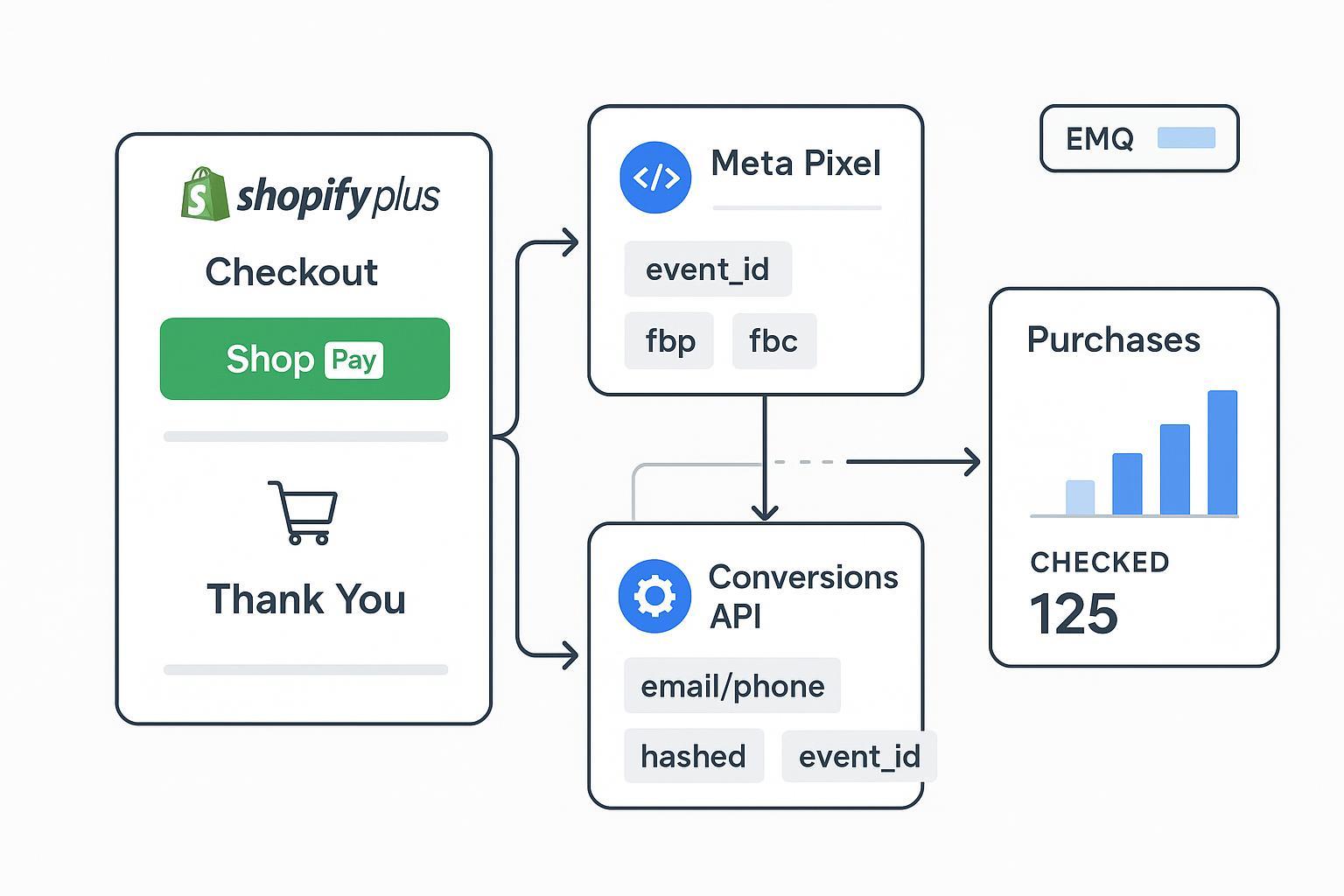
If your Meta Purchases trail Shopify Orders, start here. This playbook is for Shopify Plus teams running Meta Pixel + Conversions API (CAPI) with Shop Pay enabled, and it zeroes in on undercounted Purchase events. We’ll triage fast, then walk source-by-source to validate browser fires, server payload parity, dedup, EMQ, Shop Pay resilience, and consent.
Key takeaways
Anchor on one truth: Shopify Orders. Compare apples-to-apples by aligning attribution windows before diagnosing deltas.
Healthy setups show a single counted Purchase per order with Pixel and CAPI visible in Test Events, sharing the same event_id for dedup.
Targets (not guarantees): ≤ ~10% discrepancy after stabilization, and Event Match Quality (EMQ) ≥ 8/10 for Purchase.
Rely on modern surfaces: Web Pixels/Customer Events + server-side CAPI; avoid fragile legacy injections.
Shop Pay domain hops increase the need for server capture and proper fbp/fbc forwarding.
Why Shopify Meta Pixel CAPI purchase undercounting happens (quick triage)
Trigger a real or sandbox order. In Meta Events Manager > Test Events, do you see Purchase from Browser and Server? If only one appears, note which.
Check whether the Browser and Server entries share the same event_id. If not, expect duplicates or mismatches.
Open Diagnostics and Dataset Quality panels. Are there alerts about missing identifiers, low EMQ, or duplicate Purchases?
If you’re missing Purchases specifically when Shop Pay is used, jump ahead to Step 6 after Step 1.
Step 1: Verify the browser Purchase fires on the Thank You page
What to check
The Meta Pixel triggers a Purchase on the Thank You page (including when returning from Shop Pay), with value, currency, contents, and a browser eventID; fbp and, when available, fbc should be present.
How to verify
Use Meta Pixel Helper and your browser’s Network tab to confirm a Purchase call from the thank-you page.
In Events Manager > Test Events, place a test order and confirm a Browser source for Purchase with expected parameters.
References
Meta CAPI parameter spec (for parity context across sources): see Original Event Data parameters and dedup note in the official documentation under Original Event Data and parameters: Meta’s Original Event Data parameters guide.
Shopify’s modern tracking surfaces for checkout: Apps in checkout overview and the checkout_completed standard event.
Common failures
No fire after Shop Pay return due to domain hop; duplicate Pixels; consent gating suppresses browser tags.
Fix pattern
Use a Shopify Web Pixel and subscribe to checkout_completed rather than relying on legacy checkout.liquid scripts. Ensure only one Pixel ID is active.
Step 2: Validate the server-side Purchase via CAPI (payload completeness)
What to check
CAPI receives Purchase with event_name, event_time, action_source, event_source_url (if applicable), user_data containing hashed identifiers (em, ph, etc.), and custom_data (value, currency, contents). Forward fbp/fbc when available. Include event_id to match the browser eventID.
How to verify
In Events Manager > Test Events, confirm the Server source is received with a 2xx response in your server logs or sGTM debugger and no payload errors.
References
Parameter list and structure: Meta’s Original Event Data spec.
fbp and fbc behavior and forwarding: Meta’s fbp and fbc parameters.
sGTM implementation best practices: Meta’s GTM server-side guide.
Common failures
Missing or malformed value/currency; no hashed identifiers; not forwarding fbp/fbc; event_id omitted.
Fix pattern
Normalize and hash PII per Meta rules; forward fbp/fbc; ensure numeric value and ISO currency. Include a shared event_id.
Step 3: Confirm deduplication health (shared event_id)
What to check
The eventID on the browser Purchase equals the event_id on the server Purchase for the same order. Events Manager should show both sources with a single counted event.
How to verify
Use Events Manager > Test Events with a unique UUID per order. You should see Browser and Server receipts tied to the same ID, with one deduped.
For ongoing monitoring, use the Dataset Quality metrics to assess key coverage and EMQ.
Reference
Deduplication, original data, and Dataset Quality: Meta’s Dataset Quality API and metrics.
Common failures
Parallel CAPI pipelines (native + custom) causing doubles; mismatched IDs; multiple Pixel IDs.
Fix pattern
Consolidate to one Pixel ID and a single dedup authority. Ensure one shared event_id per order across browser and server.
Step 4: Reconcile Meta Purchases against Shopify Orders
What to check
Compare counts/values under matching attribution windows and currencies. Shopify Orders are ground truth for commerce, while Meta Purchases reflect ad-attributed and policy-filtered events.
How to verify
Pull Shopify Orders for the period; align time zones and currencies. In Meta, compare Purchases for the same window and settings.
Targets
After fixes stabilize, aim for ≤ ~10% discrepancy over a 14–30 day window. Treat this as a target, not a promise, given attribution and privacy filters.
Step 5: Raise EMQ and identifier coverage
What to check
Send multiple hashed identifiers in user_data (email, phone, first/last name, location) per Meta formatting, plus fbp/fbc when available. Provide client_ip_address and client_user_agent where relevant to improve match quality.
Reference
EMQ definition and programmatic metrics: Meta’s Dataset Quality API (EMQ).
Fix pattern
Enable Automatic Advanced Matching on Pixel. On the server, hash identifiers with SHA‑256 (lowercased/normalized) and forward fbp/fbc. Monitor EMQ trends after deployment.
Step 6: Make Shop Pay flows resilient
What to check
Purchases via Shop Pay must not rely solely on a browser fire. Ensure your server triggers Purchase on order creation or webhook receipt, and your Web Pixel listens for checkout_completed on return.
References
Shop Pay redirect context and thank-you routing: Shopify’s guidance on Apps in checkout and the Shop Pay troubleshooting context at Shopify’s commerce components pay troubleshooting guide. Community confirmation of thank-you event routing: Shopify Community discussion on Shop Pay and checkout events.
Fix pattern
Fire CAPI on order creation/webhook; subscribe your Web Pixel to checkout_completed for coverage; store and forward the same event_id and available fbp/fbc.
Step 7: Respect consent and compliance signals
What to check
Gate both browser and server events using Shopify’s Customer Privacy API signals exposed in Checkout UI Extensions and Web Pixels.
Reference
Customer Privacy API overview: Shopify’s Customer Privacy API.
Fix pattern
Read allowedProcessing and map your tag enablement accordingly. Record consent state and, if applicable, pass consent context with your server events.
Practical example: Shared event_id and payload parity (with tooling)
Below is an illustrative pattern using a Shopify Web Pixel to subscribe to checkout_completed and emit a Meta Pixel Purchase with a UUID you’ll also send server-side. Then, a CAPI JSON mirrors that event. In your stack, persist the UUID so both sources use the same value. This directly addresses Shopify Meta Pixel CAPI purchase undercounting by ensuring identical identifiers across sources.
// Shopify Web Pixel (Custom Pixel) — subscribe to checkout_completed
  analytics.subscribe('checkout_completed', (event) => {
    const value = Number(event.data.checkout?.totalPrice?.amount ?? 0);
    const currency = event.data.checkout?.totalPrice?.currencyCode ?? 'USD';
    const eventId = crypto.randomUUID(); // persist this to share with server-side

    if (window.fbq) {
      fbq('track', 'Purchase', {
        value,
        currency,
        contents: (event.data.checkout?.lines || []).map(l => ({
          id: l.merchandise?.id || l.id,
          quantity: l.quantity,
          item_price: Number(l.cost?.amountPerQuantity?.amount ?? 0)
        })),
        num_items: (event.data.checkout?.lines || []).reduce((a,b)=>a+(b.quantity||0),0)
      }, { eventID: eventId });
    }

    // Optionally post fbp/fbc and eventId to your endpoint for CAPI
    // fetch('/collect', { method: 'POST', body: JSON.stringify({ eventId, fbp: getFbp(), fbc: getFbc() }) });
  });
Server-side CAPI payload structure (simplified):
{
    "data": [
      {
        "event_name": "Purchase",
        "event_time": 1707500000,
        "event_id": "uuid-from-browser",
        "action_source": "website",
        "event_source_url": "https://yourstore.com/checkout/thank_you",
        "user_data": {
          "em": "<sha256_lowercased_email>",
          "ph": "<sha256_e164_phone>",
          "fn": "<sha256_first_name>",
          "ln": "<sha256_last_name>",
          "fbp": "fb.1.1596403881668.1116446470",
          "fbc": "fb.1.1596403881668.AQ-EXAMPLEFBCLID"
        },
        "custom_data": {
          "value": 129.99,
          "currency": "USD",
          "order_id": "1001",
          "contents": [{ "id": "SKU-123", "quantity": 1, "item_price": 129.99 }],
          "num_items": 1
        }
      }
    ]
  }
Spec references for fields: Meta’s Original Event Data parameters and fbp/fbc parameter guide.
Neutral tool example
You can validate the shared event_id across Browser and Server and monitor dedup health with platforms that surface Pixel vs. CAPI status and EMQ tips. For instance, Attribuly — Disclosure: Attribuly is our product — can flag mismatched IDs and missing fbp/fbc in an event QA view. For deeper setup context, see the internal guide: How to Set Up Shopify Server‑Side Tracking.
Validation and monitoring plan
Test orders: Run 10–20 mixed purchases (Shop Pay + standard; guest + logged-in). In Test Events, confirm both sources receive the Purchase and one is deduped via the shared event_id.
Watch window: 14–30 days post-fix. Track:
Discrepancy % between Shopify Orders and Meta Purchases (target ≤ ~10%).
EMQ trend and key coverage (email/phone hashes, fbp/fbc) in Dataset Quality.
Duplicate rate and any Diagnostics alerts.
Optional reads
A broader retargeting health checklist, including duplicate detection patterns: Retargeting Stack Checklist (30–90 Days).
Reconciling ads data with Shopify for unified reporting logic: Shopify GA4 attribution checklist.
Troubleshooting reference table
Symptom | Likely cause | What to check | Fix pattern |
|---|---|---|---|
Purchase missing on Shop Pay | Browser event suppressed or not returned; legacy scripts | Test Events shows only Server or none; Pixel Helper silent; no checkout_completed subscription | Fire CAPI on order creation/webhook; subscribe Web Pixel to checkout_completed; align consent |
Double-counted Purchases | Two Pixels or parallel CAPI; mismatched IDs | Duplicates in Events Manager; weak dedup coverage | Use one Pixel ID; choose a dedup authority; share a single event_id |
Low EMQ (<6) | Missing hashed PII or fbp/fbc | Dataset Quality EMQ and coverage metrics | Hash and send email/phone/names/location; forward fbp/fbc |
Value/currency errors | Malformed value/currency | Diagnostics and CAPI responses | Enforce numeric value; ISO currency; align with order totals |
Browser blocked by consent | CMP denies marketing | Customer Privacy API state; server not gated | Gate both Pixel and CAPI on consent; record consent state |
Next steps
Keep this playbook handy during theme/app changes. After you confirm stable Purchase counts and EMQ, automate QA so regressions don’t sneak in. Platforms that monitor Pixel vs. CAPI parity and dedup can help. If you prefer a ready workflow, see our neutral overview: Attribuly review — unify Shopify attribution.
Notes and citations policy
Where mechanisms or thresholds are mentioned, they are either targets based on practitioner norms or backed by vendor docs. For example, see: Meta’s Original Event Data parameters, fbp/fbc parameter guidance, Dataset Quality API and EMQ, Meta’s GTM server-side guide, Shopify Apps in checkout, and Shopify’s checkout_completed event.