
How to Time Shopify Abandoned Cart Emails: Step-by-Step
Step-by-step guide to Shopify abandoned cart email timing—exact delays, Klaviyo node mapping, sample copy, and testing plan to boost checkout recovery rate.
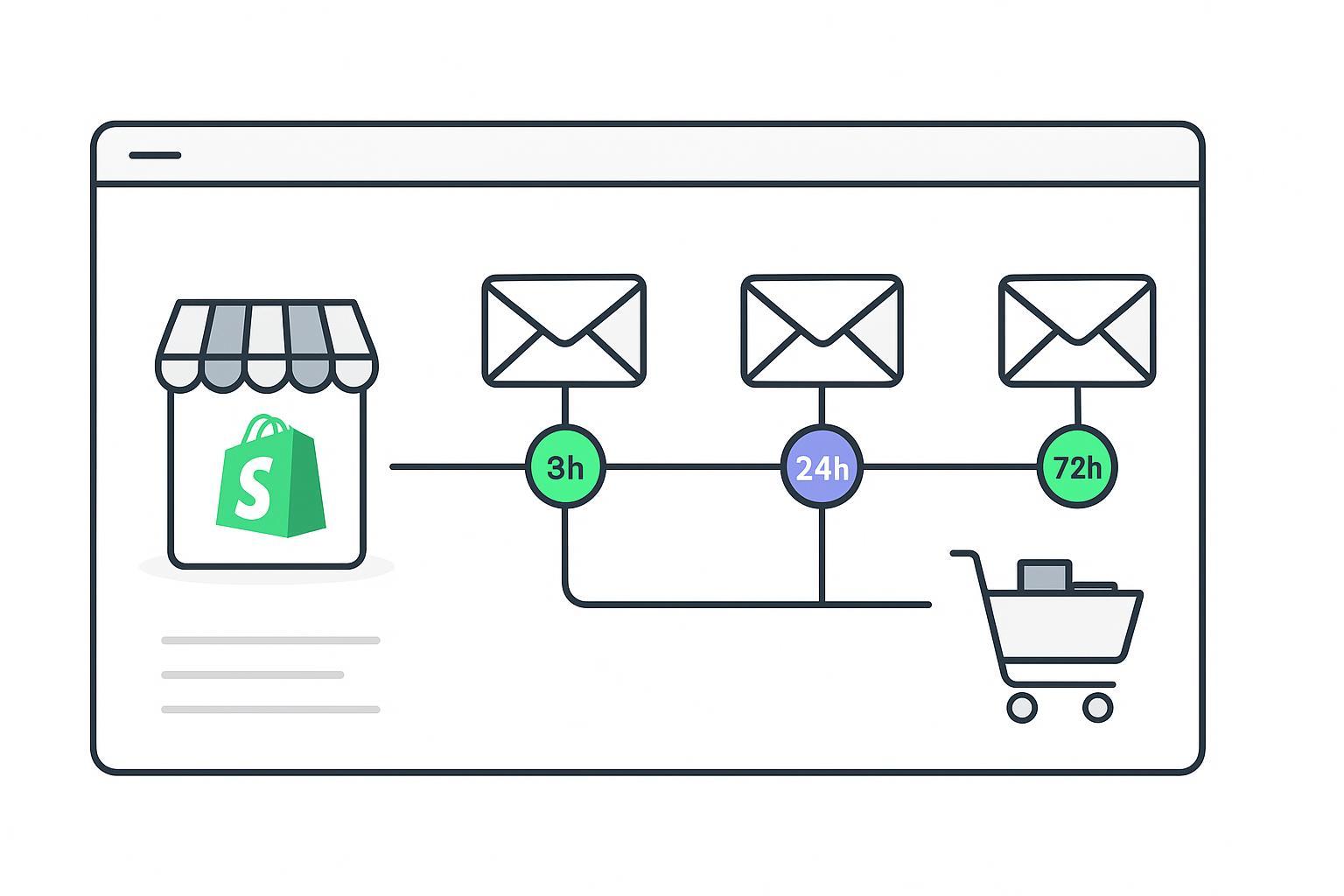
If you sell mid-ticket products ($50–$200) on Shopify, the fastest way to lift checkout recovery is to tighten your timing. This guide gives you a practical, evidence-backed cadence and a node-by-node Klaviyo build you can implement today. Primary KPI: checkout recovery rate (orders recovered ÷ carts). Secondary diagnostics: revenue per recipient (RPR) and complaint/unsubscribe rate.
Key takeaways
Use a three‑email sequence for most Shopify brands. Send Email 1 around 2–4 hours, Email 2 at ~24 hours total, Email 3 at 48–72 hours total. This balances intent with respect for inboxes, per guidance from Klaviyo and independent analyses.
Keep Email 1 discount‑free and frictionless; introduce a modest incentive in Email 2 (e.g., free shipping or ~10%). Close with urgency in Email 3.
Build the flow with exit‑on‑purchase filters and dynamic product/return‑to‑cart blocks. Use unique, time‑bounded codes to curb sharing.
Prioritize deliverability and compliance: clear unsubscribe, physical address, healthy frequency caps, and region‑appropriate consent.
Test timing (1 vs 3 hours for Email 1), incentive size, and subject lines. Reconfirm wins with periodic holdouts.
Shopify abandoned cart email timing: the mid‑ticket framework
The sequence below reflects convergence across respected sources. Klaviyo recommends the first reminder at roughly 2–4 hours and spacing subsequent touches by a day or two, while Shopify and others commonly show a faster initial nudge (around 1 hour) followed by messages at one and three days. See Klaviyo’s best‑practices overview and timing notes from Shopify and independent roundups.
Two quick notes before you build:
Your archetype: This playbook assumes mid‑ticket ($50–$200) and email‑only. If your AOV or buying cycle skews faster, test a 1‑hour first email as a variant.
KPI focus: Optimize toward checkout recovery rate first; use RPR and list health to guard against over‑incentivizing.
Recommended delay | Objective | Offer guidance | Subject focus | |
|---|---|---|---|---|
Email 1 | 2–4 hours after abandonment (test 1 hour variant) | Help them finish with minimal friction | No discount | Clear reminder + easy return |
Email 2 | ~24 hours total | Overcome hesitations; introduce modest incentive | Free shipping or ~10% off with unique code | Benefit or incentive clarity |
Email 3 | 48–72 hours total | Final chance with gentle urgency | Reiterate code with expiry window | Time‑bound, single CTA |
Evidence and further reading: Klaviyo’s abandoned cart guidance in 2026 aligns with 2–4 hours for Email 1; Shopify examples often show 1 hour, then 1 and 3 days; independent analyses (Omnisend, GrowthSuite) land on three emails within ~72 hours. For benchmark context on performance lift from multi‑email sequences, see Email Vendor Selection’s roundup of cart abandonment stats.
According to the guidance in the Klaviyo best‑practices blog, first send at roughly 2–4 hours and space follow‑ups thoughtfully: Klaviyo’s abandoned cart best practices.
Shopify showcases sequences with an early reminder and day‑spaced follow‑ups: Shopify’s abandoned cart email examples.
Independent timing guidance corroborates the three‑email window through ~72 hours: Omnisend’s playbook and GrowthSuite’s timing strategy. Benchmark context on adoption and outcomes: Email Vendor Selection’s statistics.
Why not more than three? Diminishing returns rise after three touches, and complaint risk grows. Three emails usually capture the lion’s share of incremental recoveries for mid‑ticket.
Build it in Klaviyo, step by step
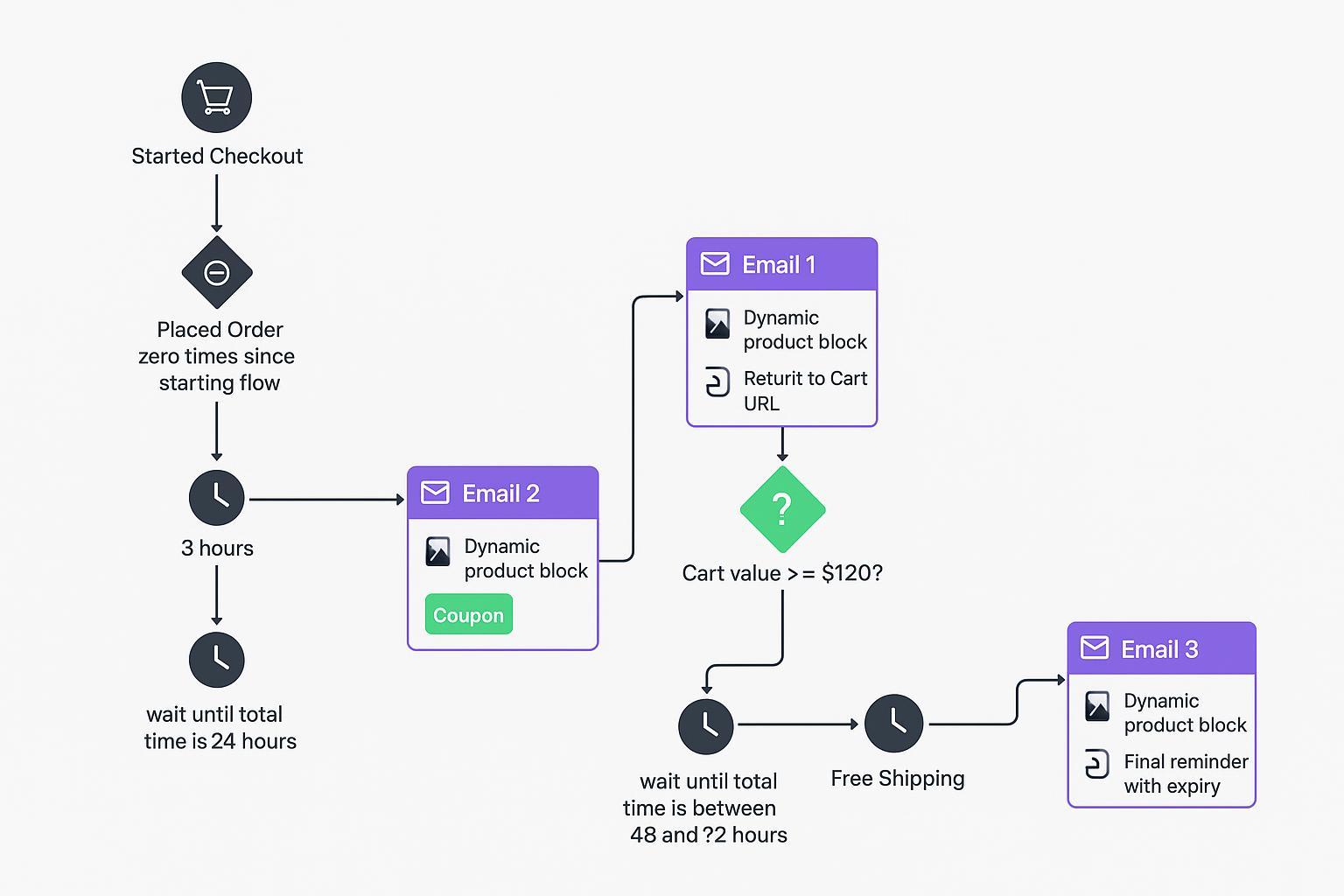
Follow this node‑by‑node setup. Where Klaviyo docs matter, I’ve linked them once for deeper reference.
Trigger and baseline filters
Trigger: Started Checkout (Shopify). You can test Added to Cart if your tracking is robust, but Started Checkout is cleaner signal for email‑only flows. See creating an abandoned‑cart flow and event choices in Klaviyo’s flow setup guide.
Flow filter (exit‑on‑purchase): Person has Placed Order zero times since starting this flow. Klaviyo re‑checks filters before each send so buyers drop out automatically (documented in the same setup guide).
Consent and list health: Suppress anyone globally unsubscribed. Consider additional flow filters for “Received email at least X times in last 7 days” to avoid fatigue.
Wait and Email 1 (no discount)
Wait: 3 hours (start your testing here for mid‑ticket; consider a 1‑hour A/B later).
Email 1 content: Dynamic product table from the event payload and a single, high‑contrast “Return to your cart” button using the checkout URL from the event. How‑to: dynamic table blocks and return‑to‑cart URL patterns.
Goal: A friendly nudge, no offer yet, trust cues (shipping, returns, support links). Keep it lightweight for mobile.
Wait until 24 hours total and Email 2 (introduce incentive)
Wait: Use a delay that equals total time since the event ≈ 24 hours (e.g., additional 21 hours if your first wait is 3 hours). See time delay behavior for stacking delays.
Conditional split by cart value (optional but recommended): If cart value ≥ $120 → 10% off; else → free shipping. This helps preserve margin for smaller carts.
Email 2 content: Benefits + reassurance + unique coupon code. Insert a unique Shopify code via Klaviyo’s coupon block: unique coupon setup. Reinforce social proof and FAQs.
Wait until 48–72 hours total and Email 3 (final reminder)
Wait: Add a delay so the total elapsed is 48–72 hours from event time (choose based on send‑time experiments and quiet hours by region).
Email 3 content: One clear CTA, time‑bound copy, repeat the unique code with stated expiry (e.g., 48–72 hours). Keep it succinct; you’re closing the loop, not re‑pitching the brand.
Exit conditions and frequency caps
Exit automatically on purchase due to the flow filter; also exit on unsubscribe/spam complaint.
Don’t exceed three touches in 72 hours for this flow; let other lifecycle programs (e.g., post‑purchase) handle subsequent messaging.
Data integrity and QA hooks
Before going live, preview using a real event to verify dynamic products render and the Return‑to‑Cart URL is valid. See the dynamic content docs linked above.
Copy and offer playbook
Email 1 — no discount, frictionless finish
Subject ideas: “You left something in your cart”, “Ready to check out?”, “Still thinking this over?”
Preview text: “Your items are saved. Pick up where you left off.”
Body beats: Friendly reminder, thumbnail table of items, shipping/returns reassurance, one primary CTA back to cart.
Email 2 — modest incentive, address objections
Subject ideas: “A little nudge to finish your order”, “Your cart + free shipping”, “Here’s 10% off to wrap this up”
Preview text: “This personal code expires soon—details inside.”
Body beats: Benefits + social proof; introduce unique code; link to support or FAQs.
Operations: Create Shopify discounts in Admin → Discounts. See create discount codes and usage limits & expiries. Insert the unique code with Klaviyo’s coupon block: unique coupon setup. Prefer 48–72‑hour expiries to support Email 3 urgency.
Email 3 — final reminder, gentle urgency
Subject ideas: “Your cart is about to expire”, “Last chance to save your items”, “Ends soon: your personal code”
Preview text: “If it’s not a fit, no worries—this is the last reminder.”
Body beats: Short, time‑bound copy, repeat code and expiry, one CTA, optional alternatives (wish‑list or save‑for‑later link).
Tone and formatting
Use straightforward language, keep paragraphs short, and ensure scannability on mobile. Mix sentence lengths to avoid robotic cadence.
QA and troubleshooting
Quick QA before you flip the switch
Trigger sanity check: Confirm the Started Checkout metric is populating in Klaviyo (Analytics → Metrics). If you don’t see events, revisit your ecommerce integration. See Klaviyo’s flow setup.
Rendering: Preview each email with a real event and confirm product images, titles, prices, and the Return‑to‑Cart link render correctly. See dynamic table blocks.
Unique codes: Send test emails to validate code insertion and redemption path; verify expiry behaves as expected.
Suppressions: Ensure recent purchasers and global unsubscribes are excluded; add any brand‑specific frequency caps to the flow filter.
Common issues and fixes
Issue | Likely cause | How to fix |
|---|---|---|
Flow never triggers | Missing or mis‑mapped events; flow set to Draft | Verify Started Checkout events in Metrics; re‑connect Shopify; set flow Live; see flow troubleshooting. |
Dynamic products missing | Wrong variable paths or block type | Use the Shopify‑specific dynamic table; confirm variable paths per dynamic content docs. |
Duplicate/overlap with other flows | Competing automations (e.g., Welcome, Browse Abandonment) | Add flow filters/conditional splits to prioritize and cap; see community guidance on preventing overlap. |
Deliverability dips | Too many touches, unclear consent, aggressive incentives | Reduce frequency, improve permission practices, authenticate domain (SPF/DKIM/DMARC), prune inactives. |
Testing and measurement
Optimize to the primary KPI: checkout recovery rate. Use RPR and complaint/unsubscribe rate as guardrails so you don’t buy short‑term revenue at the cost of list health.
Timing tests: 1 hour vs 3 hours for Email 1; 24 vs 36 hours for Email 2; try 48 vs 72 hours for Email 3. Keep changes isolated.
Offer tests: Free shipping vs 10% off; code expiry windows (48 vs 72 hours); thresholded incentives tied to cart value.
Creative tests: Subject lines and preview text; presence/placement of hero image; single vs dual CTAs.
Periodic holdouts: Run a small control cohort occasionally to estimate incremental lift beyond your baseline automations. Klaviyo’s flow analytics help you monitor per‑email and per‑sequence outcomes: flow performance overview.
Optional SMS pairing notes for later
If you add SMS later, keep it as a complement (not a replacement) to this email‑first flow. Follow consent and quiet‑hour norms.
Consent and rules: In the U.S., marketing texts require appropriate consent under the TCPA—start with the FCC’s consumer guidance on robocalls and texts: FCC TCPA consumer guide. Klaviyo’s how‑to for adding SMS to cart flows: Klaviyo SMS in flows.
Practical example: expanding reach with identification
You can lift flow reach by identifying more abandoners upstream and syncing them into Klaviyo. For example, a server‑side and first‑party data approach can recognize more high‑intent sessions and send those events into Klaviyo to trigger the same timing you built here. Tools like Attribuly support passing identified abandoners and server‑side events into Klaviyo so your 3‑email cadence reaches more eligible shoppers (neutral example; confirm your own stack and consent).
Next steps
Implement the three‑email timing with the exact waits above and the exit‑on‑purchase filter.
Add the conditional split by cart value and set up unique codes with expiries.
QA with real events, then start A/Bs: 1 vs 3 hours first send; free shipping vs 10% off.
Revisit performance weekly for the first month; run a quarterly holdout.