
What is multi-touch attribution in Shopify email?
Plain-English guide to multi-touch attribution for email in Shopify: why Shopify and Klaviyo numbers differ, common models, UTMs, identity stitching, and fixes.
If Shopify says an order came from “Direct,” Klaviyo credits a reminder email, and paid social claims an assist, who’s right? Here’s the short answer and the setup you need so email gets fair credit without double‑counting.
Definition — Multi‑touch attribution for email in Shopify: It’s a way to share conversion credit across every meaningful email touch (flows and campaigns) alongside other channels on the path to a Shopify order, so reporting reflects real‑world collaboration instead of a single last click.
Key takeaways
Multi‑touch attribution for email in Shopify distributes credit across flows and campaigns, not just the final click.
Shopify and Klaviyo disagree because of lookback windows, click vs. open rules, identity/deduping, and revenue timing.
A practical mixed journey to test: campaign click → social retargeting → email reminder click → mobile purchase.
Keep email touches from being lost by enforcing UTMs, aligning windows, stitching identities, and using Shopify pixels and (optionally) server‑side events.
Validate with model comparisons and document your rules to prevent apples‑to‑oranges debates.
What is multi-touch attribution in Shopify email? (the short answer)
In email‑heavy stores, a purchase rarely comes from one message. A welcome email introduces the brand, a campaign drives the first browse, a retargeting ad brings them back, and a cart recovery email closes the deal. Multi‑touch attribution acknowledges this teamwork. Instead of giving 100% credit to the last click, it shares credit across the touches that happened within your chosen windows and rules.
Scope notes:
“Email touches” include both automated flows (welcome, browse/cart recovery, win‑back) and one‑time campaigns.
Cross‑device journeys are normal; identity stitching connects desktop email clicks to mobile checkouts.
Privacy changes (like Apple Mail Privacy Protection) can inflate opens; prefer click‑based email attribution when reconciling to click/session tools.
Why Shopify and Klaviyo numbers don’t match
Most disputes trace back to five mechanics:
Lookback windows
Klaviyo’s default windows are commonly 5 days for email clicks and 5 days for opens, and both can be adjusted in Account → Settings → Attribution. See Klaviyo’s guidance in Understanding message attribution (Help Center, 2025) and Change attribution model/windows (Help Center, 2025): https://help.klaviyo.com/hc/en-us/articles/1260804504250 and https://help.klaviyo.com/hc/en-us/articles/11118357030555
Shopify’s marketing reports rely on UTMs captured at session entry; attribution models are available in Marketing reports (first, last, linear, position‑based, time decay). See Shopify’s coverage of marketing attribution models and changelog on new attribution models, plus the MarketingEvent API for UTM‑powered reporting: https://www.shopify.com/ca/blog/marketing-attribution; https://changelog.shopify.com/posts/new-attribution-models-available-in-marketing-reports; https://shopify.dev/docs/api/admin-rest/latest/resources/marketingevent
Click vs. view/open
Klaviyo can attribute on last open or last click if enabled; you can also exclude Apple Privacy opens and filter obvious bot clicks. See Klaviyo’s Attribution Settings and bot/MPP articles: https://help.klaviyo.com/hc/en-us/articles/22981852783899 and https://help.klaviyo.com/hc/en-us/articles/4416791883163
Shopify generally emphasizes click‑through sessions for marketing attribution, not “open‑based” or view‑through logic (see above Shopify attribution explainer link).
Model rules
Klaviyo defaults to last‑touch for message attribution, with an option to switch to Linear (equal split) in settings (Help Center, 2025): https://help.klaviyo.com/hc/en-us/articles/36457929459227
Shopify’s marketing reports let you compare multiple models, while many analytics views remain session‑centric (see changelog link above).
Deduplication and identity
Klaviyo dedupes within its messaging identifiers; Shopify dedupes orders in its analytics. Cross‑device gaps or duplicate profiles can shift or lose credit. See Shopify Web Pixels documentation for identity/event capture: https://shopify.dev/docs/apps/build/marketing-analytics/build-web-pixels
Revenue definitions and timing
Placed vs. fulfilled revenue, returns/refunds, time zones, and whether the window starts at open, click, or session can all move dollars between tools. See Klaviyo’s attribution help and Shopify analytics overview: https://help.klaviyo.com/hc/en-us/articles/1260804504250; https://www.shopify.com/ca/analytics
If you want fewer disagreements later, align windows, prefer click‑based email credit when you compare to session tools, enforce UTMs on every message, and fix identity gaps early.
The mixed journey we’ll use (campaign → retargeting → email reminder → mobile purchase)
Here’s a realistic cross‑device path we’ll reference:
Email campaign click on desktop (T0)
Social retargeting impression/click on mobile (T1)
Email reminder click on mobile (T2)
Purchase on mobile via Shopify checkout (T3)
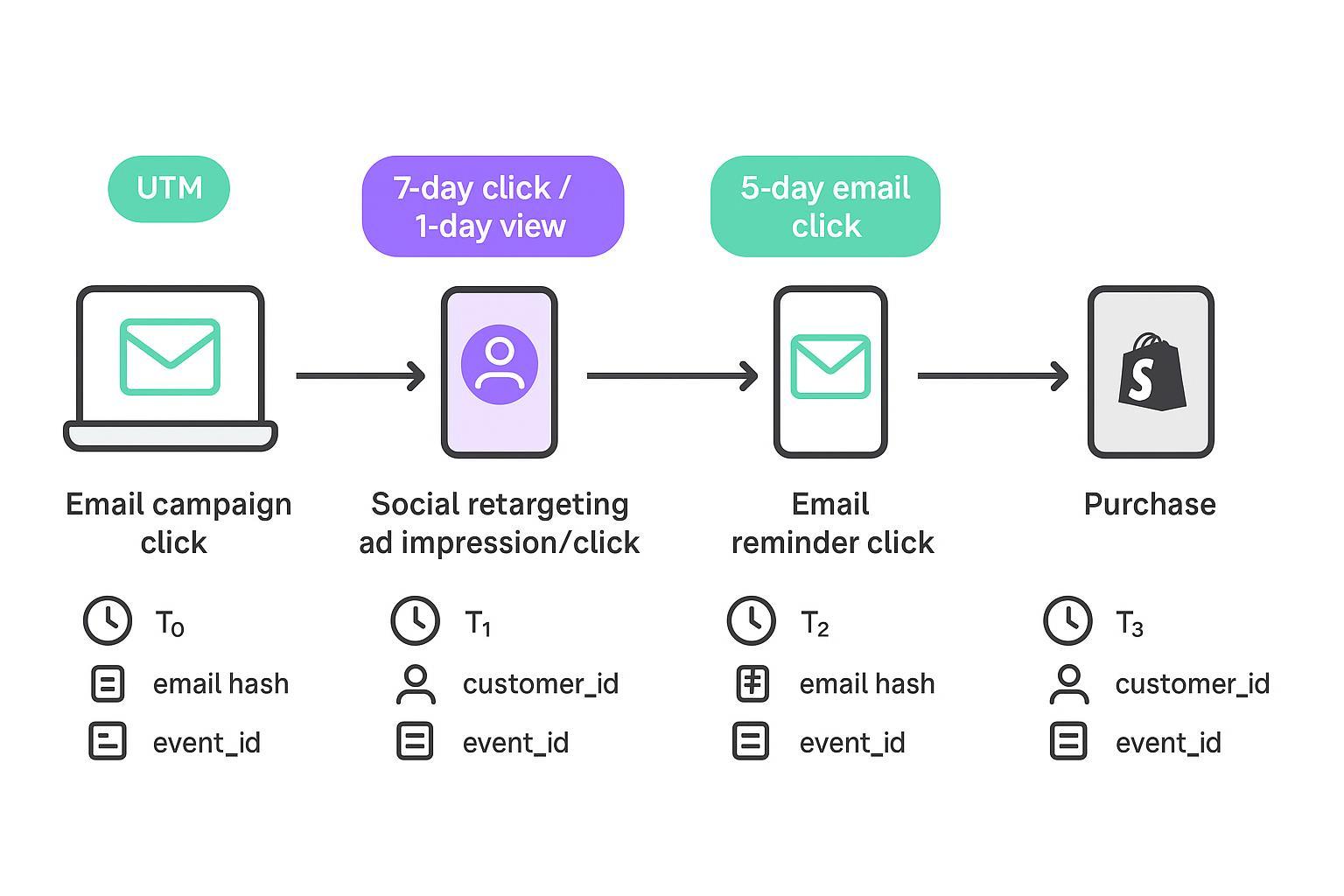
In your diagram or notes, record for each touch: timestamp (T0–T3), device/channel, identifiers present (email hash, Shopify customer ID, cookie/session), UTM parameters, and lookback windows (e.g., 5‑day email click; 7‑day paid social click / 1‑day view if you use view‑through for ads).
How common models split credit on this journey
We’ll assume all three interactions are within their windows and we use click‑only for email. If your stack counts a social view‑through, decide whether that view qualifies as a touch before you apportion credit.
First click: 100% to the initial email campaign.
Last click: 100% to the email reminder.
Linear: Split equally across qualifying touches (e.g., 33/33/33 for campaign email, social retargeting click, reminder email).
Position‑based (U‑shaped): Heavier weight to first and last touches (e.g., 40/20/40, where middle gets the remainder).
Time decay: Heavier toward recent touches (e.g., 20/25/55 if T2 is close to purchase).
Data‑driven (GA4 context): Fractional shares are learned from your data; requires consistent tagging and enough volume. See GA4’s DDA documentation: https://support.google.com/analytics/answer/12958241
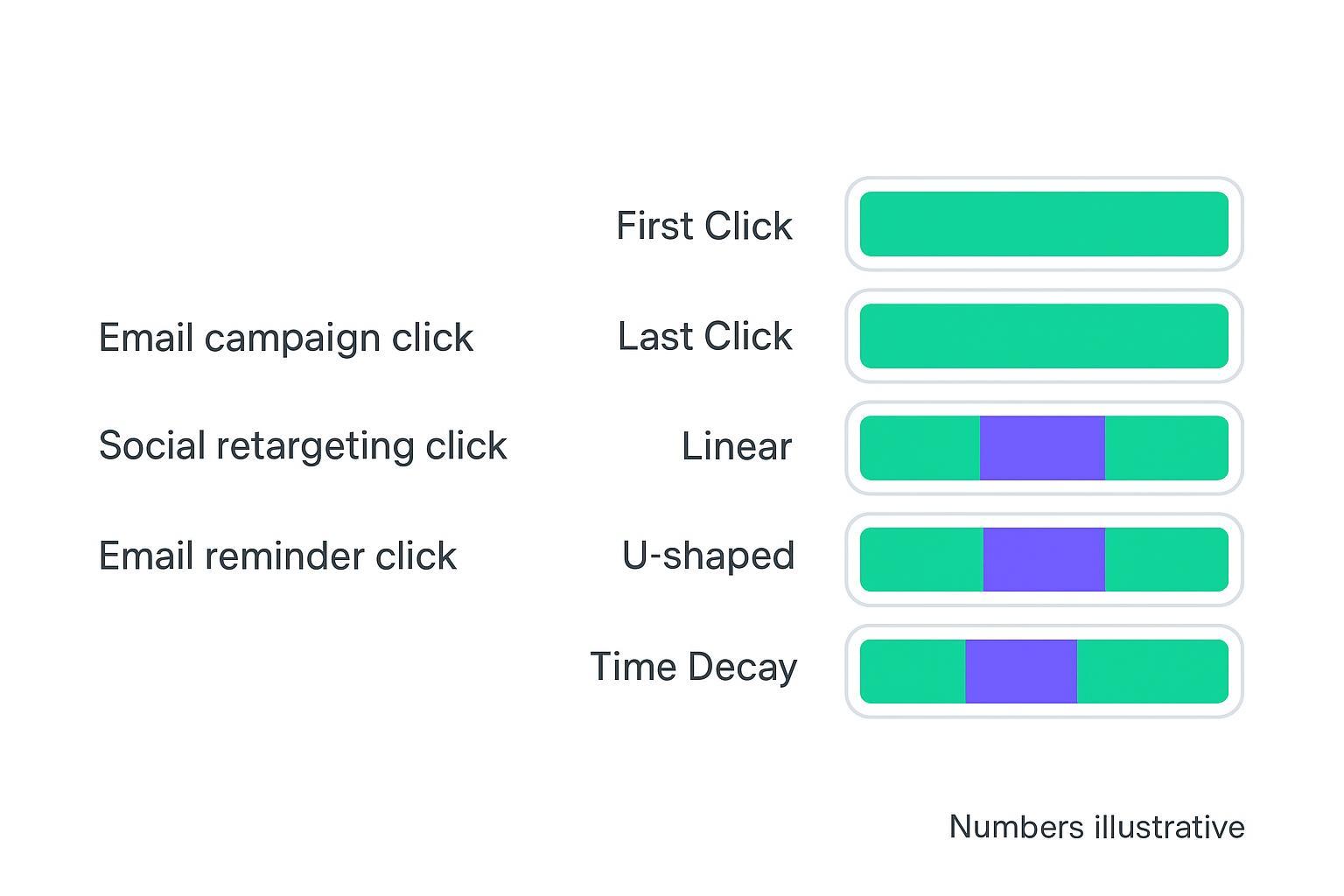
Tip: When you present these numbers internally, include your rules (click‑only vs. open, whether views count, exact windows) on the same slide. Otherwise, the same order can “move” channels depending on assumptions.
Implementation checklist: keep email touches from getting lost
UTM conventions in Klaviyo
Set defaults in Settings → Other → UTM Tracking. Recommended: utm_source=klaviyo, utm_medium=email, utm_campaign={{ message or campaign name }}, optional utm_content and utm_id for variants. Ensure lowercase and human‑readable values. See Klaviyo’s UTM tracking documentation: https://help.klaviyo.com/hc/en-us/articles/115005247808
Identity stitching and cross‑device
Favor deterministic identifiers: email address and Shopify customer ID. Encourage account creation or login where it makes sense. Reduce duplicates by merging exact matches and tightening profile rules. See Klaviyo’s omnichannel attribution guidance and Shopify Web Pixels for identity/event capture: https://help.klaviyo.com/hc/en-us/articles/41008338238875; https://shopify.dev/docs/apps/build/marketing-analytics/build-web-pixels
Shopify Web Pixels and (optionally) server‑side events
Implement Shopify Web Pixels to capture on‑site behavior and session context. Where server‑side is available, forward deduplicated events with a consistent event_id to avoid double counting. See Shopify’s developer guide on Web Pixels and the server pixels limited‑release note; design dedup logic even if docs don’t specify a universal schema: https://shopify.dev/docs/apps/build/marketing-analytics/build-web-pixels; https://shopify.dev/changelog/server-pixels-limited-release
Window alignment and model selection
In Klaviyo, consider click‑only email attribution and align the click window (e.g., 5 days) to reduce drift when comparing to Shopify or GA4. In Shopify’s marketing reports, compare models (last, first, linear, position‑based, time decay) so stakeholders see the assist value. For model options within your analytics stack, see a multi‑touch attribution product overview such as https://attribuly.com/product/attribution/
Validation passes in GA4
GA4 defaults to data‑driven attribution. Use Model comparison to view Last click vs. Linear/Time decay and gauge whether email assists line up with your expectations. Ensure UTMs pass cleanly into GA4. See GA4 model comparison docs: https://support.google.com/analytics/answer/13644080
Documentation and dashboards
Document your chosen windows, whether opens/views qualify, and your dedup rules. Label dashboards accordingly so future comparisons aren’t apples to oranges.
Practical example: aligning windows and identities with a tool
You can operationalize the above with a neutral analytics layer that supports multi‑touch credit, window alignment, and identity stitching across Shopify and Klaviyo. For instance, Attribuly can be used to compare last‑click vs. linear vs. position‑based models and to align attribution windows; see the Settings article on adjustable attribution windows for supported ranges. It also supports Shopify and Klaviyo integrations so UTMs and identifiers can flow into a single path view. For an overview of model and window options, review the multi‑touch attribution product page, plus the Shopify and Klaviyo integration pages for connection details.
Attribution product overview — https://attribuly.com/product/attribution/
Settings for attribution windows — https://support.attribuly.com/en/articles/9007971-settings
Tone note: The above links are provided for configuration context; you can implement equivalent setups with any tool that documents its models, windows, and identity handling.
Troubleshooting quick wins
Bot clicks and Apple Mail Privacy opens
Enable bot‑click filtering and exclude Apple Privacy opens in Klaviyo’s Attribution Settings when comparing to click/session tools. See Klaviyo’s Help articles on bot filtering and MPP identification: https://help.klaviyo.com/hc/en-us/articles/22981852783899; https://help.klaviyo.com/hc/en-us/articles/4416791883163
Duplicate profiles and identity gaps
Audit and merge duplicates; use deterministic keys (email, customer ID). Ensure pixels and links carry identifiers post‑click where appropriate. See Klaviyo’s omnichannel guidance and Shopify pixels doc: https://help.klaviyo.com/hc/en-us/articles/41008338238875; https://shopify.dev/docs/apps/build/marketing-analytics/build-web-pixels
Missing UTMs or redirect loss
Enforce a UTM template and QA links frequently. Verify landing pages and redirects retain UTMs; use Klaviyo’s UTM settings for defaults and overrides: https://help.klaviyo.com/hc/en-us/articles/115005247808
Direct/(none) spikes in Shopify
Investigate untagged links, in‑app browsers, and cookie loss. Consider server‑side support and identity strategies via Shopify pixels to reduce “Direct” leakage: https://shopify.dev/docs/apps/build/marketing-analytics/build-web-pixels
FAQ
What is multi‑touch attribution in Shopify email, in one sentence?
It’s a ruleset that shares revenue credit across qualifying email touches (flows and campaigns) and other channels on the path to a Shopify order, instead of assigning 100% to the last click.
Should I include email opens in attribution?
For reconciliation with click/session tools, it’s safer to stick to click‑based email credit and exclude Apple Privacy opens. If you keep opens, label your charts clearly.
How do I compare my view to GA4?
Use GA4’s Model comparison to look at Last click vs. Linear or Time decay; your email assist value should rise under multi‑touch models if campaigns are doing their job.
Which model should I start with?
If you have frequent messaging, start with Linear or Time decay to avoid overly favoring the final cart touch. Reevaluate quarterly as your cadence and device mix change.
Further reading
Shopify on marketing attribution models in reports and UTM handling — marketing attribution explainer and changelog on new models, plus the MarketingEvent API reference for UTM‑based reporting:
Klaviyo on attribution windows, last‑touch vs. Linear, and UTM tracking configuration:
GA4 on data‑driven attribution and model comparisons:
A last word: pick clear rules, align windows, and label your dashboards. Do that, and the “who gets credit?” debate gets a lot quieter while your email program gets the credit it actually earned.