
How Shopify server-side tracking fixes broken attribution (a dedupe-first guide)
Step-by-step guide to implement Shopify server-side tracking with deterministic dedupe (event_id, order_id) to improve attribution accuracy and ROAS.
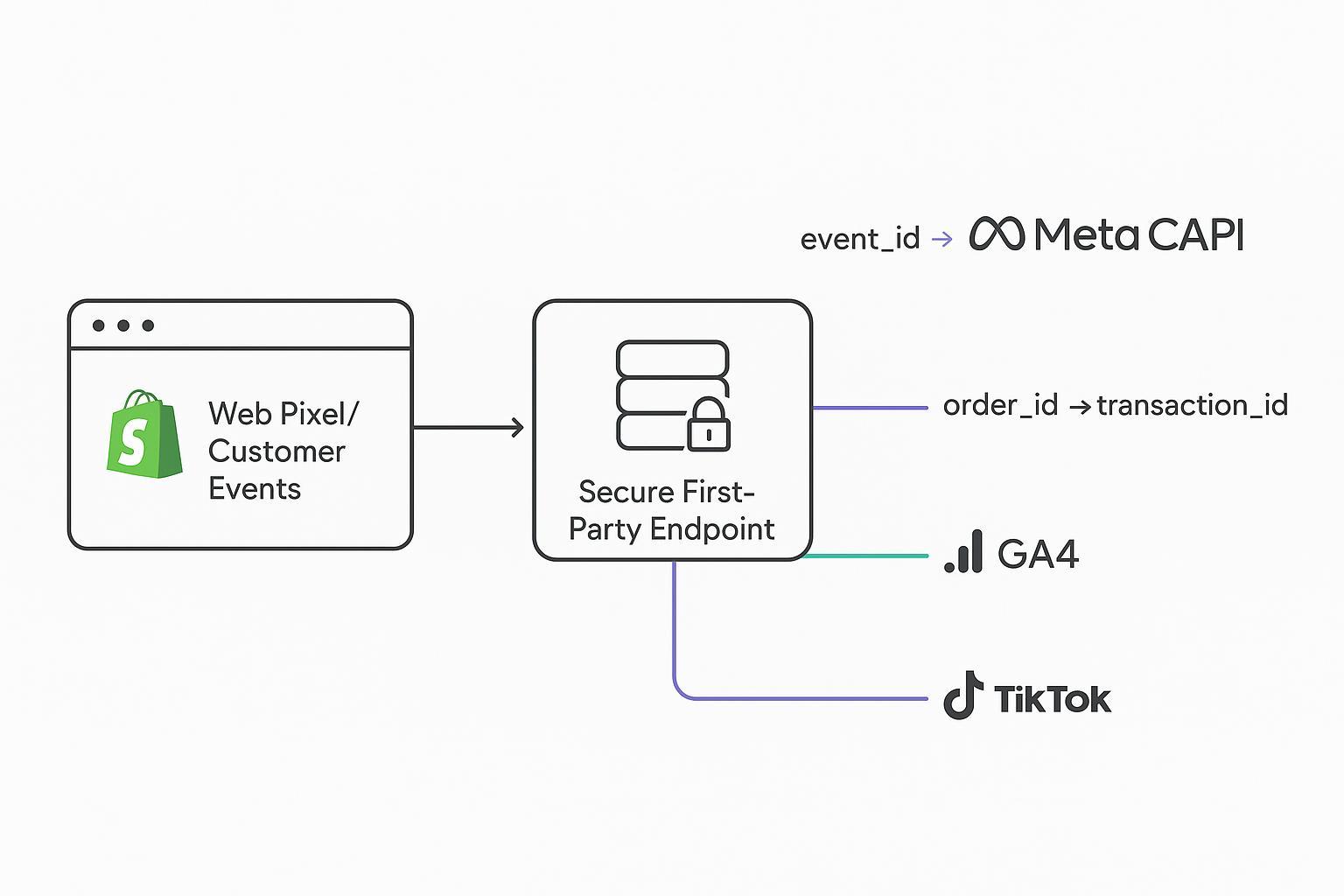
When your browser pixel fires and your server event posts the same conversion, the ad platform is supposed to count it once. In practice, many Shopify stores see double fires, mismatched IDs, or missing IDs—so purchases are over- or under-reported, and ROAS gets noisy.
This how-to shows exactly how to implement Shopify server-side tracking with a deduplication-first architecture. You’ll build a single source of truth for event_id, map Shopify order_id to GA4 transaction_id, forward browser identifiers (fbp/fbc), and hash external_id—then validate parity in platform UIs.
Key takeaways
Generate one client-side event_id (UUID/ULID) and reuse it in both browser and server calls; keep event_name identical across channels.
Map Shopify order_id (or checkout_token) to GA4 transaction_id; use consistent value/currency for parity.
Transport fbp/fbc from browser to server and hash PII (email/phone) with SHA-256 before sending when consented.
Use Shopify Checkout Extensibility: capture events via Web Pixel/Customer Events; do not inject GTM into checkout.
Run server-side on a first-party subdomain (sGTM on GCP) with idempotency and retries; aim for duplicate rate under ~1%.
Validate in Meta Events Manager (dedup + EMQ), GA4 DebugView/Realtime, and TikTok Test Events before scaling.
Architecture for Shopify server-side tracking (sGTM + hub pattern)
A clean path for reliability on Shopify in 2026 is:
Storefront and checkout emit standard events via Web Pixel/Customer Events under Checkout Extensibility.
A first-party ingestion endpoint (hub) receives those events, enforces consent, and forwards them to an sGTM server container (GCP/Cloud Run) on your own subdomain.
sGTM transforms and routes payloads to destinations: GA4 Measurement Protocol, Meta Conversions API, TikTok Events API, and optionally Klaviyo.
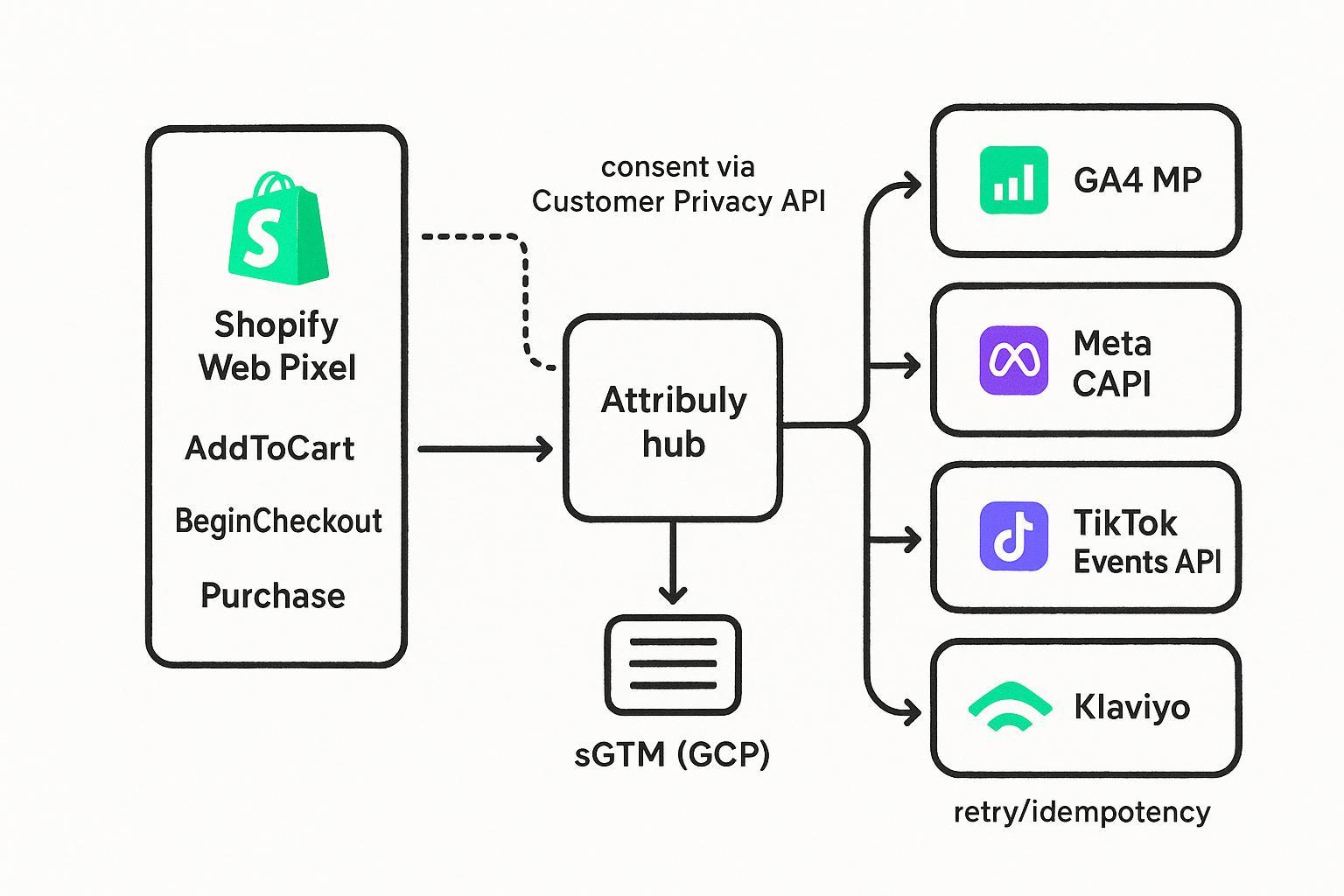
Callouts that matter most for dedupe and accuracy:
The single event_id is born on the client (earliest possible). Persist it and reuse it everywhere.
Consent gates fire at capture time (Shopify Customer Privacy API) and propagate to the hub and sGTM.
Identity continuity flows through: event_id, Shopify order_id/checkout_token, GA4 transaction_id, Meta fbp/fbc, and hashed external_id.
Authoritative references you’ll rely on:
Shopify Web Pixels and checkout_completed standard event describe checkout signaling and fields; Checkout Extensibility replaces legacy checkout.liquid. See Shopify’s guidance in the official docs for Web Pixels and Checkout Extensibility.
Web Pixels standard event “checkout_completed”: see Shopify’s standard events page: https://shopify.dev/docs/api/web-pixels-api/standard-events/checkout_completed
Building in checkout (Checkout Extensibility): https://shopify.dev/docs/apps/build/checkout
sGTM on a custom domain for first‑party signaling: Google’s server-side GTM setup guidance: https://developers.google.com/tag-platform/tag-manager/server-side/custom-domain
Deterministic deduplication, step by step
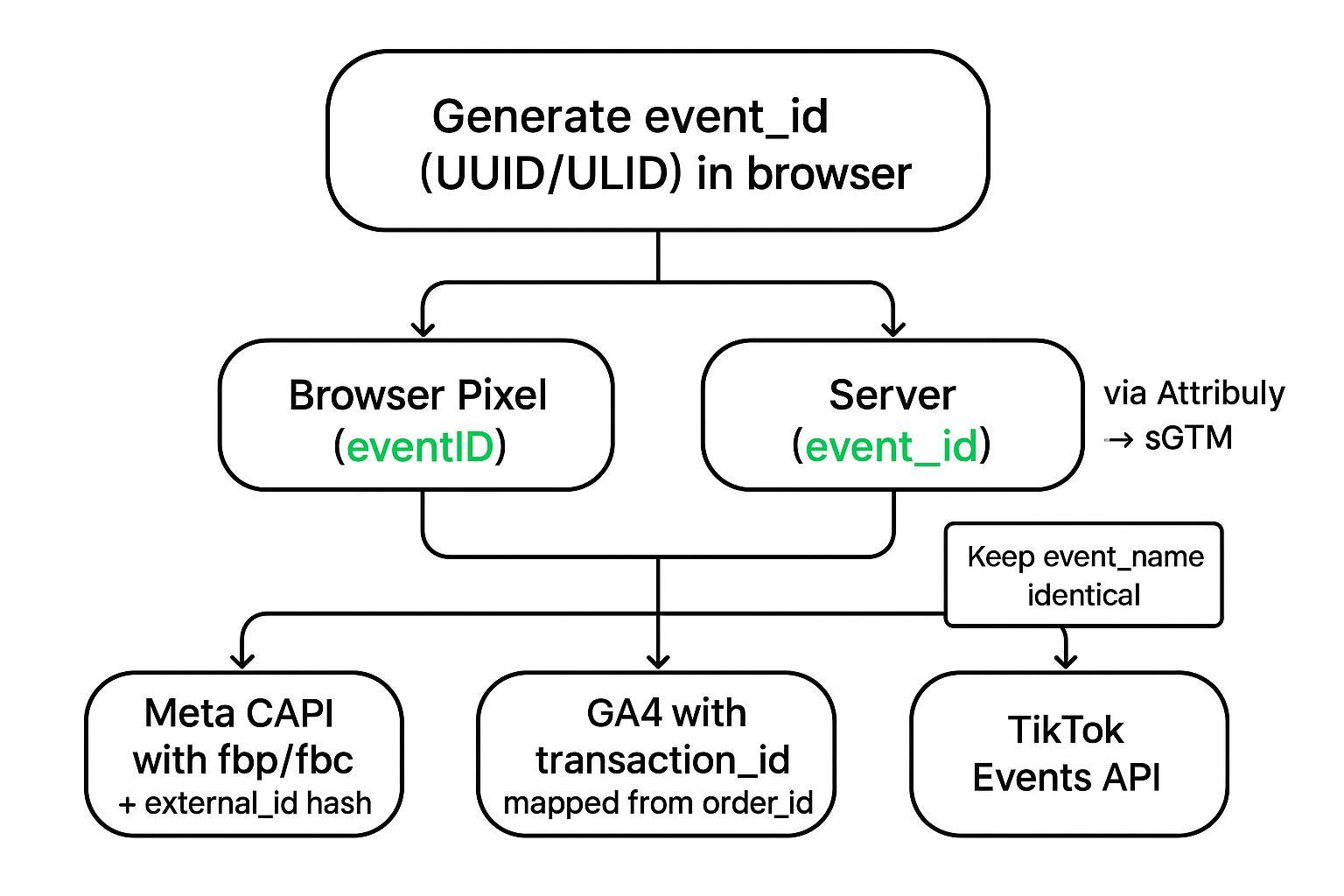
Generate and persist a single event_id client-side
Create a UUID/ULID as soon as a qualifying event occurs (e.g., add_to_cart, begin_checkout, purchase). Store it (e.g., localStorage) and attach it to both the browser pixel (eventID) and the server-bound payload.
Keep event_name identical across browser and server (e.g., Purchase vs. PURCHASE will break Meta dedup).
Meta requires the browser event’s eventID to match the Conversions API event_id, with identical event_name. See Meta’s “Original Event Data” parameters for dedup keys: https://developers.facebook.com/docs/marketing-api/conversions-api/parameters/original-event/
Map Shopify order_id to GA4 transaction_id; keep event_name parity for ads platforms
For purchases, derive GA4 transaction_id deterministically from Shopify order_id (or checkout_token). GA4 deduplicates purchases with the same transaction_id across sources via Measurement Protocol; test this in DebugView to confirm your setup. GA4 Measurement Protocol docs: https://developers.google.com/analytics/devguides/collection/protocol/ga4
Forward fbp/fbc and hashed external_id
Read Meta’s fbp/fbc cookies client-side and send them server-side in user_data to improve match quality (EMQ). Meta’s fbp/fbc parameter spec: https://developers.facebook.com/docs/marketing-api/conversions-api/parameters/fbp-and-fbc/
Normalize and SHA‑256 hash external identifiers (email/phone) before sending when consented (lowercase/trim). Meta’s docs outline normalization conventions.
Event map you can copy (Shopify → server → destinations)
Below is a minimal, destination-agnostic map for your three core events. Ensure naming parity and share the same event_id between browser and server.
Event | Browser payload (Web Pixel/Customer Events) | Server enrichment (hub/sGTM) | Destination mapping |
|---|---|---|---|
AddToCart | event_name: AddToCart; event_id: uuid; items[id, qty, price]; fbp/fbc (if available) | Attach consent flag; add client_id/session; prepare GA4/Meta/TikTok schemas | Meta CAPI: event_name AddToCart, event_id same; GA4 MP: add_to_cart; TikTok Events API: AddToCart |
BeginCheckout | event_name: BeginCheckout; event_id: uuid; cart value/currency; fbp/fbc | Carry forward event_id; map value/currency; hash em/ph if consented | Meta CAPI: BeginCheckout; GA4 MP: begin_checkout; TikTok: InitiateCheckout/StartCheckout (name parity) |
Purchase | event_name: Purchase; event_id: uuid; order_id or checkout.token; value/currency; fbp/fbc | Map order_id→GA4 transaction_id; attach hashed em/ph; idempotency key = order_id+destination | Meta CAPI: Purchase with same event_id + user_data; GA4 MP: purchase with transaction_id; TikTok: Purchase |
Wire it up (code and payload examples)
The following snippets are simplified; adapt to your stack and consent model.
Shopify Web Pixel snippet (checkout_completed)
This captures checkout token and emits a shared event_id you’ll also send server-side. Use Customer Privacy API to ensure allowed processing.
// In a Custom/Web Pixel script
  import {register} from 'https://cdn.shopify.com/shopifycloud/web-pixels-manager/v1/index.js';

  function ulid() {
    // Simple ULID stub or import a tiny library
    return '01' + Math.random().toString(36).slice(2) + Date.now().toString(36);
  }

  register((analytics) => {
    analytics.subscribe('checkout_completed', async (event) => {
      const consent = analytics.customerPrivacy?.allowedProcessing?.analytics === true;
      if (!consent) return;

      const event_id = (window.localStorage.getItem('ev_id') || ulid());
      window.localStorage.setItem('ev_id', event_id);

      const checkout = event?.data?.checkout || {};
      const orderId = event?.data?.order?.id; // may be present post-completion

      // Send to your hub endpoint (first-party)
      await fetch('https://metrics.example.com/collect', {
        method: 'POST',
        headers: {'Content-Type': 'application/json'},
        body: JSON.stringify({
          event_name: 'Purchase',
          event_id,
          order_id: orderId,
          checkout_token: checkout?.token,
          value: checkout?.totalPrice?.amount,
          currency: checkout?.totalPrice?.currencyCode,
          fbp: (document.cookie.match(/_fbp=([^;]+)/)?.[1]) || null,
          fbc: (document.cookie.match(/_fbc=([^;]+)/)?.[1]) || null,
          email: window.__customerEmail || null, // only if consented
        })
      });

      // Fire browser pixel with the same event_id (pseudocode)
      if (window.fbq) {
        window.fbq('track', 'Purchase', {value: checkout?.totalPrice?.amount, currency: checkout?.totalPrice?.currencyCode}, {eventID: event_id});
      }
    });
  });
Shopify Checkout Extensibility/Web Pixels reference: Web Pixels standard events page above; Checkout build docs above.
Meta Conversions API Purchase payload (server-side)
Keep event_name identical to the browser pixel and pass the same event_id. Include fbp/fbc and hashed identifiers when consented.
{
    "data": [
      {
        "event_name": "Purchase",
        "event_time": 1700000000,
        "event_id": "01h9xyzulidabc",
        "action_source": "website",
        "event_source_url": "https://store.example.com/checkout/thank_you",
        "user_data": {
          "fbp": "fb.1.1700000000.1234567890",
          "fbc": "fb.1.1700000000.ABCDEF",
          "em": "0c7d...sha256_of_lowercased_email",
          "ph": "1a23...sha256_of_normalized_phone"
        },
        "custom_data": {
          "value": 129.99,
          "currency": "USD",
          "contents": [{"id": "SKU123", "quantity": 1, "item_price": 129.99}],
          "content_type": "product"
        }
      }
    ]
  }
Meta dedup and identifier parameters: Original Event Data and fbp/fbc parameter docs linked above.
GA4 Measurement Protocol Purchase (order_id → transaction_id)
{
    "client_id": "12345.67890",
    "events": [
      {
        "name": "purchase",
        "params": {
          "transaction_id": "ORDER-1001",
          "value": 129.99,
          "currency": "USD",
          "tax": 10.00,
          "shipping": 0,
          "items": [
            {"item_id": "SKU123", "item_name": "Widget", "price": 129.99, "quantity": 1}
          ]
        }
      }
    ]
  }
Use GA4 Measurement Protocol and ecommerce docs to confirm parameter names and test in DebugView: https://developers.google.com/analytics/devguides/collection/protocol/ga4
TikTok Events API Purchase (Test Events for validation)
{
    "event": "Purchase",
    "event_time": 1700000000,
    "context": {"page": {"url": "https://store.example.com/checkout/thank_you"}},
    "properties": {
      "value": 129.99,
      "currency": "USD",
      "contents": [{"content_id": "SKU123", "quantity": 1, "content_type": "product"}]
    },
    "test_event_code": "TEST123"
  }
See TikTok’s Events API getting started and standard parameters for required fields and Test Events usage: https://ads.tiktok.com/help/article/getting-started-events-api
Validate parity and quality
Before you scale budgets, confirm dedup and parity with a short checklist:
Meta Events Manager Test Events: Send a Purchase from the browser and server with the same event_id and identical event_name. Expect a single counted conversion and rising Event Match Quality (EMQ) as you include fbp/fbc and hashed identifiers. Meta’s GTM server-side guide and Dataset Quality API pages explain these indicators.
GA4 DebugView/Realtime: Fire a test purchase from web and Measurement Protocol with the same transaction_id and ensure it appears once in Monetization reporting. Use BigQuery export for spot checks later.
TikTok Test Events: Use test_event_code to confirm dual-channel setup isn’t over-counting.
Targets to watch: duplicate rate under ~1%; steady or improved match quality; server vs. browser counts within expected bands by event.
Troubleshooting: when dedupe still fails
Missing or mismatched event_id: Use a single generator and pass-through; log the value at capture and at each destination. Ensure event_name parity too.
Order/transaction mismatch: Verify your GA4 transaction_id mapping (order_id or checkout_token) and ensure it’s identical across browser and server.
Consent desync: Confirm Shopify Customer Privacy API gating at capture time and that the consent state is propagated server-side.
Time skew or retries: If server events arrive too far from browser events, some platforms may flag duplicates or miss dedup; use idempotency (order_id+destination) and exponential backoff with jitter.
Payload drift: Lock schemas and add contract tests so your hub/sGTM emits stable fields for each destination.
Example: Attribuly as your server-side hub (neutral)
Disclosure: Attribuly is our product. In a hub-and-spoke setup, Attribuly can receive Shopify Web Pixel and webhook signals, attach first-party identifiers, and forward to sGTM on a first-party subdomain. From there, tags dispatch to Meta CAPI (with shared event_id and fbp/fbc), GA4 MP (with transaction_id mapped from order_id), TikTok Events API, and Klaviyo for post-purchase flows. For destination specifics on Conversions API fields and identifiers, see the Meta Ads Integration page: https://attribuly.com/integrations/meta-ads/
This pattern keeps one source of truth for event_id, standardizes payloads, and centralizes retries/idempotency without adding weight to checkout.
Privacy, consent, and operations
Privacy and consent: Rely on Shopify’s Customer Privacy API to read allowed processing and gate both browser and server sends. Keep data minimization front and center; normalize and SHA‑256 hash PII before posting to ad platforms when consented. Customer Privacy API docs are part of Shopify’s Checkout Extensibility references above.
Reliability: Run sGTM on GCP Cloud Run behind a first‑party subdomain (e.g., metrics.example.com) per Google’s server-side setup. Implement retries with exponential backoff and dead‑letter queues. Use idempotency keys such as SHA‑256(event_id + destination) and, for purchases, treat order_id as canonical.
Monitoring: Track daily browser↔server parity by event, event_id match rate, and delivery failures. Alert when mismatch exceeds 5% over 24 hours. Maintain a replay buffer for 72 hours to recover transient outages.
Next steps and templates
You now have a dedupe‑first blueprint for Shopify server-side tracking: single client event_id, consistent order/transaction mapping, fbp/fbc transport, and hashed identifiers—validated in platform tools. Implement in a staging store, run synthetic orders to baseline duplicate rate and EMQ, then deploy with monitoring. For additional implementation deep dives and related walkthroughs, browse our blogs hub: https://attribuly.com/blogs/